
Integrated Rental: Invoicing Write Back
All IR transactions are invoiced in the current, open, calendar month. All IR invoices are written to the internal Accounts Receivable (AR) account. You cannot backdate IR invoices outside of the current calendar month.
Note: When Integrated Rental (IR) is enabled for a division, Traffic functionality is not available. Traffic menus and screens are hidden for that division.
Here are some example scenarios:
-
The day is April 4th. An invoice passed to IntelliDealer from IR will post in the April sales journals and be considered an April transaction. If the AR month for March is still open, the invoice stills post to the April sales journals.
-
The day is March 31st. The AR month of March has been closed, and the AR period is now April. Because March is closed, new invoices will post into April, even though the date is still in the calendar month of March. So if you close March on the last day, and IR billings have not posted because you auto cycle overnight, all of the invoices will post into the April AR month.
-
If, for some reason, the billings on the last day of March don’t post until April 1st and March is still open, those billings will flow into April.
When IR invoice posts into the IntelliDealer database, the following fields are updated in the invoices files. This information is intended for a technical audience.
General Fields
|
IR Field |
IntelliDealer File |
IntelliDealer Field |
IntelliDealer Notes |
|---|---|---|---|
|
AccountType |
MNBDD |
BDCASH |
Possible values are: ACCOUNT, COD, CASH, INTERNAL, INVENTORY, NOT_SET IntelliDealer only checks if it is COD. Otherwise, IntelliDealer uses the default internal cash code. |
|
BillingCustomerName |
MNBDD |
BDDES |
Used to determine if record should be added on inventory and costing lines (RI, RC). |
|
BillingCustomerNumber |
ARFILE |
ARCUS |
If not blank it used as customer number. |
|
CloudPdfInvoiceUrl |
INVHIR |
INVOI00001 |
|
|
ContractNumber |
MNBDH |
BHCON |
|
|
CustomerName |
MNBDM |
BMSNME |
|
|
CustomerNumber |
MNBDH |
BHCUS |
|
|
MNBDD |
BDCUS |
|
|
|
FromDate |
MNBDH |
BHBPS |
Billing period start |
|
InfluencerSequenceNumber |
MNBDH |
BHNUM |
Contact number |
|
InvoiceDate |
MNBDH |
BHSDT |
Shipped date |
|
MNBDH |
BHBDT |
These three are used as the billing run date and passed into many other parts of the billing run. |
|
|
MNBDH |
BHODT |
||
|
MNBDD |
BDBDT |
||
|
InvoiceNumber |
MNBDD |
BDORD |
lineOrderNumber |
|
|
MNBDH |
BHORD |
orderNumber |
|
|
MNBDM |
BMORD |
orderNumber |
| INVHIR | COMPANY | Company. Prevents duplicate invoices. | |
| INVHIR | DIVISION | Division. Prevents duplicate invoices. | |
|
LocationReferenceCode |
MNBDH |
BHCO, BHDIV, BHBR |
Used to build location object (company, division, location) that is used in all billing files. |
|
MNBDD |
BDCO, BDDIV, BDBR |
||
|
MNBDM |
BMCO, BMDIV, BMBR |
||
|
PONumber |
MNBDH |
BHCORD |
purchaseOrderNumber |
|
SalesRep1Number |
MNBDH |
BHSMN |
Salesperson |
|
SalesRep2Number |
MNBDH |
BHSMN2 |
Responsible salesperson |
|
SalesRep3Number |
INVHIR |
SALESREP3 |
Sales Rep 3 |
|
SalesRep4Number |
INVHIR |
SALESREP4 |
Sales Rep 4 |
|
ShipToCity |
MNBDM |
BMSAD2 |
shipToAddress2 |
|
ShipToStreetAddress |
MNBDM |
BMSAD1 |
shipToAddress1 |
|
ShipToZip |
MNBDM |
BMSPCD |
shipToPostalZipCode |
|
StateName |
MNBDM |
BMSAD2 |
shipToAddress2[CL1] |
|
ThruDate |
MNBDH |
BDBPE |
billingPeriodEnd |
Invoice Details
|
IR Field |
IntelliDealer File |
IntelliDealer Field |
IntelliDealer Notes |
|---|---|---|---|
|
Amount |
MNBDD |
BDPRC |
Price |
|
ChargeCodeGeneralLedgerAccountNumber |
MNBDD |
BDGLSA, BDGLSC |
Sales account for Record Type MISC_CHARGES |
|
DetailType[CL1] |
|
|
Used to indicate if equipment record is “Rerent” |
|
DisplayNumber |
MNBDD |
BDIN |
Equipment part number |
|
MNBDT |
BTSTK |
Equipment stock number |
|
|
IsDamageWaiver |
MNBDD |
BDTC |
Determine whether misc charge is a damage waiver. If true, set transaction code to DW. |
|
Meter |
MNBDT |
BTHRS |
Used if MeterReturn is zero |
|
MeterReturn |
MNBDT |
BTHRS |
Machine hours |
|
Note |
MNBDD |
BDDES |
Used on miscellaneous stock number or if the complete goods type on the account is not R or S. |
|
Quantity |
MNBDD |
BDQSH |
Quantity ordered |
|
RecordType[CL2] |
|
|
Used to determine the type of record being received from IR. Possible values are: EQUIPMENT, BULK, MISC_CHARGES, TAXES, TEXT, TRANSPORTATION |
|
TaxGeneralLedgerAccountNumber |
MNBDD |
BDGLSA, BDGLSC |
Sale account for RecordType = “TAXES” |
|
TaxJurisdictionName |
MNBDD |
BDDES |
Part of description for RecordType = “TAXES” |
|
TaxLevel |
MNBDD |
BDDES |
Part of description for RecordType = “TAXES” |
|
TaxRateApplied |
MNBDD |
BDDES |
Part of description for RecordType = “TAXES” |
|
TaxType |
MNBDD |
BDTC |
Transaction Code. Used with the mapping set up in internal tools to determine the transaction code. For example, taxtype of “State” because BDTC of “T1”. |
|
TransportationMethodGeneralLedgerAccountNumber |
MNBDD |
BDGLSA, BDGLSC |
saleAccount for RecordType = “TRANSPORTATION” |
Invoice Details: DepreciationEquipmentTransaction
|
IR Field |
IntelliDealer File |
IntelliDealer Field |
IntelliDealer Notes |
|---|---|---|---|
|
Amount |
MNBDD |
BDPRC |
Price |
|
BDAVN |
Average cost |
||
|
BDNET |
Current cost |
||
|
EquipmentGeneralLedgerAccountNumber |
MNBDD |
BDGLSA, BDGLSC |
Sale account on depreciation inventory record |
|
GeneralLedgerAccountNumber |
MNBDD |
BDGLSA, BDGLSC |
Sale account on depreciation cost of sale record |
Invoice Details: RentalRevenueEquipmentTransaction
|
IR Field |
IntelliDealer File |
IntelliDealer Field |
IntelliDealer Notes |
|---|---|---|---|
|
EquipmentGeneralLedgerAccountNumber |
MNBDD |
BDGLIA, BDGLIC |
Inventory account for RecordType EQUIPMENT |
|
GeneralLedgerAccountNumber |
MNBDD |
BDGLSA, BDGLSC |
Sale account for RecordType EQUIPMENT |
Invoice Details: RentalRevenueGroupTransaction
|
IR Field |
IntelliDealer File |
IntelliDealer Field |
IntelliDealer Notes |
|---|---|---|---|
|
EquipmentGeneralLedgerAccountNumber |
MNBDD |
BDGLIA, BDGLIC |
Inventory account for RecordType BULK |
|
|
MNBDD |
BDGLSA, BDGLSC |
Sale account for RecordType BULK |
Write Back Results
The result of the IR write back is stored in these IntelliDealer fields:
|
IntelliDealer Filename |
IntelliDealer Field |
Description |
|---|---|---|
|
INVHIR |
TRANS00001 |
TID |
|
INVOI00001 |
Invoice Number |
|
|
CONTR00001 |
Contract Number |
|
|
INVOI00001 |
Invoice Link |
|
|
DATEADDED |
Date Added |
|
|
SALESREP3 |
Sales Rep 3 |
|
|
SALESREP4 |
Sales Rep 4 |
The result of the IR write back is stored differently in INVHD than a IntelliDealer generated invoice.
|
IntelliDealer Filename |
IntelliDealer Field |
Description |
|---|---|---|
|
INVHD |
HDTID |
TID |
|
HDSEQ |
Sequence |
|
|
HDLIN |
Line Number |
|
|
HDDTL |
Details |
Traffic Ticket History
Transportation transactions created in Integrated Rental are written back to IntelliDealer as read-only traffic tickets. These records allow dealers to review historical transportation activity related to rental contracts.
Traffic tickets created through this integration are for reference purposes only and cannot be edited within IntelliDealer.
Dealers can use these records to review delivery and pickup activity associated with rental transactions.
Depreciation
The Cost of Sales account assigned to the Rental Revenue account in IntelliDealer is passed to Integrated Rental and identified as an Entry Type of Depreciation. This allows Integrated Rental to determine which General Ledger account can be used when posting depreciation transactions.
 Rental Revenue G/L Cost of Sales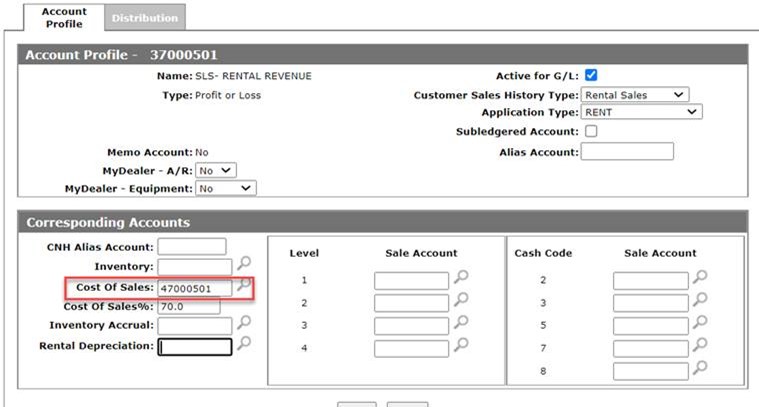
The variations of depreciation are:
Scheduled Depreciation
If a straight-line depreciation is scheduled from within Integrated Rental, the units will be populated into the General Invoicing system in IntelliDealer.
Post-requisite: A General Billing Run must be performed for the depreciation transactions to be posted in IntelliDealer. Depending on the dealer’s configuration, this may occur through real-time billing or through the standard general invoicing billing run.
Note: Dealers with real-time billing enabled may not need a manual run; confirm configuration before proceeding.
IntelliDealer uses the Depreciation Account field that is found in Equipment Defaults for the accumulated depreciation-side of the accounting entry.
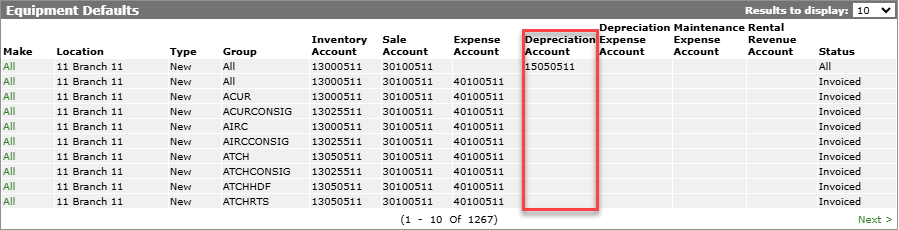
If no equipment defaults are setup for a unit then it will fail to populate and return an error message to Integrated Rental. After no errors are found and the process completes a success message appears.
The expense side of the accounting entry comes from the General Ledger Account Rules configured within Integrated Rental.
Activity-based Depreciation
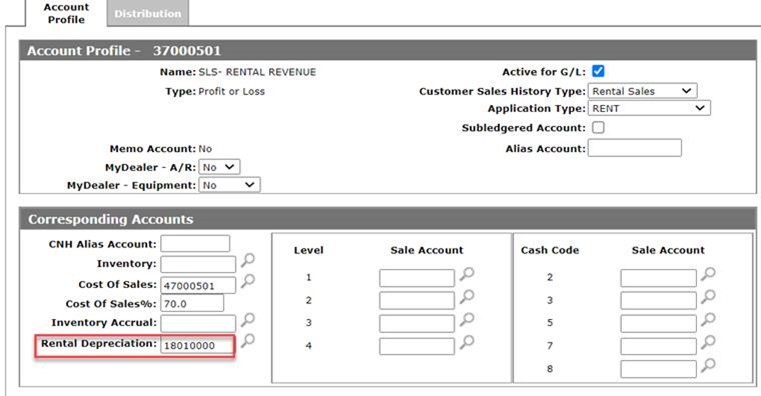
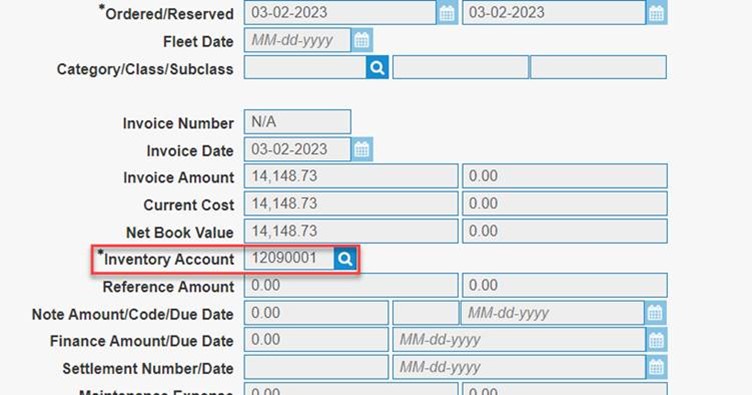
If the Rental Depreciation account is populated on the rental revenue G/L account (Account Profile), the accumulated depreciation posts to that account. If the field is not set, the depreciation is posted to the equipment's configured inventory G/L account (Equipment Profile) .
The expense side of the accounting entry comes from the General Ledger Account Rules configured within Integrated Rental.