
SUBLET special parts are used to record the sale of outside labor and materials. The following is the suggested method of use.
Set up special part numbers beginning with SUBLET for each scenario you will purchase outside labor and materials based upon tracking needs and/or G/L accounts.
e.g. SUBLETWELD , SUBLETMACHINE
It is important that the part number begin with the word SUBLET so that the total appears under SUBLET on the work order. The part should be have: Source - 99, Class - $MP (required on miscellaneous Purchase Orders), Vendor - GL, OFC - 5. The part will have a 0 LIST and COST.
No costing at time of sale
The part number should have a sale account that does not have an application type of 'Parts' on it.
When this part is sold it will record a sale but no cost of sale. The reason for this is that the cost of sale will be recorded via an accounts payable voucher when the invoice for the outside labor & materials arrives. In other words, the invoice should be posted to cost of sales on the distribution line of the voucher. This will ensure proper costing. It may be desirable to order the SUBLET parts through a miscellaneous purchase order to cross reference with the A/P voucher that will input the costs. Do not use parts purchase orders.
Costing at time of sale
You can optionally put a CLASS of '$MP' on the part. When the part is sold it will prompt the user for the cost on the parts requisition screen. This is the cost that will be used for that line item.
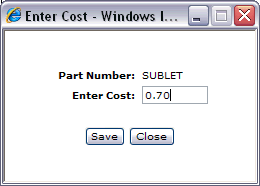
If you are using class $MP your part should be loaded with a sale account that has an application type of 'Parts' on it. Any corresponding cash code or price level sale accounts should also be coded with an application type of 'Parts'.
If the '$MP' is not used, sublets work like the 'No costing' option.