
CNH Customer Sales History
Use the CNH Customer Sales History screen to generate and download customer sales history files for submission to CNH. This screen is available if you are licensed to use the CNH Customer End-User Segmentation feature. See also: Area Sales.
To open the CNH Customer Sales History screen, click the CNH Customer Sales History link on the Area Sales screen.
 CNH Customer Sales History screen
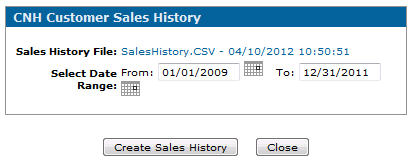
CNH Customer Sales History screen
The fields on the CNH Customer Sales History screen are:
| Field | Description |
|---|---|
| Sales History File | Displays the name of the file along with the last date and time the customer sales history was generated. Clicking the hyperlinked SalesHistory.CSV file name allows you to save or view the file on your local PC. Once saved, you can submit the file to CNH. |
| Select Date Range: | Use the From: and To: fields to set the date range for which the customer sales history is to be generated. The date range must cover a minimum 3 year period. It defaults to the last 3 complete calendar years. |
Use these buttons to complete your work on the CNH Customer Sales History screen:
| Button | Description |
|---|---|
| Create Sales History | Generates a new sales history CSV file for all customers in your currently assigned company and division. Once the file has been created, you receive a message indicating the process has completed. Internal, Deleted and Prospect customers and their history are omitted when this file is built. |
| Close | Closes the CNH Customer Sales History screen without saving any changes and returns to the Area Sales screen. |
Revision: 2025.12