Adding a Late Charge Code
Adding a Late Charge code allows you to set up parameters for applying late charges to overdue accounts receivable amounts. Late charge codes are attached to customer records in the customer Profile tab and are applied during an A/R Aging update or during the printing of A/R statements.
-
From any IntelliDealer screen, click on the Configuration tab.
The Configuration Quick Links screen will appear.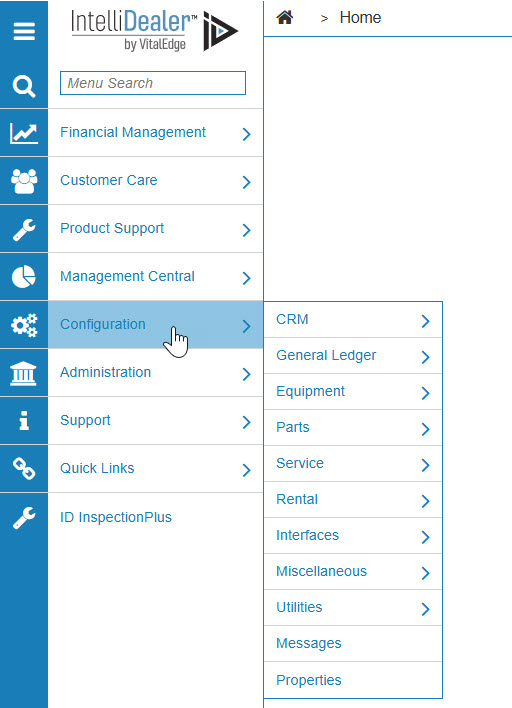
Configuration Quick Links screen
-
From the General Ledger list, click the Accounts Receivable link and select Late Charge from the drop down list.

Configuration Quick Links screen
-
The Late Charges screen will appear.
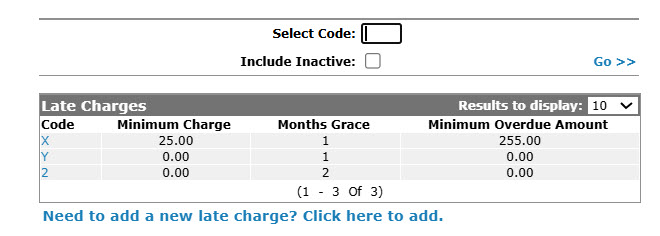
Late Charges screen
-
On the Late Charges screen, click on the Need to create a new late charge? Click here to add link.
The Add Late Charges screen will appear.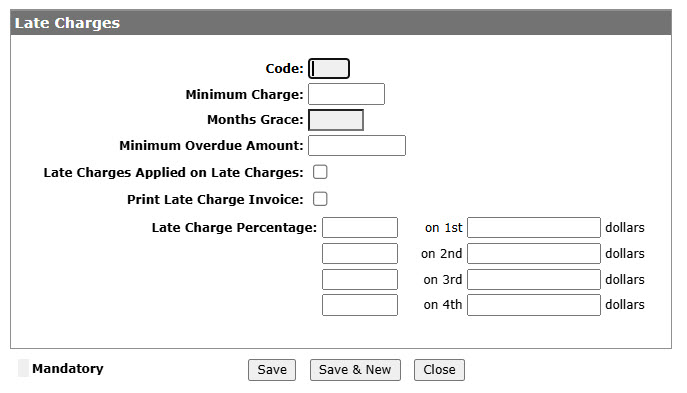
Add Late Charges screen
-
On the Add Late Charges screen, enter a one character Code used to represent the late charge code throughout the system.
-
Enter a Minimum Charge amount. The minimum late charge amount applied to overdue A/R accounts each month.
-
Enter the Months Grace amount. The number of months an account must be overdue before late charges can be applied.
-
Enter the Minimum Overdue Amount. The minimum amount an A/R accounts must be over by before late charges can be applied.
-
Select the Late Charges Applied on Late Charges checkbox, indicating that your dealership applies late charges on top of late charges.
-
Select the Print Late Charge Invoice checkbox, to print a separate late charge invoice for each account when printing A/R statements.
-
Enter a Late Charge Percentage and corresponding Dollar amount, applying a late charge percent to an A/R account overdue by the specified Dollar amount.
-
On the Add Late Charges screen, click the Save button to save the new late charge code and return to the Late Charges screen.
- or -
Click the Save & New button to save the new late charge code.
The Add Late Charges screen will refresh allowing you to add another late Charge code without closing the screen.