
A/P Check Reconciliation Month End
The A/P Check Reconciliation Month End screen allows you to close the bank reconciliation month. Before the month end bank reconciliation is run ensure that:
-
All accounts payable checks (cashed or canceled) for the month being closed have been entered.
-
Each bank account is reconciled before the month end check reconciliation is performed.
-
The accounts payable month end has been run for the month being closed.
The
A/P check reconciliation month end closes all A/P bank accounts.
Once the check reconciliation month end is run, all checks reconciled or canceled since the last check reconciliation month end are marked as historical and can no longer be reconciled.
To open the A/P Check Reconciliation Month End screen, click the Check Reconciliation Month End link on the Check Reconciliation screen.
Topics in this section are:
Performing a Month End Check Reconciliation
This procedure produces the following reports: Check Reconciliation-Outstanding Checks, Check Reconciliation-Reconciled Checks, Check Reconciliation-Canceled Checks, Check Reconciliation-Checks Issued This Month.
-
Navigate to Financial Management > Accounts Payable > Check Reconciliation.
-
Click the Check Reconciliation Month End link.
-
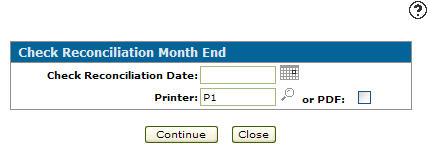
To select a day to post this batch to the G/L, enter a date in Check Reconciliation Date field or use the calendar to select a date.
-
Select or enter the Printer you want the reports sent to.
- or -
Select the or PDF checkbox to generate an Adobe PDF file. -
Click Continue to submit the check reconciliation month end.
- or -
Click Close to exit the screen without submitting the month end.
 The Check Reconciliation screen appears.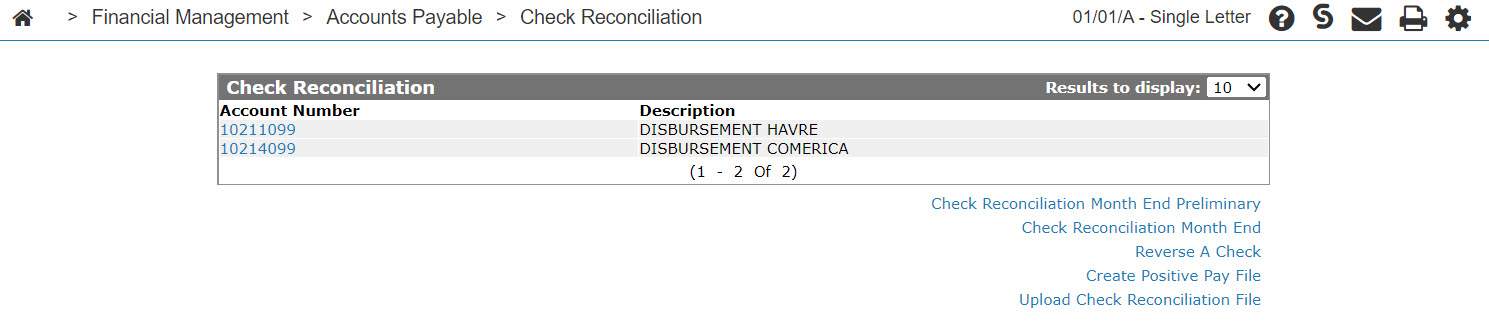
Screen Description
The fields on the A/P Check Reconciliation Month End screen are:
| Field | Description |
|---|---|
| Check Reconciliation Date | Enter the check reconciliation date to be used for the check reconciliation month end. The date used must be a date in the current accounts payable check reconciliation month. |
| Printer | Select the printer to print the report(s). |
| or PDF | Creates a PDF file of the report(s) which can be viewed via the PDF Viewer. |
The reports produced during an A/P Check Reconciliation Month End are:
| BA0001-1000 | Check Reconciliation - Outstanding Checks |
| BA0001-0100 | Check Reconciliation - Reconciled Checks |
| BA0001-0010 | Check Reconciliation - Canceled Checks |
| BA0001-0001 | Check Reconciliation - Checks Issued This Month |
Use these buttons to complete your work on the A/P Check Reconciliation Month End screen:
| Button | Function |
|---|---|
| Continue | Runs the Report(s). |
| Close | Closes the A/P Check Reconciliation Month End screen without running the report(s) and returns to the Check Reconciliation screen. |
Security: 601 - Accounts Payable
Revision: 2026.05