
Parts Purchases
Use the Parts Purchases screen to view a history of all parts purchased by a customer. To open this screen, click the Parts Purchases link on the Customer Profile screen.
 Parts Purchases screen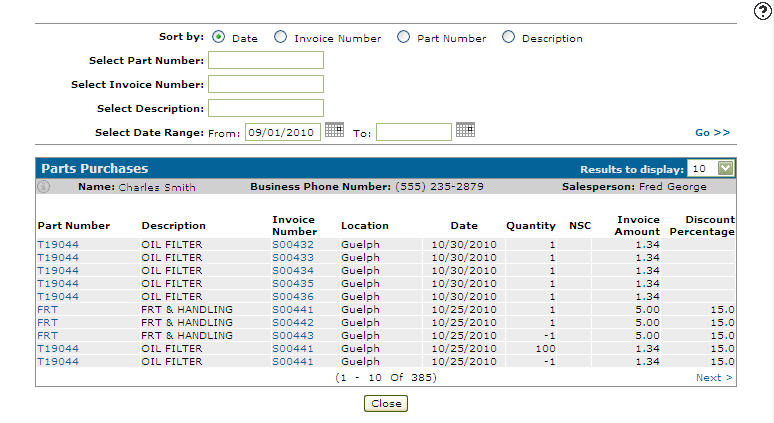
Sort by options on the Parts Purchases screen are:
| Sort by | |
|---|---|
| Field | Description |
| Date | Sorts the search results by date. |
| Invoice Number | Sorts the search results by invoice number. |
| Part Number | Sorts the search results by part number. |
| Description | Sorts the search results by part description. |
Search fields on the Parts Purchases screen are:
| Field | Description |
|---|---|
| Select Part Number | Search for parts purchases by entering a part number. |
| Select Invoice Number | Search for parts purchases by entering an invoice number. |
| Select Description | Search for parts purchases by entering a description. |
| Select Date Range | Narrow down the parts purchases search results by selecting or entering a date range. |
Information fields on the Parts Purchases screen are:
| Information | |
|---|---|
| Field | Description |
| Name | The customer's name. |
| Business Phone Number | The customer's business phone number. |
| Salesperson | The salesperson associated with the customer. |
Fields on the Parts Purchases screen are:
| Field | Description |
|---|---|
| Part Number | The number of the part purchased by the customer. Click a Part Number to open the Parts Profile screen. |
| Description | A brief description of the part. |
| Invoice Number | The invoice number the part was sold on. Click an Invoice Number link to view a preview of an invoice. |
| Location | The location where the part was sold. |
| Date | The date the part was invoiced. |
| Quantity | The quantity of the part purchased on the invoice. |
| NSC | The part's non-stock code. See the NSC table for more information. |
| Invoice Amount | The dollar amount the part was sold for on the invoice. |
| Discount Percentage | The discount amount applied to the invoice, calculated from the net purchase amount. |
Valid NSC (Non-Stock Code) values are:
| NSC | |
|---|---|
| Code | Description |
| Stocked Sale (Blank) | Regular stocked parts sale. This code impacts sales, demands, and bin trips. |
| Non-Stocked (N) | Non-stocked parts sale. The special order frequency and quantity is updated on the Parts Profile screen. This code impacts sales, demands, and bin trips. |
| Special Order (S) | Special order stocked parts sale. The part is normally stocked but had to be special ordered. The special order quantity and frequency is updated on the Parts Profile screen. This code impacts sales, demands, and bin trips. |
| No Charge (X) | Part is sold at no charge. This code impacts sales, demands, and bin trips. |
| Transfer (T) | The part is transferred to a location and the transaction is recorded at average cost. An inventory account is used instead of a sales account. The sales history for the part is not updated. This code does not impact sales, demands, and bin trips. |
| One Time Sale (A) | One time sale that is not expected again. The on hand and all sales values are updated, except for the current month sales quantity. This code does not impact sales, demands, and bin trips. |
| Branch Transfer Non-Stocked (M) | Branch transfer of a non-stock part number, created using sales order branch transfers. This code impacts sales, demands, and bin trips. |
| Branch Transfer Stocked (O) | Branch transfer of a stocked part number, created using sales order branch transfers. This code impacts sales, demands, and bin trips. |
Click Close to complete your work on the Parts Purchases screen.
Data Source: PARTHIST
Revision: 2025.12