
Add Related Parts
Use the Add Related Parts screen to import related parts onto a parts invoice/quote, parts requisition, service quote, equipment invoice/quote or rental contract.
 Add Related Parts screen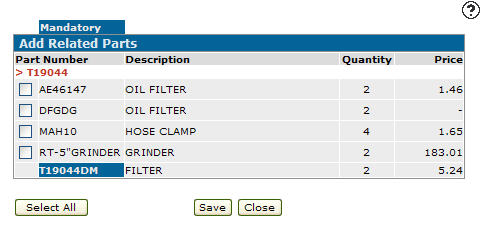
Fields on the Add Related Parts screen are:
| Field | Description |
|---|---|

|
If selected, indicates whether or not the related part is optional or mandatory when selling a parent part.
|
| Part Number | The number of the related part you wish to import into the selected invoice, quote, requisition, or contract. |
| Description |
A brief description of the part. If the related part has already been added to the invoice or quote a message appears in red text in the Description field. Any comments related to the selected part appear below the description. |
| Quantity | The number of related parts that are added to an invoice, quote, requisition, or contract, when the associated parent part is sold. |
| Price | The selling price of the related part. |
Click Select All to select all of the available parts on the screen.
Click Deselect All to deselect all of the selected parts on the screen.
Click Save & Close to add the related parts selected to the sales order and return to the previous screen.
Data Source: PARTMAST
Revision: 2026.01