
Configuration: Location Settings
Use the Location Settings screen to set up purchase order system settings by location.
To open the Location Settings screen, navigate to Configuration > General Ledger > Purchase Orders > Location Settings.
Topics in this section are:
Configuring a Location's Purchase Order Settings
-
Navigate to Configuration > General Ledger > Purchase Orders > Location Settings.
-
Click Search
 next to the Select Location field. On the Location Selection screen, select a location.
 -
Configure purchase order settings for the location. Refer to the Screen Description for field details.
-
Optional: Select the Click here to copy purchase order setup to another location link to copy the current setup to another location.
-
Click Save to save your changes.
- or -
Click Save & Close to save your changes and close the screen.
- or -
Click Close to close the screen without saving.
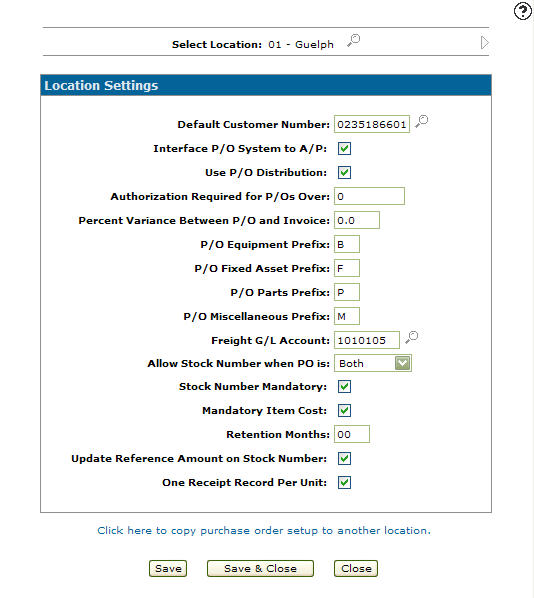
 The Location Settings screen appears.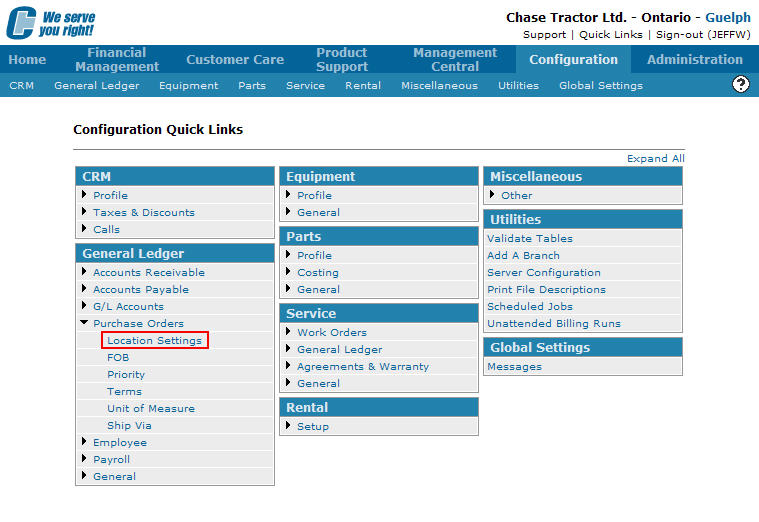
Screen Description
The search field on the Location Settings screen is:
| Field | Description |
|---|---|
| Select Location | Click on the Search icon and select the location you wish to configure. |
Click on the Previous or Next
 icon to scroll to the next location or back to a previous location.
The fields on the Location Settings screen are:
| Field | Description |
|---|---|
| Default Customer Number |
The system defaults the customer's ship-to and billing information (addresses and names) to populate the billing and shipping fields on purchase orders created through the PO system. |
| Interface P/O System to A/P |
Allows you to interface the PO system with the A/P system. If selected, it allows users creating vouchers in A/P, to choose outstanding POs created from the Purchase Order system for payment. |
| Use P/O Distribution |
The Purchase Order system enables automatic distribution of PO amounts to specific General Ledger accounts, which affects the Accounts Payable system when the PO and A/P systems are interfaced. |
| Authorization Required for P/Os Over |
If an unauthorized purchase order exceeds the entered limit, it requires proper authorization before being placed On Order. |
| Percent Variance Between P/O and Invoice |
Specifies the allowable variance between the Purchase Order amount and the invoice amount. If the variance is exceeded, a message appears in the A/P system. This field applies only if the Interface P/O System to A/P field is selected. |
| P/O Equipment Prefix |
The prefix used when creating an equipment PO. This prefix is attached to the beginning of the PO number making it easier to recognize the PO in the system (e.g . Equipment PO's start with “E”). |
| P/O Fixed Asset Prefix | The prefix used when creating a fixed asset PO. This prefix is attached to the beginning of the PO number making it easier to recognize the PO in the system (e.g . Fixed Asset PO's start with “F”). |
| P/O Parts Prefix | This option is not currently used. The start digits for parts purchase orders can be configured in the legacy CMBR3 table using the Purchase Order 1st Digits setting. |
| P/O Miscellaneous Prefix | The prefix used when creating a miscellaneous PO. This prefix is attached to the beginning of the PO number making it easier to recognize the PO in the system (e.g. Miscellaneous PO's start with “M”). |
| Freight G/L Account |
The G/L account to which the freight charge on the purchase order is posted. If the PO and A/P systems are interfaced, the freight amount allocated to this account is also applied in the A/P system. |
| Allow Stock Number When PO is |
Allows the user to assign a stock number to a unit on an equipment PO when the status of the PO changes.
|
| Stock Number Mandatory |
Indicates that a stock number is mandatory and automatically assigns the stock number based on the option selected in the Allow Stock Number When PO is field. If No is selected the stock number will not be assigned within the PO system. |
| Mandatory Item Cost |
Indicates that all items on a purchase order must have an associated cost. If any item cost is missing, the purchase order status cannot be changed to On Order. Only Miscellaneous and Fixed Asset purchase orders are affected by this field. |
| Retention Months |
The number of months the system retains purchase order history after a data purge occurs during the A/P month-end process. This setting controls the retention of Parts, Equipment, and Miscellaneous Purchase Orders. However, Parts are hard-coded with a 12-month minimum retention. For example, if the setting is '00', Equipment and Miscellaneous Purchase Orders are not retained after an A/P month-end purge, but Parts purchase orders are still retained for a minimum of 12 months. |
| Update Reference Amount on Stock Number |
If selected, updates the Estimated Cost field on the equipment profile with the Total Receipted Price (Receipted Price + Receipted Options) from an equipment purchase order. |
| One Receipt Record Per Unit |
If selected, allows a dealership to create separate receipt records for every unit that is receipted on an equipment purchase order. |
| Create JDMINT P/O Receipt Records | If selected, JDMINT equipment receipt records are created in the purchase order system. |
| Active for System |
Controls whether the purchase order settings are active for use within the system.
|
The buttons complete work on the Location Settings screen:
| Button | Function |
|---|---|
| Save | Save changes made on the Location Settings screen. |
| Save & Close | Saves changes made on the Location Settings screen and closes the screen, returning to the Configuration Quick Links screen. |
| Close | Closes the Location Settings screen without saving and returns to the Configuration Quick Links screen. |