
John Deere: Warranty dates
Use the Warranty Dates screen to manage how the system consumes the John Deere Warranty Date PINs API. This interface ensures equipment warranty records are synchronized with John Deere’s official database.
To open Warranty Dates screen Configuration > Interface > John Deere > Warranty Dates.
 The Warranty Dates screen.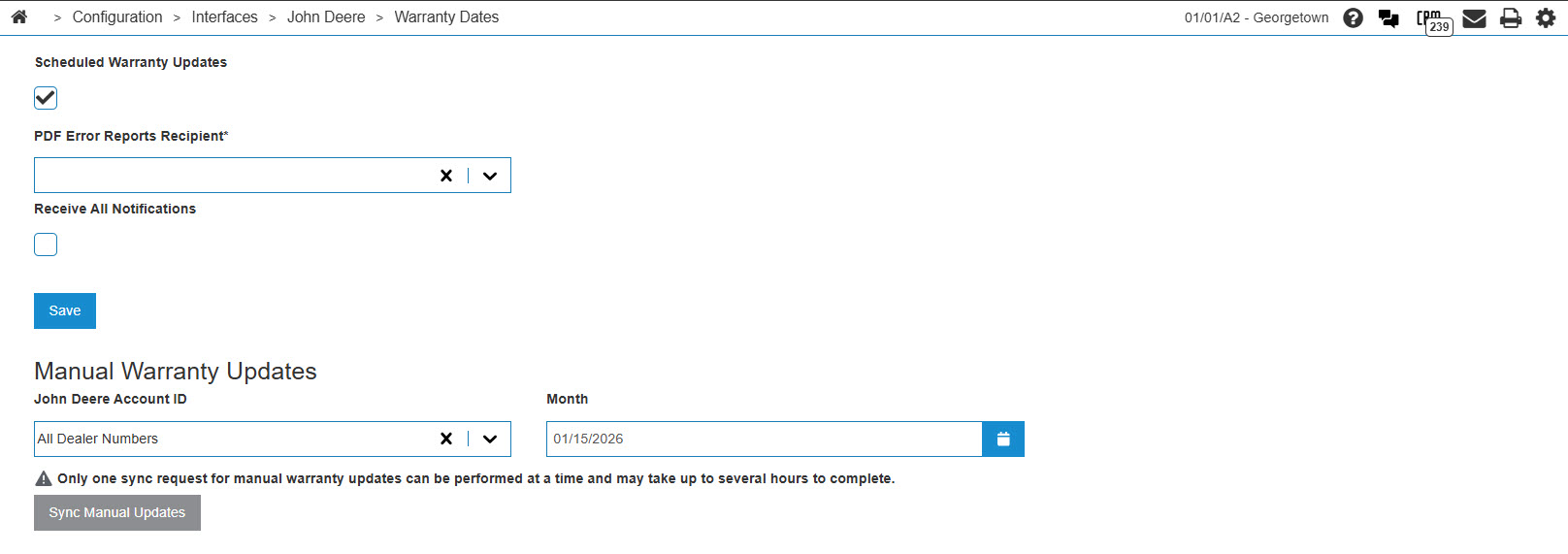
Scheduled Warranty Updates
Use Warranty Updates to configure the automated retrieval of warranty information.
| Field | Description |
|---|---|
| Scheduled Warranty Updates | If selected, the system automatically checks for and downloads warranty updates at regular intervals. |
| PDF Error Reports Recipient | The user or email address that receives a notification report if the API fails to process specific PINs. |
| Receive All Notifications | If selected, the recipient receives reports for every sync attempt, including successful ones. |
Click Save to save the settings recorded in the Warranty Updates section.
Manual Warranty Updates
Use Manual Warranty Updates to fetch warranty data immediately outside of the scheduled window.
| Field | Description |
|---|---|
| John Deere Account ID | The specific dealer number for which to sync data. Select All Dealer Numbers to sync data for the entire organization. |
| Month | The specific month and year for which warranty records are requested. |
Only one sync request for manual warranty updates can be performed at a time and may take up to several hours to complete.
Click Sync Manual Updates to initiate the request to the John Deere API.