
Subtotal
Use the Subtotal screen to review the total of all selected invoices from the Key Cash Receipts screen and perform actions on the selected invoices.
To open the Subtotal screen, click the Subtotal button on the Key Cash Receipts screen.
 Subtotal screen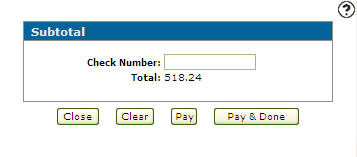
The fields on the Subtotal screen are:
| Field | Description |
|---|---|
| Check Number | The number of the check being applied to the selected invoices. |
| Total | The total of all the selected invoices. |
The buttons on the Subtotal screen are:
| Button | Function |
|---|---|
| Close | Returns to the Key Cash Receipts screen. |
| Clear | Returns to the Key Cash Receipts screen and removes all check marks from the previously selected invoices. |
| Pay | Returns to the Key Cash Receipts screen and pays each of the selected invoices. |
| Pay and Done | Pays each of the selected invoices and returns to the Outstanding Accounts Receivable screen. |
Security: 600 - Financial Management - Accounts Receivable
Revision: 2025.12