
This document describes 2 simple methods to record a credit issued by a vendor in the accounts payable system.
A vendor may issue a credit to a dealer for a variety of reasons. For example, it could be a credit for a warranty, or a credit for returned parts. The reason for the credit will generally determine the G/L account to be used in the distribution section of the voucher. If the dealer is unsure of the details surrounding the credit but knows it should be used to either pay outstanding invoices or be deposited into their bank account, then a voucher can still be made to reflect the transaction using a clearing account in the distribution and then at a later time, when it is determined where that credit should have posted, a simple adjustment voucher (or journal) can be made to debit the clearing account that was originally used and credit the proper account.
There are 2 main options when entering the voucher to reflect the credit:
 1. Post as a credit to accounts payable so that the credit can be used against other outstanding A/P invoices.
In this example Vendor SR shows 3 outstanding invoices in A/P Adjust Outstanding:
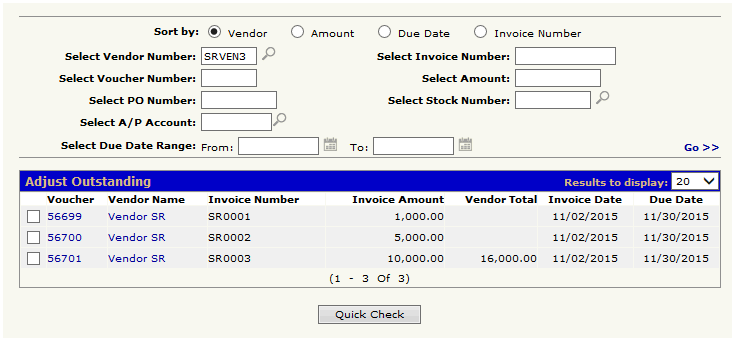
If the dealer is issued a credit and would like to use the credit to pay existing outstanding invoices, a credit voucher can be made. In this case, the credit will be for 1000.00:
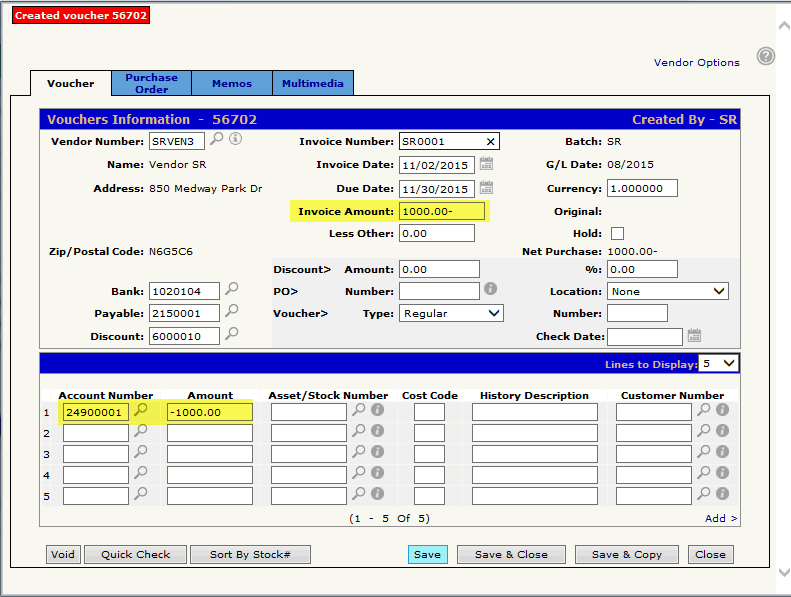
The invoice amount at the top will be -1000.00 and -1000.00 will also be used in the distribution section. As mentioned above, the account used for the credit in the distribution will depend on the reason for the credit. If the dealer is unsure of the details surrounding the credit but knows it should be used to pay outstanding invoices, then a credit voucher can still be made using a clearing account in the distribution like in this example. At a later time, when it is determined where that credit should have posted, then a simple adjustment voucher (or journal) can be made to debit the clearing account that was originally used and credit the proper account.
When the voucher is updated, the credit will appear in A/P Adjust Outstanding:
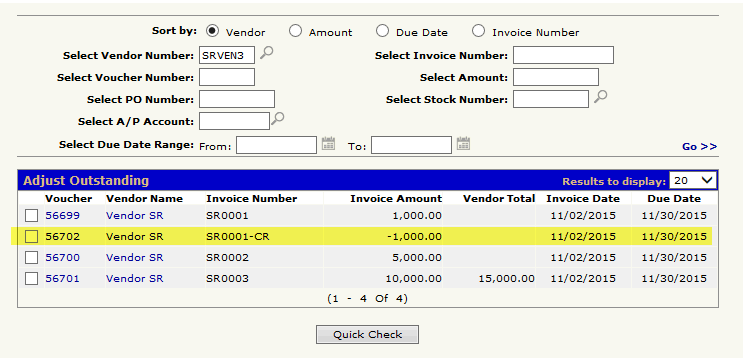
At this point the -1000.00 can be used against any of the outstanding invoices by creating a check batch and selecting the credit along with the invoice that you want to apply the credit against. In this case we will apply the 1000.00 credit to the invoice for 1000.00:
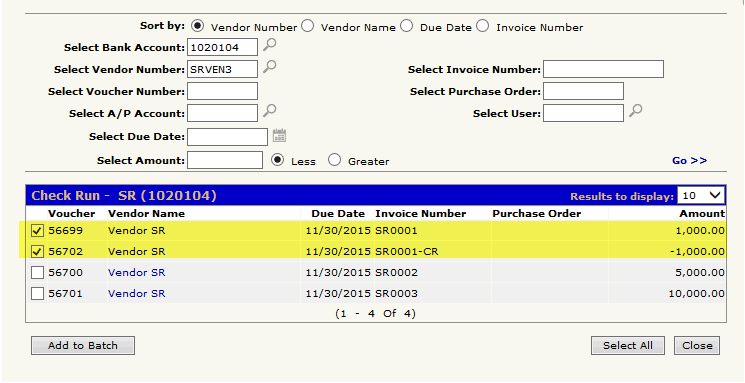
Check batch total will be zero:
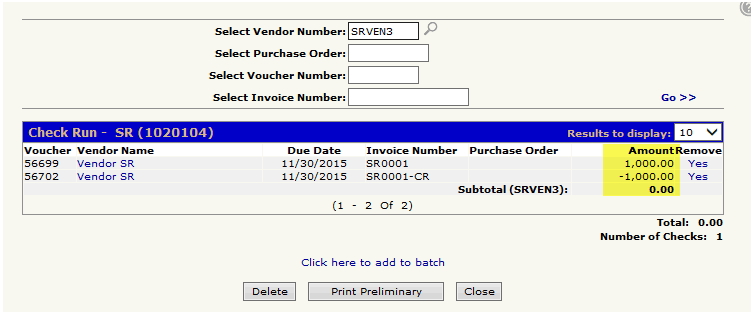
Once the zero dollar check batch gets updated, the credit and the invoice the credit was applied against will be removed from the A/P Adjust Outstanding screen:
Notes:
- If you were applying the 1000.00 credit against an invoice that was greater than 1000.00, then an actual check would be produced at the point of updating the check batch (like any other check batch update) for the amount of the difference between the invoice amount and the credit amount.
- The quick check option can not be used for zero dollar amounts.
Or
2. Post directly into the bank account (or other account) bypassing the A/P account (adjustment voucher).
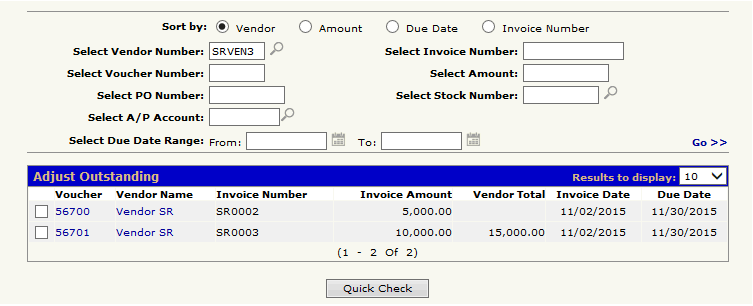
In this example Vendor SR shows 2 outstanding invoices in A/P Adjust Outstanding
If the dealer is issued a credit and would not like to use the credit to pay existing outstanding invoices, but would like to simply deposit the credit amount into their bank account (this may be the case if the dealer is issued a physical check from the vendor) then an adjustment voucher would be created. In this case, the credit will be for 1000.00:
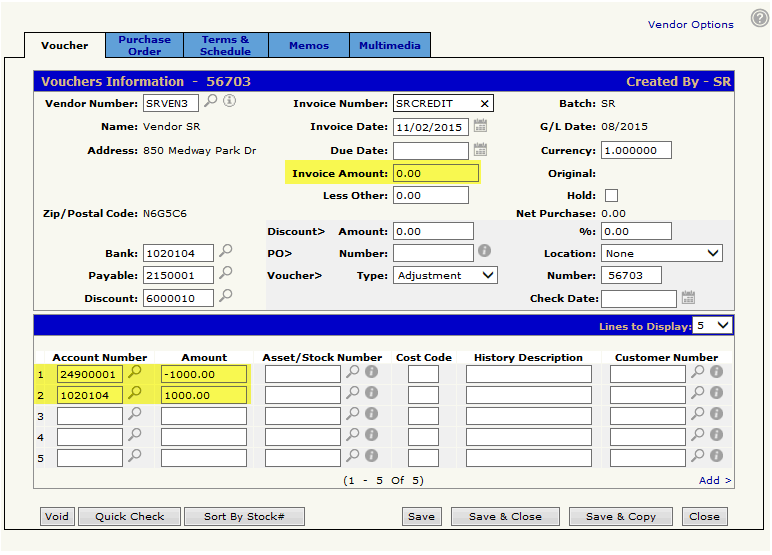
The invoice amount at the top will be 0.00 and the -1000.00 will be used in the distribution section only. As mentioned above, the account used for the credit in the distribution will depend on the reason for the credit. If the dealer is unsure of the details surrounding the credit but knows that they want to deposit it into their bank account, then an adjustment voucher can still be made using a clearing account in the distribution like in this example. At a later time, when it is determined where that credit should have posted, then another adjustment voucher (or journal) can be made to debit the clearing account that was originally used and credit the proper account.
Another distribution entry needs to be added to the voucher for the bank account entry (bank account can be used in the distribution as long as the invoice amount at the top of the voucher is zero).
When the voucher is updated, the credit will not appear in A/P Adjust Outstanding as nothing posted against the payable account. The original 2 outstanding invoices will remain unaffected: