
Today's Revenue Meter
Note: If you are using Real Time Processing at your dealership (the Real Time Processing switch is activated in the CMBR5 table, and Real Time Processing File Monitoring is activated in the COMPUTER table), any Today's Revenue Barometers configured for Parts Invoicing, Shop Parts or Shop Labor are automatically updated immediately after any parts invoices, work orders or parts requisitions are created at your dealership. (After performing a billing run, the value displayed on the meter does not change.) Parts transfers do not affect the values displayed in the barometers.
 Area Sales Barometer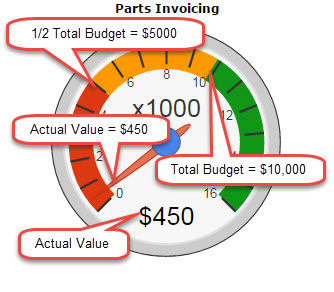
The color indicators on the Area Sales Barometer are:
-
Values in the Red portion of the Barometer represent the lower half of the total budget.
-
Values in the Yellow portion of the Barometer represent the upper half of the total budget.
-
Values in the Green portion of the Barometer represent values above the total budget.
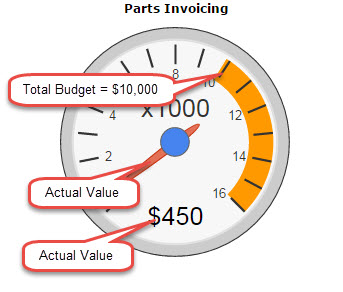
The color indicator on the Area Sales Speedometer is:
-
Values in the Orange portion of the Speedometer indicate that dealership sales have exceeded the total budget.
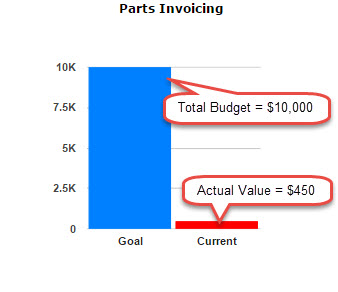
The color indicator on the Area Sales Bar Chart is:
-
The Actual Value appears as the Current value displayed on the chart.
-
The Total Budget appears as the Goal value displayed on the chart.
How available areas are populated on the Today's Revenue Meter:
| Area | Description |
|---|---|
| Equipment | Uses all equipment invoices that have been released. |
| Parts Invoicing | Uses all parts invoices where the customer invoiced quantity is not equal to zero. |
| Work Orders | Uses work orders that have every segment set to closed status. |
| Shop Parts | Uses all posted part transactions. |
| Shop Labor | Uses all posted labor transactions (scanned or keyed). |
| Rental | Uses all rentals with a date less than or equal to today's date that have not been returned. Rental reservations, requests, and no charge contracts are not included. If the minimum hours is greater than 24, a value for one day is determined; otherwise the partial day value is used. |
| General | Uses all general invoices with a date of next invoice that is less than or equal to today's date with invoices that have not yet been billed. If an A/R Agency account is used on the invoice, the amount posted to this account is used. If no A/R Agency is used, the amount posted to the sales accounts is used. |
Setup
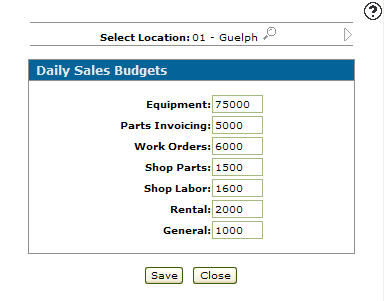
Budgets that drive the budget color indicator on the Today's Revenue Meters are set up on the Daily Sales Budgets screen. To set up a budget, refer to set the daily sales budgets for selected locations.
Revision: 2026.01