
TechProgress
The TechProgress screen allows you to view and update work order details assigned to active technicians at a dealership.
The following fields are displayed on the TechProgress screen:
| Field | Description |
|---|---|
| Keyword Filter |
Allows you to filter the list to specific work order or technician number. |
| Work Order Number |
The work order number. |
| Customer Name |
The name of the customer on the order. |
| Make/ Model |
The manufacturer and model number of the equipment on the order. |
| Description |
A brief description of the unit. |
| Serial Number |
The unit's serial number. |
| Priority Code |
The code that determines the priority level on the work order. The Priority Code is user defined in IntelliDealer |
| Hours Worked |
The number of hours that have been logged to the order. |
| Job Code Hours |
The number of hours associated to job code assigned to the order. |
Clicking on a work order in the TechProgress screen will open the TechProgress Segment screen:
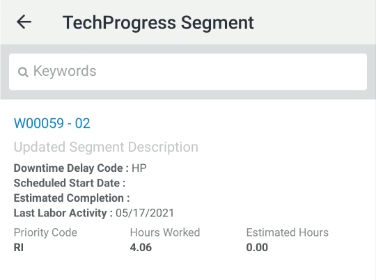
The following field information is displayed on the TechProgress Segment:
| Field | Description |
|---|---|
| Work Order Number |
The work order number. |
| Description | A brief description of the unit. |
| Downtime Delay Code | When applied, the code used to describe the reason for a delay of work on the unit. |
| Scheduled Start Date | The date work on the unit started. |
| Estimated Completion | The date work on the unit is estimated to end. |
| Last Labor Activity | The date where work on the unit was last logged. |
| Priority Code |
The code that determines the priority level on the work order. The Priority Code is user defined in IntelliDealer |
| Hours Worked | The number of hours that have been logged to the order. |
| Estimated Hours |
The number of hours associated to job code assigned to the order. |
Clicking on a specific segment within the TechProgress Segment screen opens the Update TechProgress Detail screen:
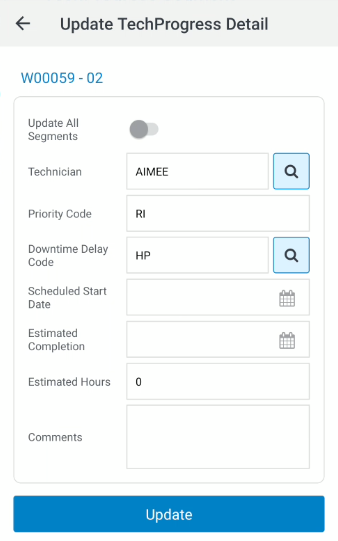
Clicking the Update All Segments checkbox will apply changes to ALL segments (excluding Estimated Hours & Comments)
Note: While Technician Scheduling is active in IntelliDealer, TechProgress will not allow a user to update the Priority Code, Technician, and Start Date