
Adjustment
Use the Adjustment screen to record accounting transactions. Any general ledger account can be entered on the Adjustment screen. However, equipment accounts, parts accounts, and accounts payable should not be used. It is recommended that the Adjustment screen only be used for writing off late charges.
To open the Adjustment screen, click the Adjustment button on the Key Cash Receipts screen. The Adjustment screen opens when the Adjustment, Reverse, or Copy buttons are selected.
 Adjustment screen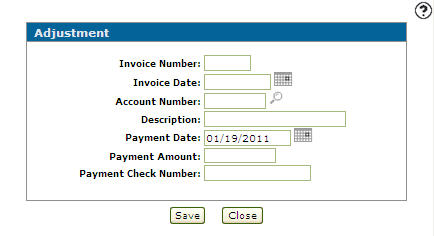
The fields on the Adjustment screen are:
| Field | Description |
|---|---|
| Invoice Number | The reference number for the invoice that is being adjusted. |
| Invoice Date | The original date that the invoice being adjusted was created. This date determines the aging period that the invoice appears in if this adjustment affects accounts receivable. |
| Account Number | The number of the account being referenced by this adjustment. |
| Description |
A brief description of the transaction being performed. The description is only retained when a non A/R account is used and a miscellaneous customer is not being used. |
| Payment Date |
The date the payment is applied to the invoice. The payment date entered must be a date in the current accounts receivable month. |
| Payment Amount | The amount applied to the amount owing on the invoice. |
| Payment Check Number | The number of the check used to pay the invoice. |
The buttons on the Adjustment screen are:
| Button | Description |
|---|---|
| Save | Saves changes made to the Adjustment screen and records the accounting transaction. |
| Close | Closes the Adjustment screen without saving and returns to the Key Cash Receipts screen. |
Security: 600 - Financial Management - Accounts Receivable
Revision: 2025.12