
Service Contracts
Use the Service Contracts screen to view customer service contracts. To open this screen, click the S.A.M Contracts link on the Customer Profile screen.
 Service Contracts screen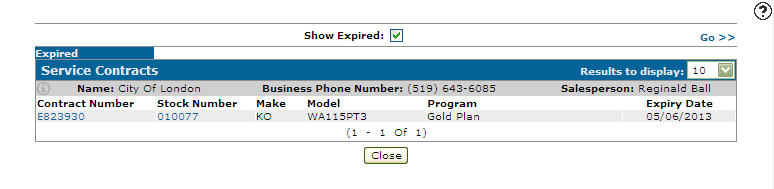
Search fields on the Service Contracts screen are:
| Field | Description |
|---|---|
| Show Expired | If selected, includes expired service contracts in the search results. |
Fields on the Service Contracts screen are:
| Field | Description |
|---|---|
| Contract Number | The service contract number. Click a Contract Number to open the Contract Details screen. |
| Stock Number | The unit's stock number. Click a Stock Number to open the Equipment Profile screen. |
| Make | The manufacturer of the unit. |
| Model | The model number on the unit. |
| Program | The customer's service program plan. |
| Expiry Date | The expiry date of the service program plan. |
Click Close to complete your work on the Service Contracts screen.
Data Source: PMCNTRH, PMCNTRD
Revision: 2025.12