
Pending Special/Allocation Orders
Use the Pending Special/Allocation Orders screen to display a list of the vendors that have a special order, or daily group order that needs to be ordered.
To open the Pending Special/Allocation Orders screen, click the View pending special/allocation orders link on the Parts Ordering screen.
 Pending Special/Allocation Orders screen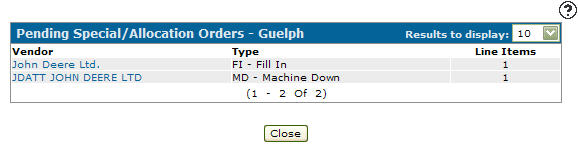
Fields on the Pending Special/Allocation Orders screen are:
| Field | Description |
|---|---|
| Vendor | The vendor of the part. |
| Type | The order type. |
| Line Items | The number of line items on the parts order. |
Click a Vendor name to open the Parts Order screen.
Click Close to close the screen and return to the Parts Ordering screen.
Data Source: BACKORD
Revision: 2026.01