
Accept Segments
The Accept Segments screen allows the user to accept the work order quote. The user can choose to accept only certain segments on the quote or all of the segments.
To open the Accept Segments screen, click the If you would like to accept this quote click here link on the Customer - Quote Header tab.
Note: Once a quote is accepted, any multimedia associated to the quote (as specified on the Multimedia tab of the quote) is automatically be added to the work order that is created.
 Accept Segments screen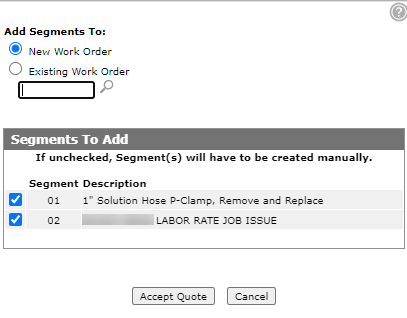
The selection fields on the Accept Segments screen are:
| Field | Description |
|---|---|
| Create Sales Requisition |
Allows you to create a sales requisition from a work order quote. Note: If there are no parts on the quote or estimate this selection will not appear. |
| Create Work Order | Allows you to create a work order from a work order quote. |
| Select Work Order Number |
The number of the work order you are creating. If a work order number is specified when accepting a work order quote, the system adds the parts to the existing work order requisition. If the work order number is left blank the system looks for an existing work order requisition. If a work order requisition does not exist, the system creates a new one. |
The fields on the Accept Segments screen are:
| Field | Description |
|---|---|

|
Indicates the segments to be accepted when the quote is created into a work order. |
| Segment | Segments you wish to include in the quote. |
| Description | A brief description of the segment. |
Use these buttons to complete your work on the Accept Segments screen:
| Button | Function |
|---|---|
| Save | Accepts the indicated segments on the part quote. |
| Close | Closes the Accept Segments screen without saving and returns to the Customer - Quote Header screen. |