
Configuration: JD PMMANAGE
Use the JD PMMANAGE screen to send PMMANAGE information for parts to Deere. This screen controls the transmission of PMMANAGE data and determines which sale accounts are assigned as John Deere. PMMANAGE should be used for John Deere parts management only.
To open the JD PMMANAGE screen, from anywhere within IntelliDealer navigate to Configuration > Parts > General > JD PMMANAGE .
Topics in this section
Adding a PMMANAGE Record
-
From anywhere within IntelliDealer ,navigate to Configuration > Parts > General > JD PMMANAGE .
-
Click the Need to create a new PMMANAGE record? Click here to add link.
-
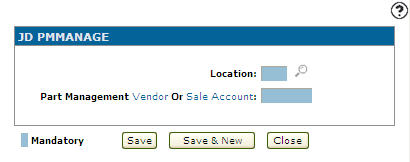
On the Add JD PMMANAGE screen, enter a Location indicating the location where the PMMANAGE record is configured for transmitting PMMANAGE parts information to Deere.
- or -
Click on the Search icon and select a location from the Location Selection screen.
 -
Enter a Vendor or Sale Account.
- or -
Click on the Vendor link to add a vendor from the Vendor Selection screen.
- or -
Click on the Sale Account link to add a sales account from the Account Lookup screen. -
On the Add JD PMMANAGE screen, click the Save button to save the new report group and return to the Report Groupings screen.
- or -
Click the Save & New button to save the new report group.
The Report Groupings screen refreshes, allowing you to add another cost code update without closing the screen.
 The JD PMMANAGE screen appears.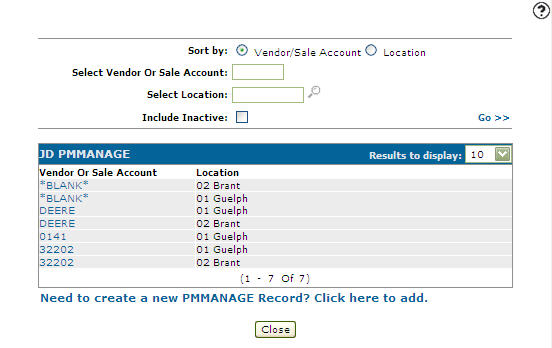
Editing a PMMANAGE Record
-
From anywhere within IntelliDealer ,navigate to Configuration > Parts > General > JD PMMANAGE .
-
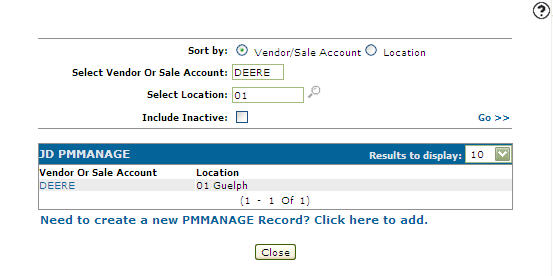
Fill out the appropriate fields and click the Go >> link.
-
Click on a Vendor or Sale Account.
-
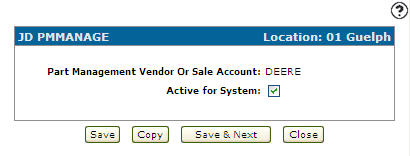
On the Change JD PMMANAGE screen, you may edit any of the available fields within the selected PMMANAGE record.
-
Click the Save button to save any changes made to the PMMANAGE record.
- or -
Click the Save & Next button to save any changes made to the PMMANAGE record and continue to the next PMMANAGE record on the list.
Screen Description
The sorting options on the JD PMMANAGE screen are:
| Sort by | |
|---|---|
| Field | Description |
| Vendor/Sale Account | Sort the search results by vendor or sale account. |
| Location | Sort the search results by location. |
The search fields on the JD PMMANAGE screen are:
| Field | Description |
|---|---|
| Select Vendor or Sales Account |
Search for PMMANAGE records by vendor or sale account. Clicking on the Vendor link opens the Vendor Selection screen allow you to search for a Vendor. Clicking on the Sale Account link opens the Account Lookup screen allow you to search for a Sale Account. |
| Select Location | Search for PMMANAGE records by location. |
| Include Inactive | Include inactive PMMANAGE records within the search results. |
The fields appear on the JD PMMANAGE screen are:
| Field | Description |
|---|---|
| Vendor or Sales Account |
The Vendor or Sale Account number included in the PMMANAGE transaction to Deere. The value entered on the Parts MGMT Report by Account or Vendor (A or V ) security switch on the COTAB table will determine whether or not sales accounts or vendors need to be setup on the JD PMMANAGE screen. |
| Location | Indicates the branch location where the record is configured for transmitting PMMANAGE parts information to Deere. |