
NextGen Configuration
The NextGen experience is being introduced for selected IntelliDealer screens in a phased rollout. Use the NextGen Configuration screen to enable or disable NextGen screens for your dealership. During Phase A, NextGen screens are available but are Off by default until you enable them. During Phase B, NextGen screens are defaulted to On to all dealers. Legacy screens remain available until a screen reaches Phase C. See NextGen Overview for rollout phase details.
To open the NextGen Configuration screen, navigate to Administration > NextGen Configuration.
 The NextGen Configuration screen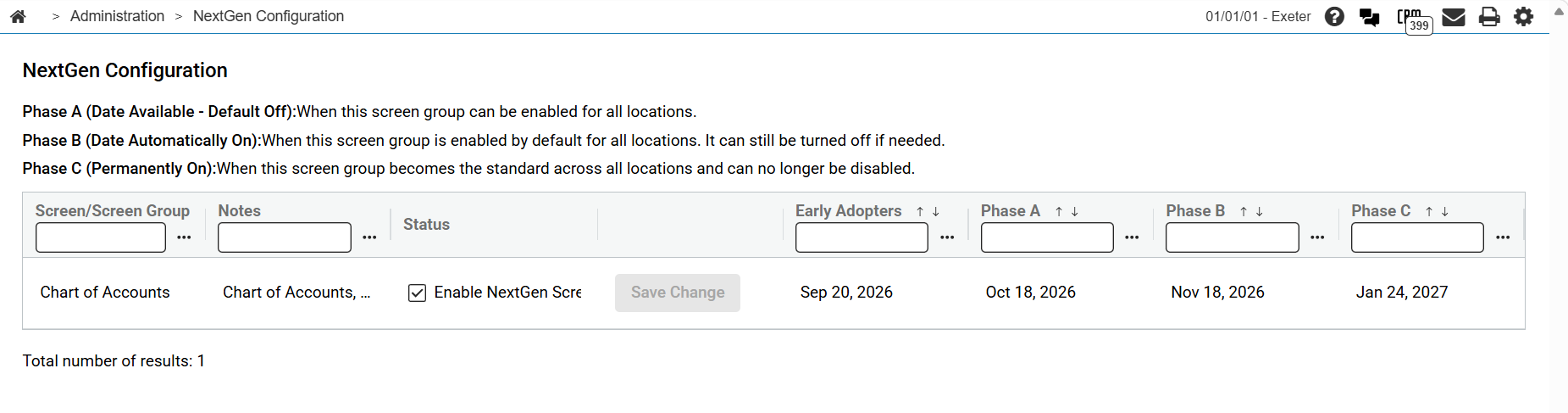
Click the submenu icon  to open column filters for the listing. You can filter on Screen/Screen Group, Notes, Early Adopters, Phase A, Phase B, and Phase C.
Note: Enable and disable settings apply at the dealership level, not per user.
These columns appear on the NextGen Configuration listing:
| Column | Description |
|---|---|
| Screen/Screen Group | The NextGen screen or screen group name. |
| Notes | Rollout notes for the screen or screen group. |
| Status |
Contains the Enable NextGen Screen(s) checkbox for the row. When selected, the NextGen screen is enabled for your dealership. When cleared, users see the legacy screen. Changing the checkbox does not save automatically. Click Save Change on the row to apply the update. |
| Save Change | Saves the enable or disable change for the row. This button is available only when the checkbox value differs from the last saved setting. When you click Save Change, IntelliDealer displays a confirmation message that the change may affect transactions in progress and that users must refresh the session or sign out and sign back in to see the updated screen. |
| Early Adopters | Early adopter rollout information for the screen or screen group. See NextGen Overview for rollout phase details. |
| Phase A | Phase A rollout date and details for the screen or screen group. |
| Phase B | Phase B rollout date and details for the screen or screen group. |
| Phase C | Phase C rollout date and details for the screen or screen group. After Phase C begins for a screen, the Enable NextGen Screen(s) checkbox is disabled and all users see the NextGen screen. |
Revision: 2026.09
Security: 994 - WebAdmin