
John Deere Complete Goods Events
The John Deere Complete Goods Events interface handles order creation, maintenance, and cancellation events for equipment units ordered from John Deere.
The John Deere Complete Goods Events configuration screen can be accessed from Configuration > Interfaces > John Deere > Complete Goods Events.
Topics in this section include:
Configuring John Deere Complete Goods Events
The Configuration tab has these sub tabs:
Equipment Creation Sub Tab
 Equipment Creation sub tab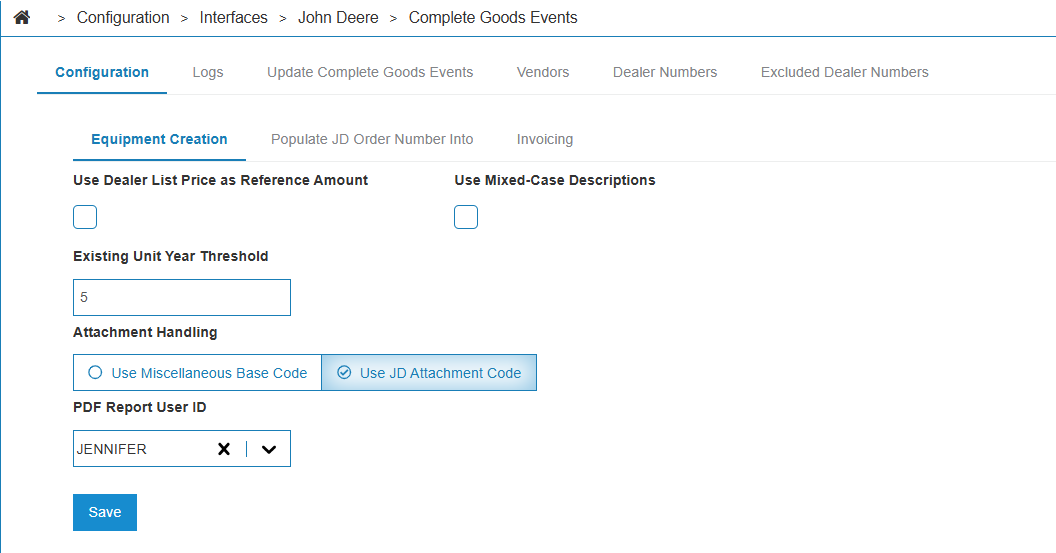
The fields on the Configuration tab, Equipment Creation sub tab are:
| Field | Description |
|---|---|
| User Dealer List Price as Reference Amount | If selected, uses the dealer list price as the reference amount on created equipment. |
| Update Rental Units | If selected, updates rental units that are in On Order status to Rental for financial reporting or borrowing purposes. This is useful for automatically configuring new equipment as rental fleet assets. |
| Update Sold Units | If selected, the interface updates equipment units that are in Sold status when an order maintenance or other event is received from John Deere. If unselected, the interface only updates units in On Order, Pre-Sold, and Rental status (Rental requires Update Rental Units to be selected). |
| Use Mixed Case Descriptions |
If selected, the interface populates the descriptions on equipment units and bases created by the interface with mixed-case characters. If unselected, then the interface uses upper-case. The default functionality for this interface is to use mixed-case descriptions. When selected, this interface uses mixed-case only when initially adding a base number. If the base number was loaded in upper-case before this setting was enabled, and you want to use mixed-case, then edit the base number description to mixed-case. After this change, all new units with the edited base number use the mixed-case description. |
| Default Units to Out Status | If selected, when a new Equipment Profile is created, the In/Out status defaults to Out/InTransit. |
| Always Update Model Year | If selected, the interface updates the model year on the Equipment Profile whenever an order maintenance or other event is received from John Deere, not only when the unit is first created. |
| Update Settlement Information | If selected, the interface updates the Settlement Number/Date on the Equipment Profile when a payment event is received from John Deere. |
| Create Attachment Units | If selected, the interface creates stock records for units if an attachment is received by John Deere. This option is enabled by default and can be turned off if you do not want attachments created. |
| Attachment Handling |
If there is an attachment to a John Deere Goods Event, this option determines how this interface interacts with that attachment and how it is recorded for that equipment profile.
|
| Miscellaneous Base Code | When Attachment Handling is set to Use Miscellaneous Base Code, enter the miscellaneous base code from Base & Options that the interface uses when creating attachment units. |
| Create Pre-Sold Units | If selected, the interface creates Equipment Profile records for units that John Deere reports as pre-sold, so that sold-but-not-yet-delivered units are tracked in the system. |
| Default Customer | When Create Pre-Sold Units is selected, this is the customer applied to the created units when the interface cannot map a customer to the unit. |
| Use IntelliDealer Group Code Mapping | If selected, the interface uses IntelliDealer group code mapping when creating equipment units. This allows the interface to map John Deere group codes to the corresponding IntelliDealer group codes configured in the system. |
| Default Group Code | When Use IntelliDealer Group Code Mapping is selected, this is the group code applied to created equipment when the interface cannot map a John Deere group code to a IntelliDealer group code. |
Populate JD Order Number Into Sub Tab
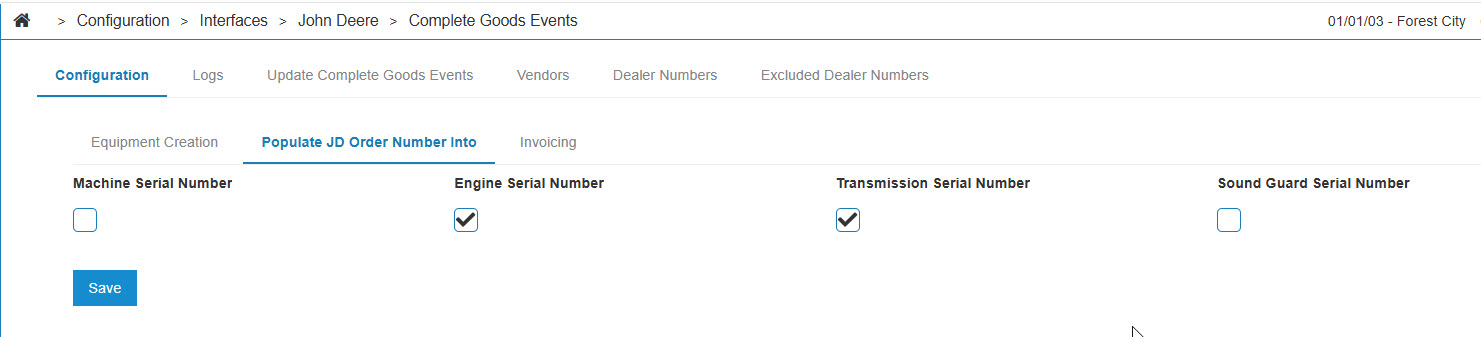
Use this tab to control which serial number field the John Deere order number populates on an equipment profile. This is used in situations where John Deere has not provided an official serial number for the unit.
Each checkbox determines the named field the serial number appears under if selected.
The default option for serial numbers populated by this process is Machine Serial Number.
Invoicing Sub Tab
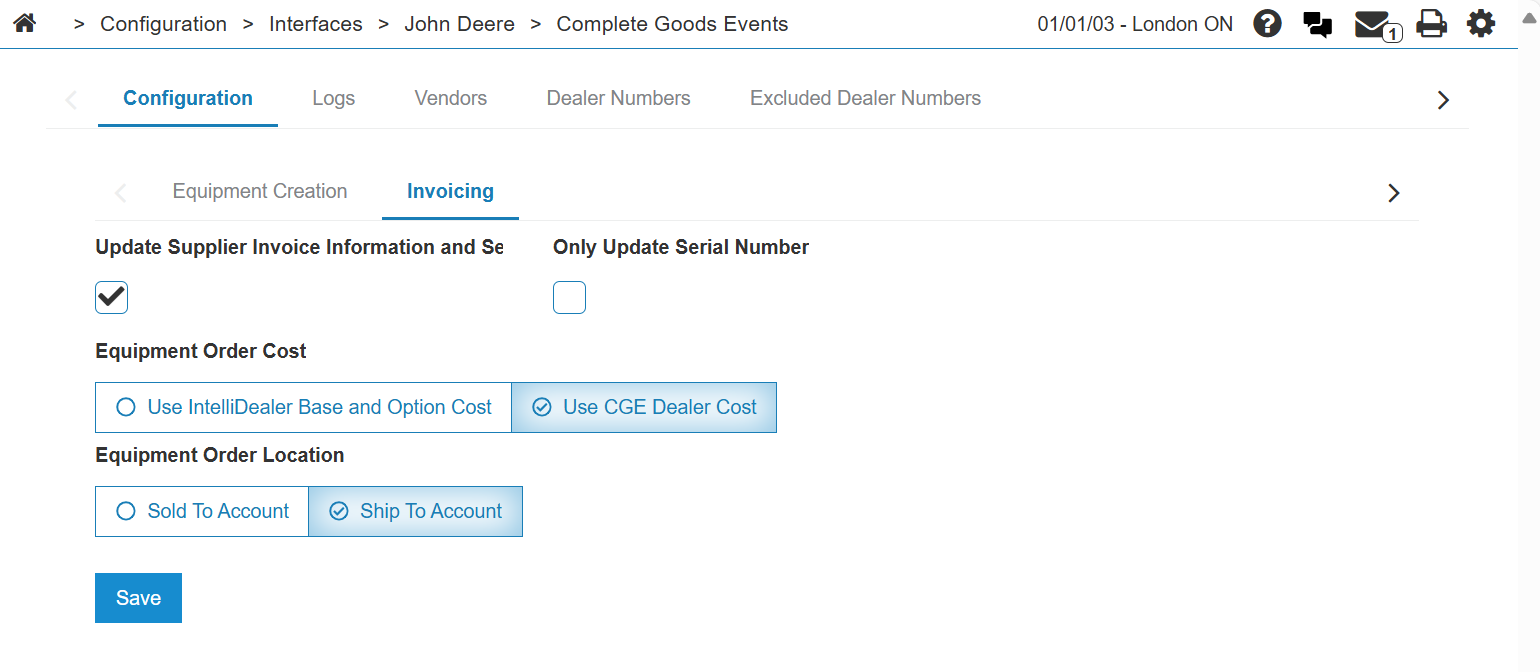
The fields on the Configuration tab, Invoicing sub tab are:
| Field | Description |
|---|---|
| Update Supplier Invoice Information and Serial Number | If selected, updates the machine serial number, invoice number, amount, and date when processing an Invoice event. |
| Only Update Serial Number | If selected, updates only the machine serial number when processing an Invoice event. |
| Create Equipment PO | If selected, the interface creates an equipment purchase order during a transfer event. |
| Update Options on Invoice Event | When Create Equipment PO is not selected, this option appears. If selected, when an Invoice event includes option lines, the interface updates equipment option records on the unit and creates or updates the corresponding master option records in Base & Options for the unit's base code. When Create Equipment PO is selected, option and pricing updates still occur during Invoice events. |
| Equipment Order Cost | Choose whether the cost on the equipment order should be set to either the CGE Dealer Cost or the IntelliDealer Base and Option Cost, which includes fees and surcharges. |
| Equipment Order Location | Choose whether the equipment order is created in either the location to which the unit was sold or the location to where it is shipped. |
Attachment Exclusion List Sub Tab
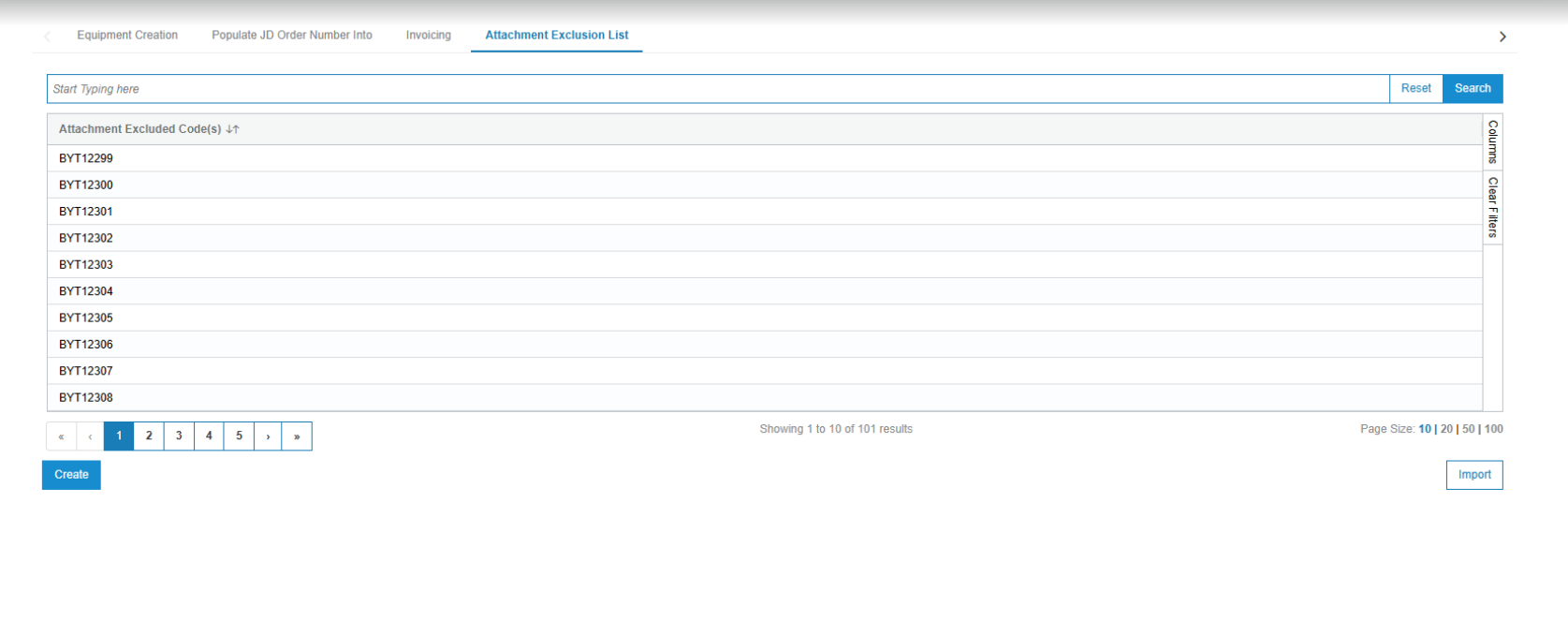
Use the Attachment Exclusion List as a data filtering mechanism to prevent automatic creation of records for attachments.
The Create button opens a creation window to manually enter codes.
The Import button opens a request for a .CSV file that is used to upload several codes at once.
Note: The uploaded .CSV file must contain a single column named "Codes" to successfully import.
Group Code Mapping Sub Tab
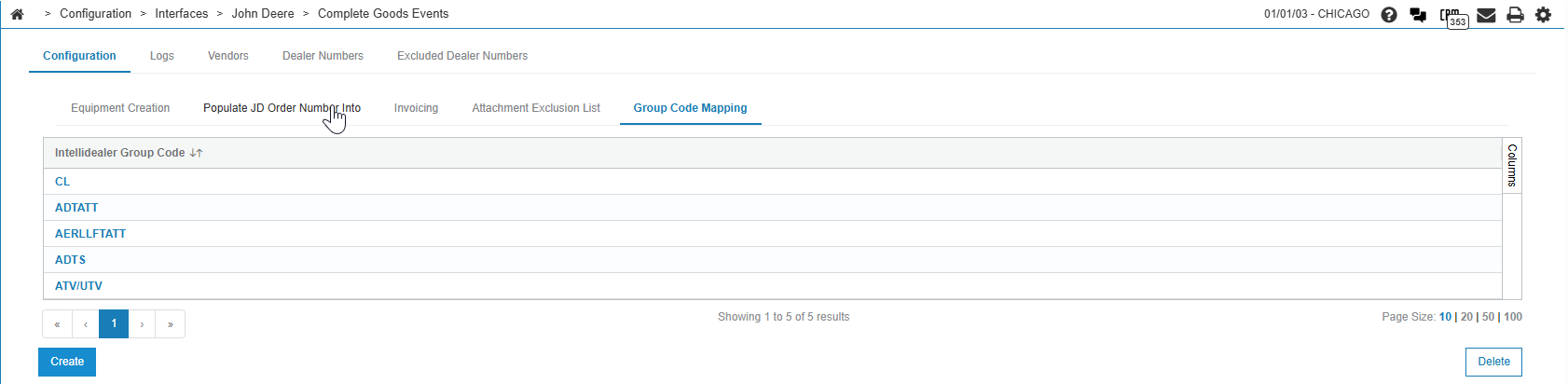
Use the Group Code Mapping sub tab to associate John Deere group codes with IntelliDealer equipment group codes when Use IntelliDealer Group Code Mapping is selected on the Equipment Creation sub tab. If that option is cleared, this sub tab is hidden.
The list shows each IntelliDealer group code that has mappings. Click a row to open the mapping and maintain the John Deere group codes for that IntelliDealer group code.
The IntelliDealer Group Code field is the IntelliDealer equipment group code for this mapping. Each group code appears once in the list. When you create a mapping, select a value from Group Codes.
One or more John Deere group codes can map to the selected IntelliDealer group code.
A given John Deere group code can map to only one IntelliDealer group code across all mappings.
Click Create on the list to add a mapping. After you select an IntelliDealer group code and save, use Create on the grid to add John Deere group codes to that mapping. Use the row actions on the grid to remove individual John Deere group codes.
Click Delete on the list toolbar to open a dialog where you choose an IntelliDealer group code and remove that entire mapping, including all John Deere group codes linked to it.
Logs
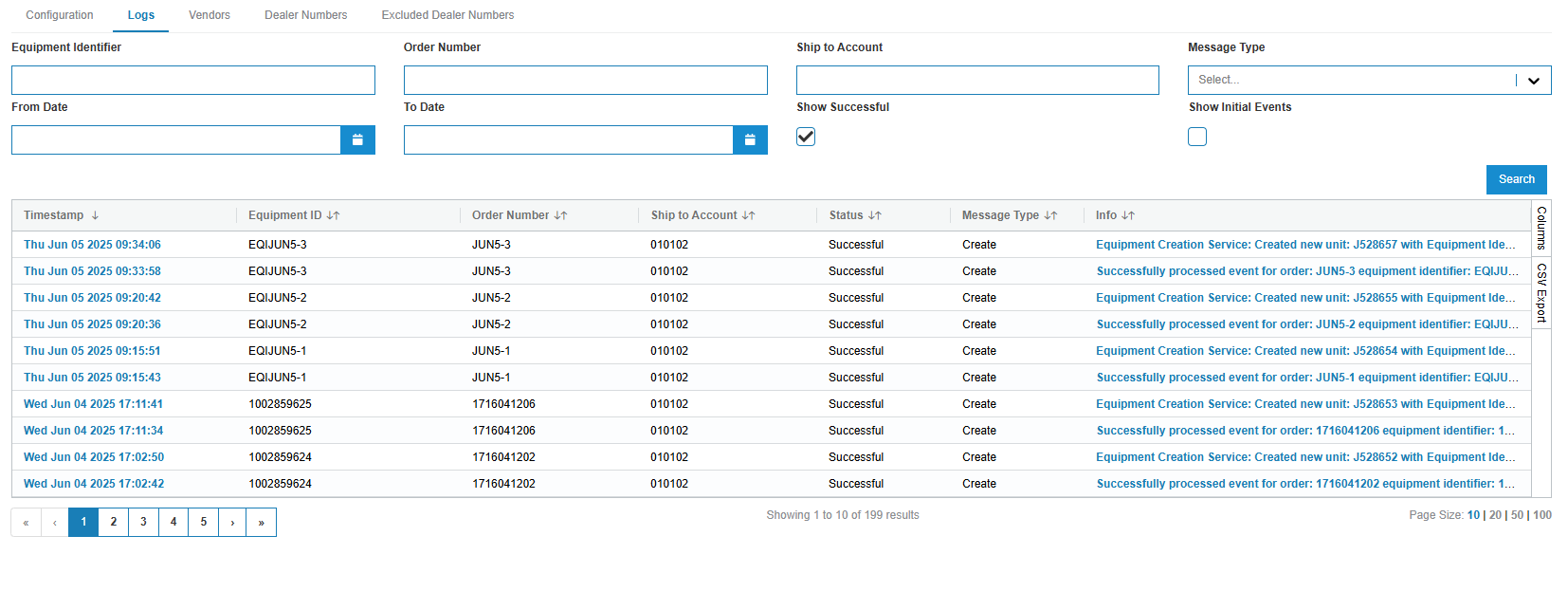
The Logs screen keeps a record of events processed by the interface, such as:
-
A Success event is generated when a unit is created or updated, or a PO is created.
-
An Error event is generated when there is some kind of issue while processing an event.
-
An Initial event is a record of the request when it was first received from John Deere. This information is logged to ensure there is a record of the raw request in case something goes wrong and a proper Error is not logged.
Errors are shown by default and some errors are clickable to show additional data. This data may be useful when attempting to isolate a problem with the interface. Note that the Customer entityId in the error messages is John Deere's customer number.
Use the Message Type drop-down to filter logs by event type. Values include Create, Maintain, Transfer, Cancel, Invoice, Reconcile, Logistics Update, Payment, and Request Advance.
You can also filter the listed results by clicking the Show Successful or Show Initial Events checkboxes respectively.
Logs are retained for up to three months before they are cleared from the system.
Click the  icon on the right to export logs to a .csv format. See Listing Screens.
Vendors - Dealer Codes
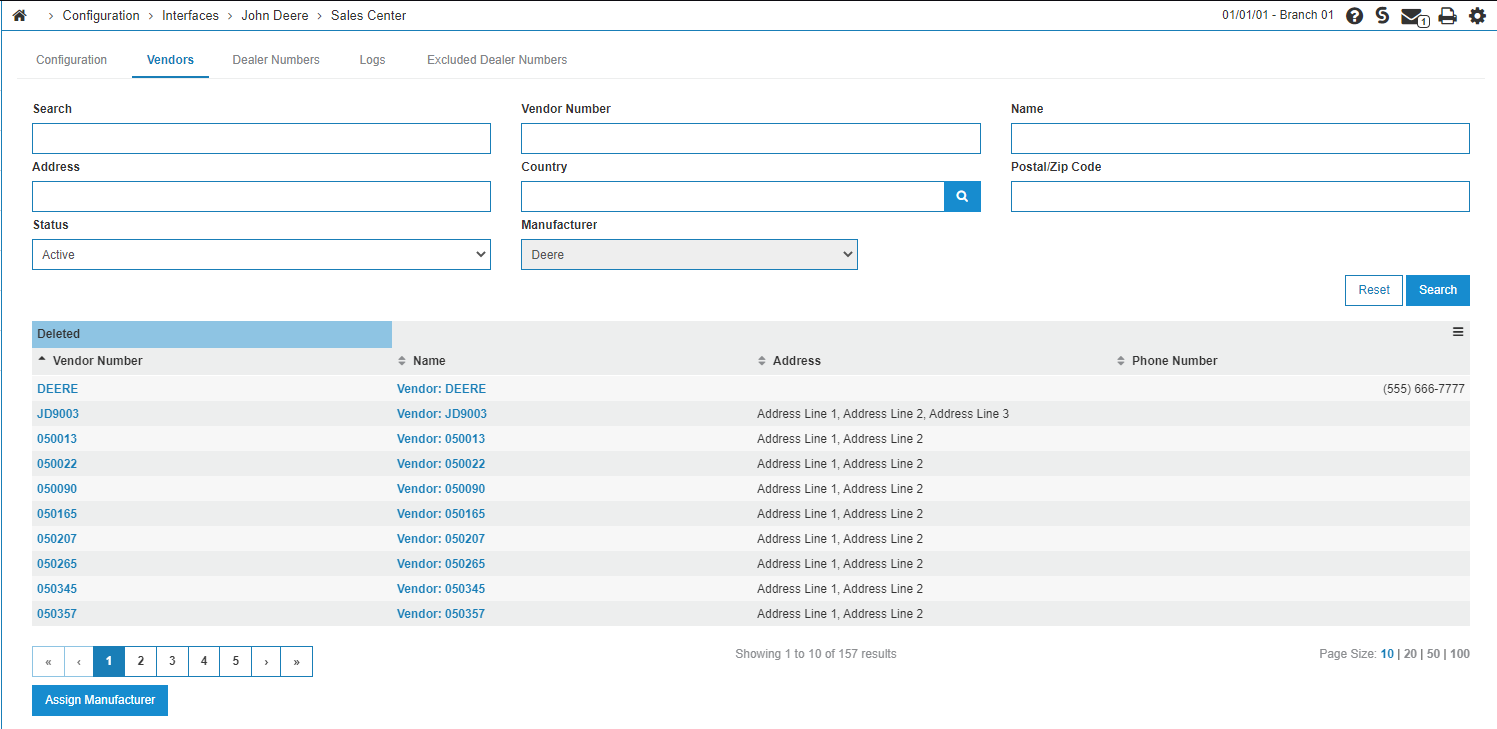
Use the Vendors tab to set a Manufacturer Code. You should ensure all John Deere vendors have been set up with the appropriate manufacturer code and verify that all dealer numbers used with the Complete Goods Events interface are properly configured.
This tab displays a vendor list, where you can find the vendor you want to apply the manufacturer code to. These manufacturer codes are used by multiple John Deere interfaces and are often already set. If no John Deere vendor has been located, clicking the Assign Manufacturer button sets the manufacturer code.
Dealer Numbers
The Dealer Numbers tab shows dealer numbers for vendors with a John Deere manufacturer code. All dealer numbers used by the interface appear in this list and it is how the interface matches the John Deere Ship to Account to a location in IntelliDealer:
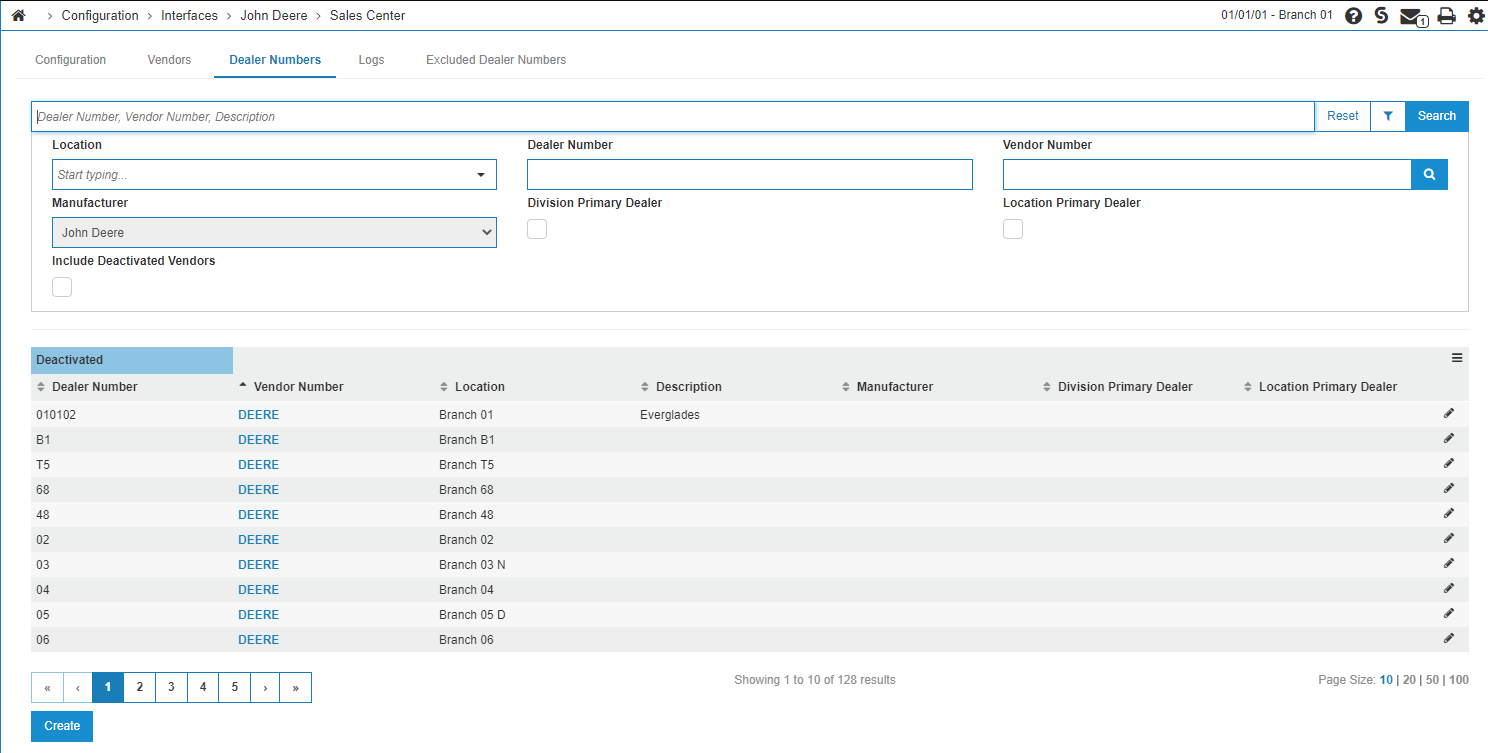
To add a new Dealer Number click Create.
Excluded Dealer Numbers
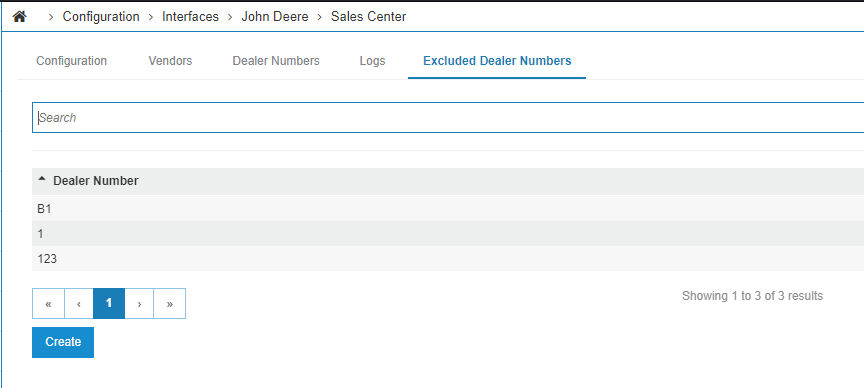
Use the Excluded Dealer Numbers tab for unique cases where events for a particular location should not be processed. This configuration option is not likely to be used except in very rare situations, and should generally be left blank when configuring this interface. The excluded dealer numbers on this screen are also shared with the John Deere Parts Catalog interface.
Equipment Defaults
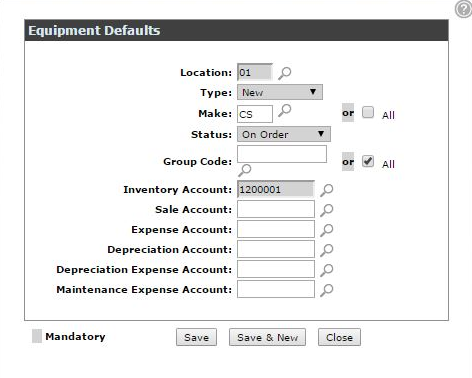
Equipment Defaults must be set so the interface can pick the appropriate inventory account for created units. These defaults are configured similarly for many other parts of the system:
-
Navigate to Configuration > Equipment > Profile > Equipment Defaults, then click Need to add a new equipment default? Click here to add.
-
For each location, configure these fields:
-
Type—must be set to New.
-
Make—set the code to JD or check the All box.
-
Status—must be set to On Order.
-
Group Code—must be set to All.
Note: Inventory Account and Sales Account must be selected for the interface defaults to properly apply.
-
-
Click Save to save your work.
List of Complete Goods Events
The list of events and the actions taken by the John Deere Complete Goods Events interface are:
| Event | JD Complete Goods Events Interface Action |
|---|---|
| Order Creation | A stock unit is created in IntelliDealer with the John Deere Equipment Identifier populated in the Customer Fleet Number field. The interface creates base and option master records if they do not already exist, and updates existing records with pricing information if they have been previously created. |
| Order Maintenance | Updates are made to a stock unit in IntelliDealer, identified by the Deere Equipment Identifier in the Customer Fleet Number field. |
| Order Cancellation | If a stock unit matching the Deere Equipment Identifier is found in IntelliDealer, it is set to status 'D' and disabled in the system. |
| Transfer |
Sent when equipment moves from one John Deere dealer body to another (from one CoG to another CoG), such as from one dealership group to another. John Deere no longer sends transfer events for moves between locations or dealer numbers within the same CoG. When a transfer event is received, if a matching stock unit exists in IntelliDealer, the interface uses the ship-to dealer number on the event to determine the target location. If only location changes within the same company and division, the existing unit is moved to the new location. If the company or division changes, the existing unit is removed and a new unit is created in the new division and location with a new stock number. |
| Invoice | An Equipment Order is created in the Parts Order system for the stock unit located by the Deere Equipment Identifier. When option updates are enabled, the interface also updates equipment options and pricing and maintains master option records in Base & Options, consistent with Order Creation. |
| Reconcile |
A preliminary event sent to pre-populate the Equipment Identifier field on existing units. The Reconcile event continues to match units using either the John Deere Order Number or the Equipment Identifier. All other events now match using the Equipment Identifier only. These events transition JDMint units to JDSC CGE. |
OEM Equipment Details
When John Deere sends Complete Goods Events messaging for a unit, IntelliDealer can store selected OEM data for the dealer to review on the OEM Equipment Details screen. Open this screen from Machine Quick Links on the Equipment Profile when OEM equipment data exists for the unit.
Payment-related events populate the Payment Information fields on that screen. When John Deere sends an order type with the message, the interface stores the Deere order type code and displays the full description on the Order Type field (for example, DP - Dealer Presold). Order type is saved on order creation, maintenance, transfer, invoice, cancellation, and payment events and is updated when John Deere sends a later value.
Create, maintain, invoice, and transfer events can also update MDP price and exchange rate on the MDP Price section of OEM Equipment Details. Sales date events update the Retail Sales Dates fields. See OEM Equipment Details for field descriptions.
Feature Number: 6260 - John Deere Sales Center CG Events
Security: 999 Configuration
Revision: 2026.09