
Cost Code Logic
There are two types of cost codes in IntelliDealer, both of which are used to calculate the Landed Cost The Landed Cost of a part is the final cost of the part on an order after all applicable Order Creation and Order Update cost code factors have been applied to the Current Cost of the part. Cost factors are applied when the part is ordered and receipted into the system based on the order Type (eg. SO: Stock Order, MD: Machine Down, FI: Fill In, etc.) The Landed Cost of a part will, in turn, be factored into the Average Cost of a part (as specified in the Average Cost field of the Parts Profile tab.)
For details regarding cost code logic, please see the Cost Code Logic topic in the FAQs and Troubleshooting section of the online help.
For details regarding the Average Cost of a part, please see the Average Cost definition in the Glossary section of the online help. of a part when it is ordered through the system:
The Landed Cost of a part is the final cost of the part on an order after all applicable Order Creation and Order Update cost code factors have been applied to the Current Cost of the part. Cost factors are applied when the part is ordered and receipted into the system based on the order Type (eg. SO: Stock Order, MD: Machine Down, FI: Fill In, etc.) The Landed Cost of a part will, in turn, be factored into the Average Cost of a part (as specified in the Average Cost field of the Parts Profile tab.)
For details regarding cost code logic, please see the Cost Code Logic topic in the FAQs and Troubleshooting section of the online help.
For details regarding the Average Cost of a part, please see the Average Cost definition in the Glossary section of the online help. of a part when it is ordered through the system:
-
Order Creation—cost codes are assigned to the parts and vendors at your dealership using the Cost Code field on the Parts Profile and Vendor Profile screens. Once assigned to a part or vendor, whenever that part/vendor is placed on a parts order, the Cost Factor associated to the code is applied to the Current Cost
Original cost plus any additions (frieght, pre-delivery, repairs, etc.) less any removals, rental costing.
Original cost + all capitalized entries (work orders that hit the inventory account) of the part to calculate the PO Cost. -
Order Update—cost codes are automatically assigned to the parts or vendors to which the matching Order Creation codes have been assigned. For example, if Order Creation code 'AA' is assigned to a part, Order Update code 'AA' is also automatically assigned. Once assigned to a part or vendor, whenever a parts order for that part/vendor is receipted into the system, the Cost Factor associated to the code is applied to the PO Cost of the part to calculate the final Landed Cost.
For example, assume part number 'ABC321' has a Current Cost of $10.00 and is assigned Order Creation code 'JC', for which there is a corresponding Order Update code:
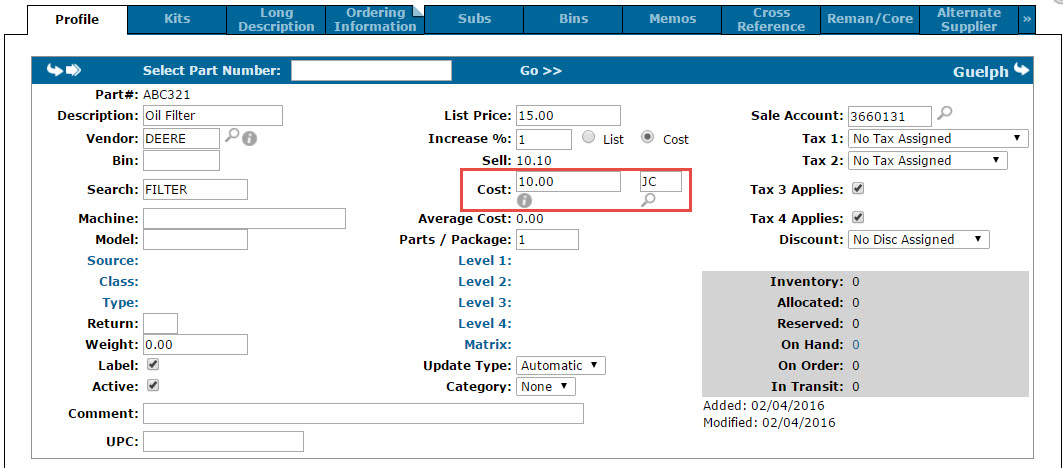
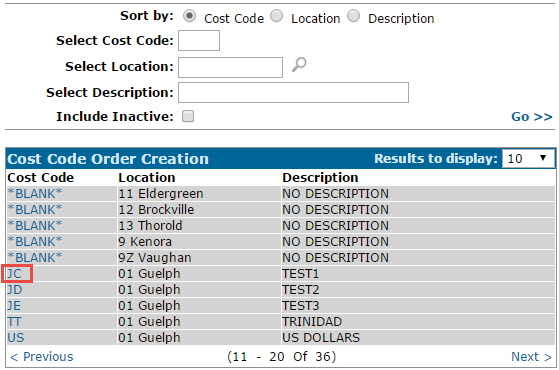
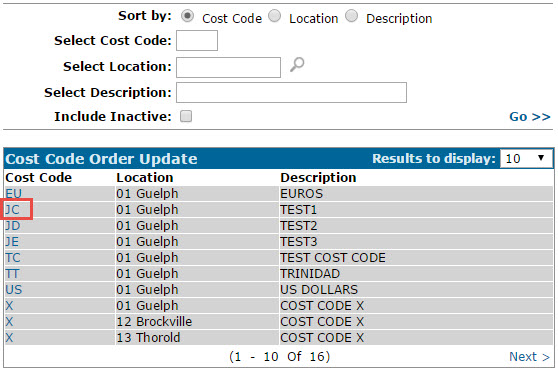
The Cost Factor for Stock Orders is 2.00 for Order Creation code 'JC', and the Cost Factor for Stock Orders is 0.50 for Order Update code 'JC':
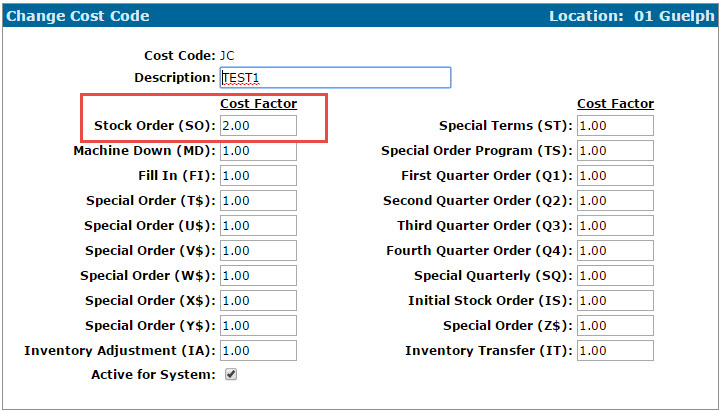
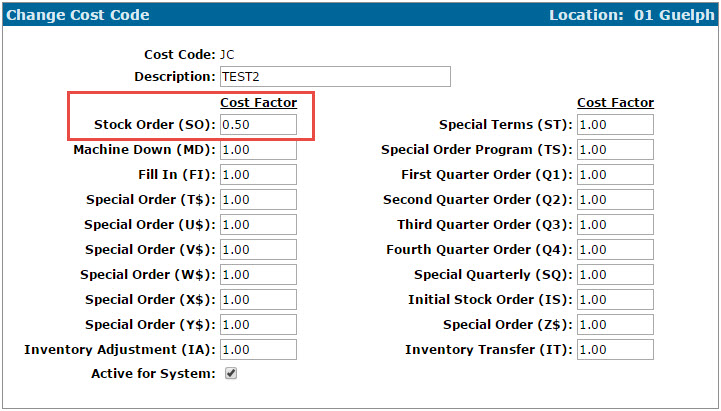
As such, when a Stock Order for part number 'ABC321' is created, the PO Cost is calculated as follows:
Current Cost ($10.00) x Cost Factor (2.00) = PO Cost ($20.00)
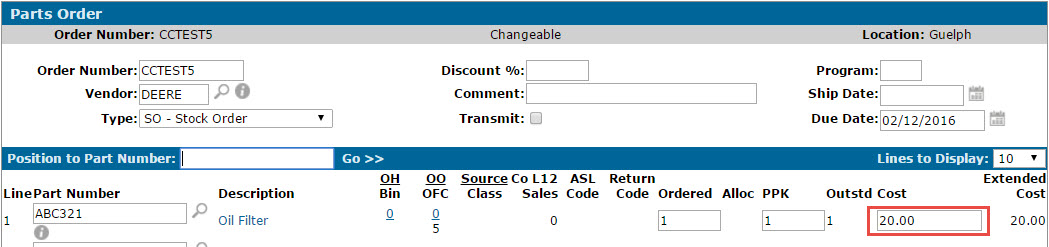
When the order is then receipted into the system, the Landed Cost is calculated as follows:
PO Cost ($20.00) x Cost Factor (0.50) = Landed Cost ($10.00)

In situations where the parts and vendor on an order have been assigned different Order Creation/Order Update codes (or if the vendor on an order is changed before the parts are receipted) the system uses specific logic to determine the cost codes that are used. This logic is outlined in the scenarios below.
Cost Code Logic Scenarios
Each of the following scenarios assume a Current Cost of $10.00 for the part in question (as specified in the Cost field of the Parts Profile). See the table at the bottom for Scenario Results.
Scenario 1: No cost code assigned to the part number (in Parts Profile) and no cost code assigned to the vendor (in Vendor profile) that is assigned to the part.
Scenario 2: Cost code assigned to the part number (in Parts Profile) for which there is an Order Creation cost code factor of 2.0 and no Order Update cost code factor. No cost code assigned to the vendor (in Vendor Profile) that is assigned to the part.
Scenario 3: Cost code assigned to the part number (in Parts Profile) for which there is an Order Creation cost code factor of 2.0 and an Order Update cost code factor of 0.50. No cost code assigned to the vendor (in Vendor Profile) that is assigned to the part.
Scenario 4: Cost code assigned to the part number (in Parts Profile) for which there is an Order Creation cost code factor of 2.0 and no Order Update cost code factor. Cost code also assigned to the vendor of the part (in Vendor Profile) for which there is an Order Creation cost code factor of 3.0 and no Order Update cost code factor.
Scenario 5: Cost code assigned to the part number (in Parts Profile) for which there is an Order Creation cost code factor of 2.0 and no Order Update cost code factor. Cost code also assigned to the vendor of the part (in Vendor Profile) for which there is an Order Creation cost code factor of 3.0 and no Order Update cost code factor. The vendor on the order is then changed to one for whom no cost code is assigned (Cost Code field on Vendor Profile is blank).
Scenario 6: Cost code assigned to the part number (in Parts Profile) for which there is an Order Creation cost code factor of 2.0 and no Order Update cost code factor. Cost code also assigned to the vendor of the part (in Vendor Profile) for which there is an Order Creation cost code factor of 3.0 and no Order Update cost code factor. The vendor on the order is then changed to one for whom there is a cost code assigned with an Order Creation cost code factor of 1.5 and no Order Update cost code factor.
Scenario 7: Cost code assigned to the part number (in Parts Profile) for which there is an Order Creation cost code factor of 2.0 and an Order Update cost code factor of 0.50. Cost code also assigned to the vendor on the part (in Vendor Profile) for which there is an Order Creation cost code factor of 3.0 and an Order Update cost code factor of 0.75.
Scenario 8: Cost code assigned to the part number (in Parts Profile) for which there is an Order Creation cost code factor of 2.0 and an Order Update cost code factor of 0.50. Cost code also assigned to the vendor on the part (in Vendor Profile) for which there is an Order Creation cost code factor of 3.0 and an Order Update cost code factor of 0.75. The vendor on the order is then changed to one for which there is an Order Creation cost code factor of 4.0 and no Order Update cost code factor.
Scenario 9: Cost code assigned to the part number (in Parts Profile) for which there is an Order Creation cost code factor of 2.0 and an Order Update cost code factor of 0.50. Cost code also assigned to the vendor on the part (in Vendor Profile) for which there is an Order Creation cost code factor of 3.0 and an Order Update cost code factor of 0.75. The vendor on the order is then changed to one for which there is an Order Creation cost code factor of 4.0 and an Order Update cost code factor 0.25.
Scenario 10: Cost code assigned to the part number (in Parts Profile) for which there is an Order Creation cost code factor of 2.0 and an Order Update cost code factor of 0.50. Cost code also assigned to the vendor on the part (in Vendor Profile) for which there is an Order Creation cost code factor of 3.0 and an Order Update cost code factor of 0.75. The vendor on the order is then changed to one for which there is an Order Creation cost code factor of 4.0 and an Order Update cost code factor 0.25. Moreover, the cost of the part for the selected vendor is $15.00 (as specified in the Alternate Supplier tab of the Parts Profile.)
Scenario Results
| Scenario | Cost Code Factor Used Upon Order Creation | Cost Code Factor Used Upon Receipt of Order | PO Cost | Final Landed Cost |
|---|---|---|---|---|
| 1 | N/A | N/A | N/A x Current Cost = $10.00 | PO Cost x N/A = $10.00 |
| 2 | 2.0 (from Cost Code on Part) | N/A | 2.0 x Current Cost = $20.00 | PO Cost x N/A = $20.00 |
| 3 | 2.0 (from Cost Code on Part) | 0.50 (from Cost Code on Part) | 2.0 x Current Cost = $20.00 | PO Cost x 0.50 = $10.00 |
| 4 | 3.0 (from Cost Code on Vendor) | N/A | 3.0 x Current Cost = $30.00 | PO Cost x N/A = $30.00 |
| 5 | 2.0 (from Cost Code on Part- Vendor Cost Code is ignored because Vendor was changed to one with blank Cost Code) | N/A | 2.0 x Current Cost = $20.00 | PO Cost x N/A = $20.00 |
| 6 | 1.5 (from Cost Code on the Vendor to which the order was reassigned) | N/A | 1.5 x Current Cost = $15.00 | PO Cost x N/A = $15.00 |
| 7 | 3.0 (from Cost Code on Vendor) | 0.75 (from Cost Code on Vendor) | 3.0 x Current Cost = $30.00 | PO Cost x 0.75 = $22.50 |
| 8 | 4.0 (from Cost Code on the Vendor to which the order was reassigned) | 0.50 (from Cost Code on Part- Vendor Cost Code is ignored because Vendor was changed to one with blank Order Update cost code factor) | 4.0 x Current Cost = $40.00 | PO Cost x 0.50 = $20.00 |
| 9 | 4.0 (from Cost Code on the Vendor to which the order was reassigned) | 0.25 (from Cost Code on the Vendor to which the order was reassigned) | 4.0 x Current Cost = $40.00 | PO Cost x 0.25 = $10.00 |
| 10 | 4.0 (from Cost Code on the Vendor to which the order was reassigned) | 0.25 (from Cost Code on the Vendor to which the order was reassigned) | 4.0 x Current Cost specified on Alternate Supplier tab ($15.00) = $60.00 | PO Cost x 0.25 = $15.00 |
Revision: 2026.01