
Configuration: ASN Invoice Import
The Komatsu ASN Invoices interface downloads Advance Ship Notice (ASN) invoices for import into the IntelliDealer Vouchers system.
Invoices are downloaded and imported automatically during the nightly process and are then available on the Komatsu ASN Invoices listing screen, which displays invoice details and provides the option to create a voucher directly from the imported invoice.
To configure the ASN Invoice Import, navigate to Configuration > Interfaces > Komatsu > ASN Invoice Import.
Topics in this section
Setup Requirements
-
Feature 6119 - Komatsu ASN must be licensed to use this interface
-
Komatsu FTP should also be configured in order to download the invoices. For most dealers, this setup process is already completed. See Komatsu: FTP.
Defaults Tab
The Defaults tab controls the primary automated behavior and fallback settings for the Komatsu ASN Invoice interface. These settings manage how invoices are retrieved nightly and how the resulting vouchers are initialized.
 The Defaults tab controls the basic functionality of the interface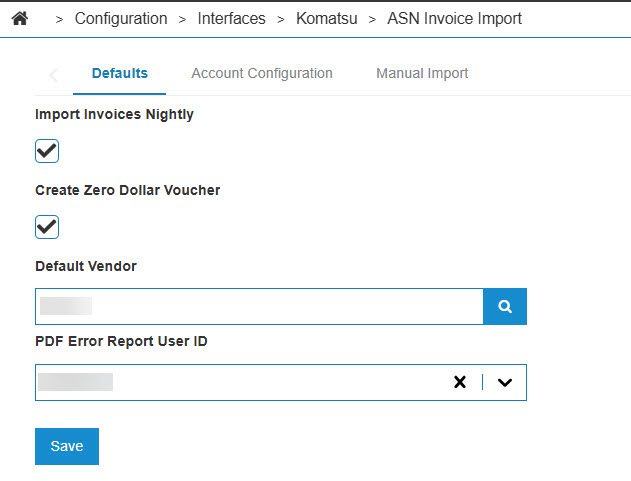
The fields on the Defaults tab are:
| Field | Description |
|---|---|
| Import Invoices Nightly | Controls whether invoices are automatically imported nightly into the ASN Invoice listing screen. |
| Create Zero Dollar Voucher | Allows the interface to process invoices into a zero dollar voucher when checked. If unchecked, a normal voucher is created. |
| Default Vendor | The fallback vendor ID used for voucher creation. This can be overridden at the location level on the Account Configuration Tab. |
| PDF Error Report User ID | Specifies the user ID that receives a PDF report if errors occur during either the nightly or manual invoice import processes. |
Account Configuration Tab
Use the Account Configuration tab to define location-specific settings for how vouchers are generated and distributed. This ensures that invoices are mapped to the correct General Ledger accounts based on the location and the type of transaction.
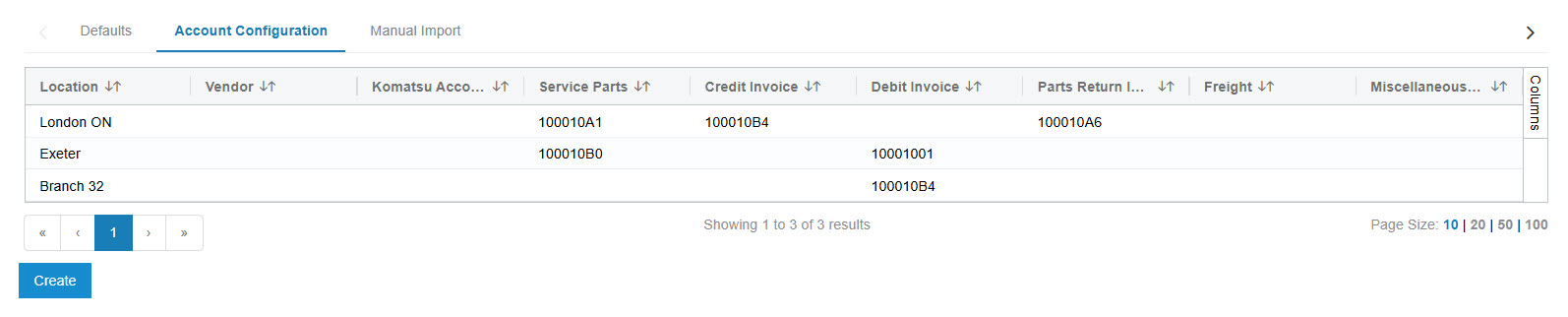
The fields on the Accounts Configuration tab are:
| Field | Description |
|---|---|
| Location | The location this configuration applies to. |
| Vendor | The Vendor ID to use for this location. If no vendor is specified, the vendor configured on the Defaults Tab is used. |
| Komatsu Account |
The G/L account to use. Accounts should be configured for each location where invoices of a particular type are created. Freight and Miscellaneous charge accounts must be configured for parts invoices that contain freight and other miscellaneous charges. |
| Service Parts | |
| Credit Invoice | |
| Debit Invoice | |
| Parts Return Invoice | |
| Freight | |
| Miscellaneous |
Click Create to create a new configuration for a location, or click on a location's row to edit an existing location's settings.
Manual Import Tab
Use the Manual Import tab to trigger the system to retrieve Komatsu invoices on demand, bypassing the standard nightly schedule. This is useful to back-fill data after a system pause or during the initial interface setup.
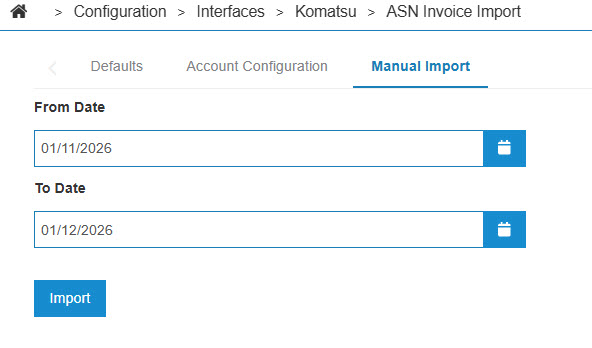
| Field | Description |
|---|---|
| Date Range | Requires a start and end date to define the period for which Komatsu invoices should be retrieved. |
| Import | Submits a batch job to process and import invoices for the specified dates into the listing screen. |