
Equipment Costing
You can use the Equipment Costing screen to view the an equipment's costing.
To open the Equipment Costing screen, click the Costing link on the Equipment Profile screen.
Tip: You can only access the Equipment Costing screen if your User Profile has the Equipment Costing parameter set to All Costing or Sales Cost Only .
 Equipment Costing screen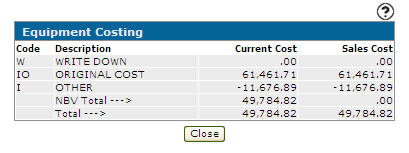
Topics in this section are:
Salesperson Cost Overview
The Sales Cost, or Salesperson Cost, is an optional representation of cost that dealers can present to configured users (typically their sales team) instead of the net book value, or actual cost. Sales Cost usually includes the cost of the machine plus or minus the cost of goods or services that the dealer as identified as impacting the sale of the machine. For example, preparing the equipment for sale by cleaning it or giving the customer a full tank of gas upon purchase. A sales person can use the Sales Cost when selling a machine to better understand what is going into the cost of selling it.
Using Sales Cost is optional, and must be setup within IntelliDealer by configuring a History Sub-Type with Include in Salesperson Cost selected. Then, when accepting a payment to a Voucher, you can apply this History Sub-Type to the Cost Code field, so that IntelliDealer will include the payment in the Sales Cost on this screen.
Screen Description
The fields on the Equipment Costing screen are:
| Field | Description |
|---|---|
| Code |
A code to identify the type of equipment cost. The system's default application types and subtypes are:
Types(first digit):
Subtypes (second digit):
History and Equipment Inventory application types can be set up on the History Sub-Types screen. The total cost(s) associated to History (H) codes only appear on this screen if the Use Cost Summary Window Breakdown field is deactivated on the System Settings - Company tab. |
| Description | A brief description of the equipment cost code. |
| Current Cost | The current cost of the unit. This value is the original cost plus any charges or credits that have been posted to an inventory account using the stock number of this unit. This field is automatically updated by the billing and accounts payable systems. |
| Sales Cost |
The sales cost of the selected unit. Sales cost is driven by the History Sub-Types screen. If there are entries in the History Sub-Types screen and the Include in Salesperson Cost field is selected for the History Sub-Type, then the amounts are included as a sales cost. Only G/L Accounts coded with an application type of Inventory or History are used. Note: To see sales cost information, a user profile must have the Equipment Costing parameter set to either Sales Cost or All Costing on the User Profiles screen. |
Click Close to complete your work on the Equipment Costing screen.