
CNH DEP eWarranty Vehicle Lookup
This feature is currently in beta.
Use the CNH DEP eWarranty vehicle lookup interface to look up warranty, repair history, PIPs, and vehicle service information for CNH units. No data is written to any database files for this interface - it is a direct retrieval of information from CNH's web service.
This interface shares most of its functionality with the older CNH eWarranty Lookup interface. Both interfaces can potentially be running at the same dealership, however the DEP (Data Exchange Platform) is newer and is the preferred interface to use. Dealers without access to the DEP are only able to use the old eWarranty Lookup interface.
First, configure the unit's make on the CNH Data Exchange Platform configuration screen. Then you can look up units of that make, either through the CNH DEP eWarranty button on the Equipment Profile screen or while on the Work Order Segment screen, via the Work Order Options menu.
Topics in this section are:
See also: Configuration: CNH Data Exchange Platform and Configuration: CNH DEP eWarranty Vehicle Lookup.
Vendor Information Tab
This tab contains eWarranty vehicle data about the unit. Data is only available if eWarranty vehicle data is found for the unit's serial number and the unit's make code is configured on the configuration screen.
 The Vendor Information tab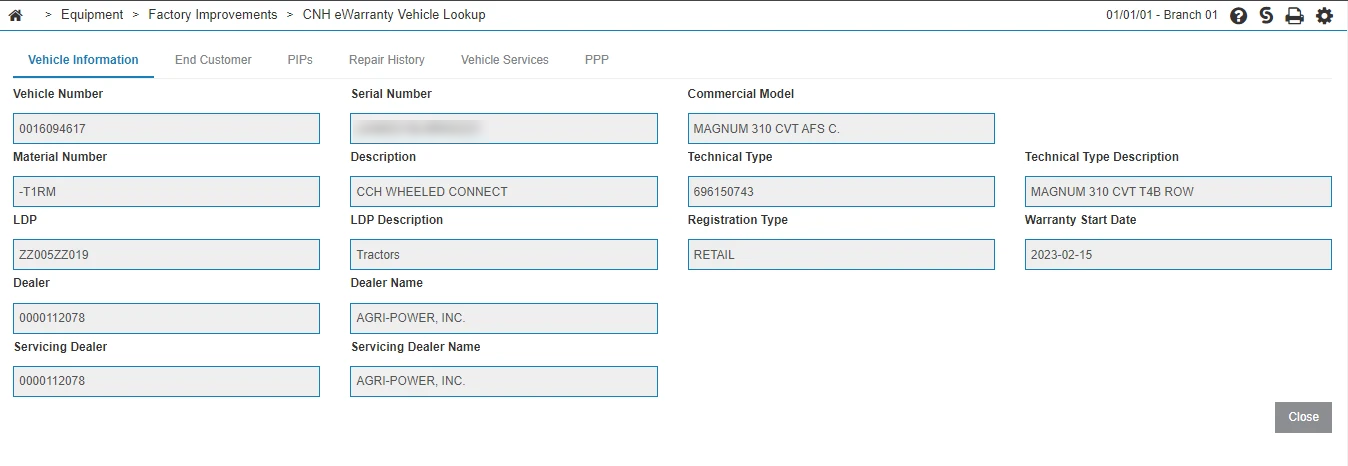
End Customer Tab
Displays data about the end customer who owns the unit, including the customer's code, name and address.

PIPs Tab
Displays PIP information for the unit.

Repair History Tab
Displays submitted warranty claims for the unit. Claim amounts may not be visible if the account which submitted the claim is different than the account inquiring about the claim.
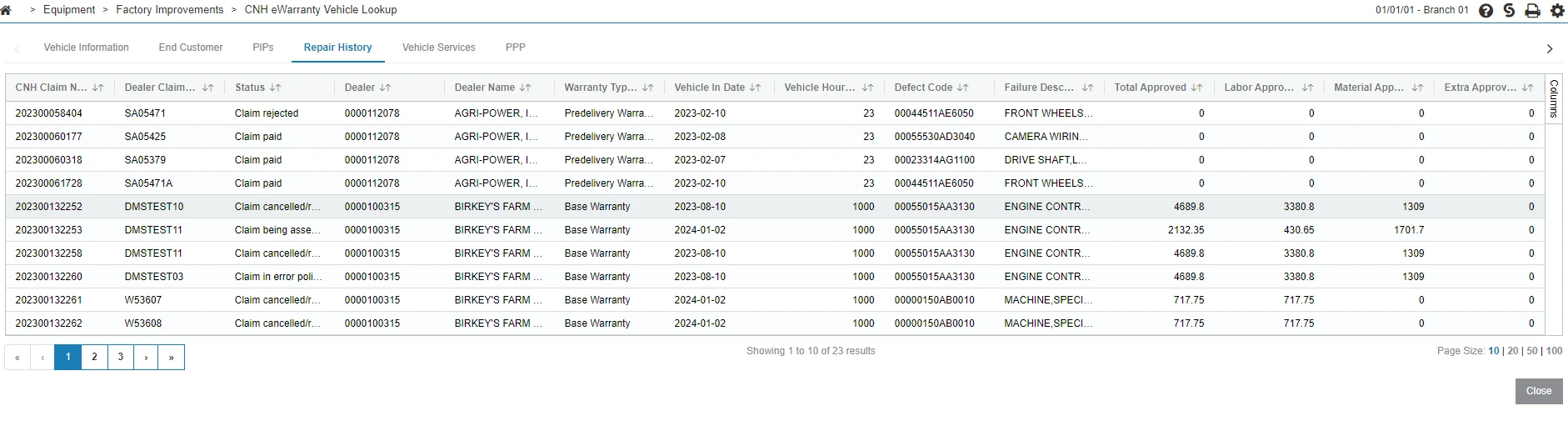
Vehicle Services Tab
Displays any warranties or coverage plans available for the unit.
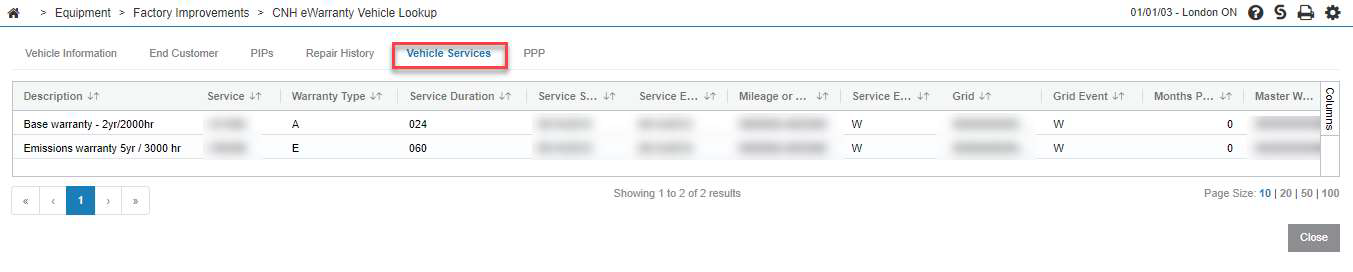
PPP Tab
Displays any additional plans available for the unit. Available plans also show on the Vehicle Services tab.
You can download a copy of CNH documents associated with the equipment by clicking these buttons:
-
Download MPS—to download the CNH Master Part Schedule (MPS)
-
Download TnC—to download the Associated Terms and Conditions

PPP Claim Invoice Report Tab
Prerequisites: You must have Access CNH Equipment Reports enabled in security switch 809 and your CNH user credentials must be valid.
Use this tab to retrieve PPP claim invoice data from CNH DEP. The Report Type drop-down determines which report is generated and which search fields are displayed. The available report types are:
-
Invoice Summary Report (default)
-
Invoice Daily Report
-
Invoice Detail Report
When you select a different report type, any previously displayed results and validation messages are cleared.
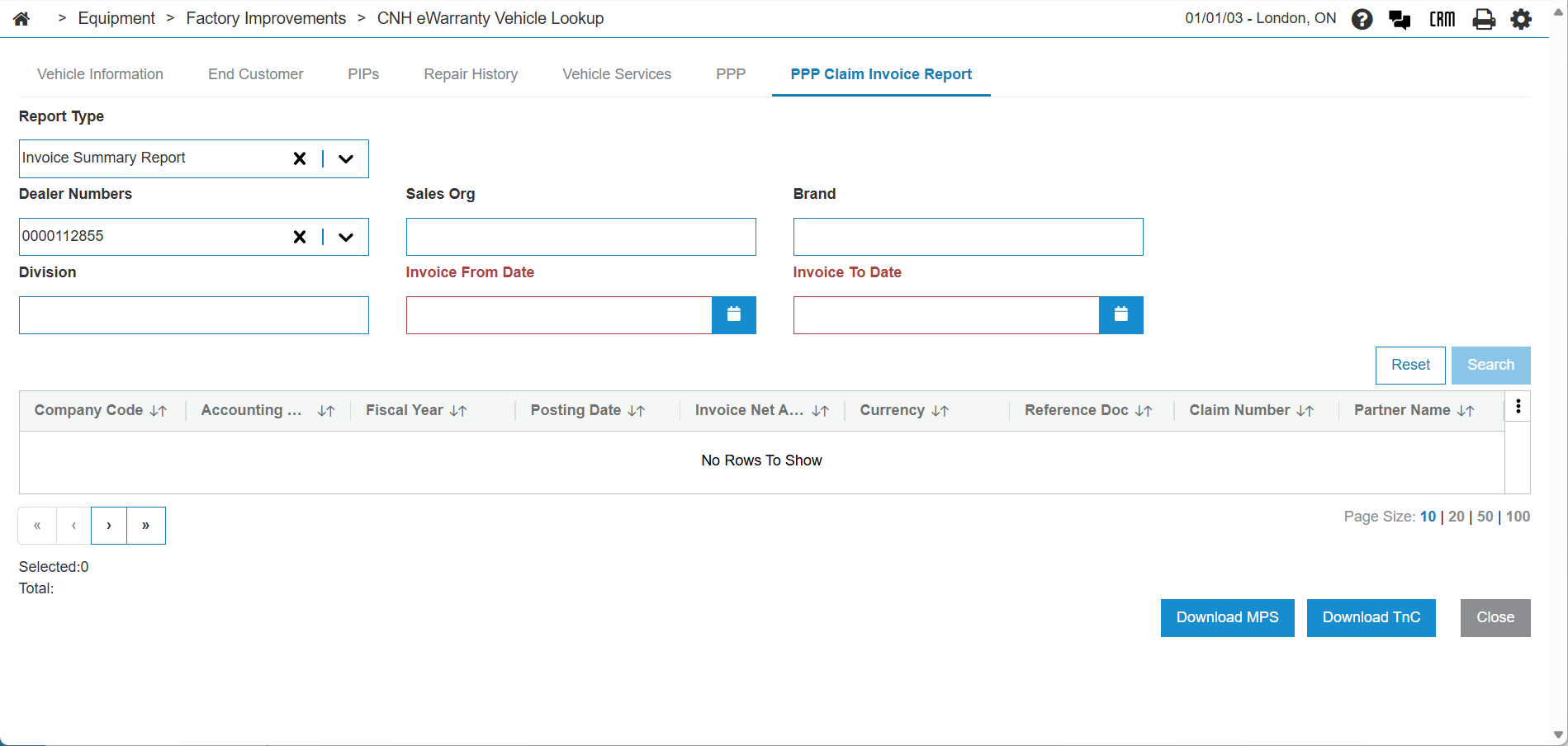
Invoice Summary Report and Invoice Daily Report
The search fields for the Invoice Summary Report and Invoice Daily Report are:
| Field | Description |
|---|---|
| Dealer Numbers | Select the dealer for the report. |
| Sales Org | Enter the sales organization for the report. |
| Brand | Enter the brand for the report. |
| Division | Enter the division for the report. |
|
Invoice From Date Invoice To Date |
Choose the date range for the report. |
Enter the criteria for the desired report, then click Search. To start a new search, click Reset.
Invoice Detail Report
The Invoice Detail Report retrieves detailed invoice header and line-item information for a specific invoice. The search fields for this report type are:
| Field | Description |
|---|---|
| Company Code | Enter the company code for the invoice. Required. |
| Invoice Number | Enter the accounting document number for the invoice. Required. |
| Invoice Year | Enter the fiscal year for the invoice. Required. |
Enter the criteria, then click Submit. To clear the form and results, click Reset.
When the report is generated, the results are displayed in two sections:
-
Invoice Header Information—displays invoice-level data such as company code, accounting document, fiscal year, posting date, net amount, currency, reference document, claim number, partner code and name, invoice key, and document date.
-
Invoice Line / Claim Details—displays a grid of line-item records for the invoice, including claim numbers, warranty claim type, partner information, amounts (material, labor, sublet), processing status, and other detail fields.
If the API returns error messages, a red alert banner is displayed above the results area and the report table is not shown. If no line items are returned, the grid displays "No Rows To Show."
Results and Downloads
The results on the PPP Claim Invoice Report tab contain the data from CNH for the related equipment.
You can download a copy of CNH documents associated with the equipment by clicking these buttons:
-
Download MPS—to download the CNH Master Part Schedule (MPS)
-
Download TnC—to download the Associated Terms and Conditions
Feature: 6429 - CNH Data Exchange Platform
Security: 800 - Equipment Profile, or 810 - Work Orders
Revision: 2026.06