
Data Portal
The Data Portal is a centralized repository for system-generated reports and data. It provides access to information from various areas of IntelliDealer, including reports from Real-time Billing Runs, the Aged Trial Balance, and Vendor Parts Order (POR38231), with additional report types added over time. Users can view available data and export results to Microsoft Excel for further analysis.
Many billing run reports are stored in the Data Portal instead of being sent to a printer only. See Billing Run/Billing Run Preliminary and Unattended Billing Runs. Report codes and sample reports are listed below.
The features provided by the Data Portal include:
-
A separate PDF file is generated for each invoice, in an improved format.
-
Ability to search for and collect the report for a single invoice.
-
Export to Excel. The data for all invoices in the file can be collated and exported into an .XLS file.
Topics in this section include:
Report Codes and Sample Reports
Reports in the new format have a new report code. Click the hyperlink of the report's name to see a sample of the report.
Rental reporting is not supported if Integrated Rental is enabled.
Reports generated for General Billing, Rental Billing, Equipment Billing, and Work Order Billing
Not all reports are run for each type of billing. The last column specifies which type of billing can produce the report: G for General billing, R for Rental billing, E for Equipment invoicing, and W for Work order billing. When a report can be produced by every billing run type, the column shows All billing runs instead of listing G, R, E, and W.
| Report Name | Description | OLD Report Code | New Report Code | Run for: |
|---|---|---|---|---|
|
Lists customer number, customer name, invoice number, invoice amount and billing date by co/div/br then by customer number. The accounts included in the invoice amount column are set up as cash, A/R, or charge accounts (A/R Agencies) in the system configuration. |
BIL982 | IRR11499 | All billing runs | |
| Sales Analysis Allocation Summary |
Lists a summary, by G/L allocation, of all invoices issued in this billing run.
|
BIL919 | SAASR91449 | All billing runs |
| Rental Cost of Sales Journal |
Prints a detailed report of the rental cost of sales and rental inventory G/L allocations generated by the rental sales from the billing runs. Totals are printed for divisions and company:
|
BIL929 | RCOSJ17470 | G,R |
| Prints a summary of all billing G/L allocations for the current G/L month in standard journal format. | GL9300 | SAJR8825 | All billing runs | |
| Sales Analysis Allocation Register | Lists an invoice-by-invoice breakdown of the resultant entire journal entry including related details such as part numbers, stock numbers, taxes and so on. | BIL900 | SAARR67079 | All billing runs |
| Duplicate Check Register | Lists duplicate identifiers found during bank reconciliation for the billing run (for example, duplicate check numbers when checks are issued, or duplicate reference numbers when a bank entry is created from an invoice) and the replacement number assigned. | BA0002 | DCRR93401 | All billing runs |
| Released Invoices | Lists any invoices being billed that do not have any details for a printed invoice. | BIL940 | RIWNP85579 | G,R |
|
This report lists all stock number's that have been returned to inventory (status 'V') in this billing run. A credit invoice has been issued to reverse a sales invoice that was issued in a previous billing run. |
CGI030, CGI030-E | CPAEL3860 | G,R | |
| Equipment Original Cost Errors | Prints when the equipment cost changed from zero to non-zero. It does not print when it changes from non-zero to zero. | CGI029 | EOCER19047 | All billing runs |
|
Lists invoices that have been charged to CBS (IBS) in this billing run. FARMPLAN, AGLINE, POWERPLAN, and most other A/R agencies appear on the Transaction Log report (BIL994), not on this report. Only invoices with charges to the G/L accounts configured for CBS agency processing are printed on this report. |
BIL922 | CTLR55135 | All billing runs | |
|
List postings to each A/R Agency code when the cash code configuration for the agency uses the special A/R agency names that control this report. Includes customer number, customer name, invoice number, invoice amount, card number, authorization number, and G/L account. The page breaks on A/R Agency name. |
BIL994 | ATLR39250 | All billing runs | |
|
This report lists the transactions that had an authorization number keyed from the invoicing application. This includes in-house A/R and A/R Agency transactions. |
BIL957 | AIRR12725 | All billing runs | |
| Account Distribution Report | Lists each distribution account with a percentage of the amount entered. The report shows the percentage, original account, and billing date. | BIL891 | ADR11213 | All billing runs |
|
Prints an error and control report for the parts department to review if a part sold in this billing run meets one of these conditions:
|
PAR014 | PEACR70081 | G,R | |
| Parts Cost of Sales Analysis - Summary & Details | Lists the cost analysis for parts billed to an invoice and shows the profit for each part sold. Generated for billing runs where parts can be invoiced (rental, equipment, and work order billing runs), not for general invoicing-only billing runs. | PAR127- Parts | PCAR16427 | G,R |
| Labor Cost of Sales Analysis - Summary & Details | Lists the cost analysis for labor billed to an invoice and shows the profit for each labor entry. Generated for general, rental, and equipment billing runs that include work-in-process labor; not generated for work order billing runs (work order labor is reflected on other work order billing reports). | PAR127- Labor | LCAR80235 | G,R,E |
|
Lists vendor parts order information including buyer and vendor details, order information, ship-to address, and parts ordered with quantities, prices, and extended totals. The report includes comments, ship via, and FOB point information when available. This report is not produced by billing runs; it is generated manually from Parts Ordering. |
PAR119 | POR38231 | Manual |
Reports generated for General Billing Only
| Report Name | Description | OLD Report Code | New Report Code |
|---|---|---|---|
| Order Register | Prints the details for the general invoice and lists the invoices that are being generated and billed for it in this run. | BIL944 | GORR24583 |
Reports generated for Rental Billing only
| Report Name | Description | OLD Report Code | New Report Code |
|---|---|---|---|
| Customer Marketing Survey Report | Generated when the invoice amount is greater than the maximum amount or less than the minimum amount. | BIL963 | CMSR23439 |
| Rental Billing Run Preliminary Report |
Lists all the header and details of the rental contract. Report RM034-F only prints if the Print Future Preliminary Report switch is enabled for the rental contract location. See Billing/Invoice. |
RM034 | RBPR43865 |
Reports generated for Work Order Billing only
| Report Name | Description | OLD Report Code | New Report Code |
|---|---|---|---|
| Work Order Register | Prints a register of all closed work orders that are being processed in this work order billing run, showing each repair on the work order and all the G/L allocations for the charges made to the work order. The register also shows the cash codes, tax codes, discount codes, etc. that were used when the parts and/or labor was charged to the work order. | WOR006 | WORR75765 |
Analysis reports
| Report Name | Description | OLD Report Code | New Report Code |
|---|---|---|---|
|
Report for service completed on a specific work order. Generated at Product Support > Service > Analysis Reports, on the Work Order Audit tab. |
WOR160 |
WOAR24624 |
Screen Description
To access the Data Portal, navigate to Management Central > Utilities > Data Portal.
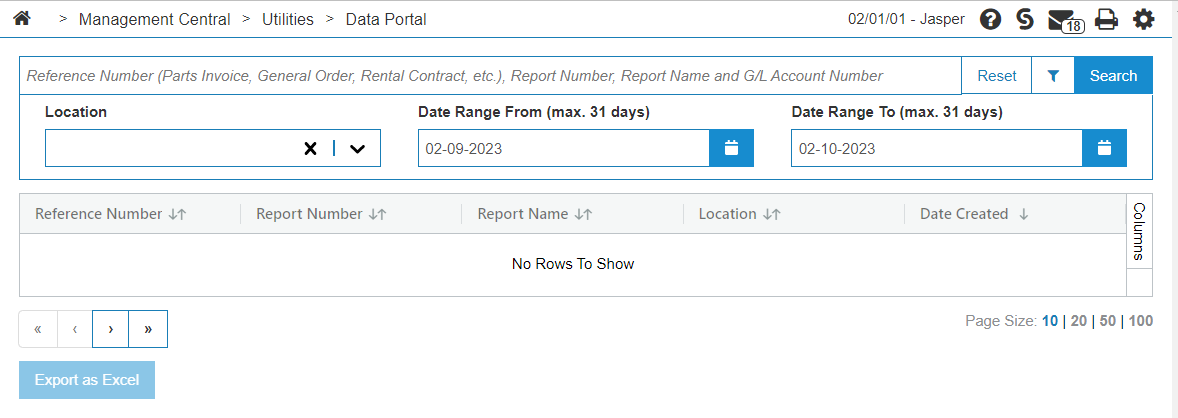
The available fields are:
| Field | Description |
|---|---|
| Search Field |
Enter a Reference Number, Report Number, Report Name or G/L account number to pull up an old report. |
| Filter Icon | Click the filter icon ( )to use toggle the view. )to use toggle the view. |
| Location | The location for which to generate the report. |
| Date Range From Date Range To |
The date range for the report. The default is the last 24 hours. You can specify any range to a maximum of 31 days. Click the calendar icon ( |
 ) to use a calendar to pick the date, or enter a date in the field in the format: mm-dd-yyyy.
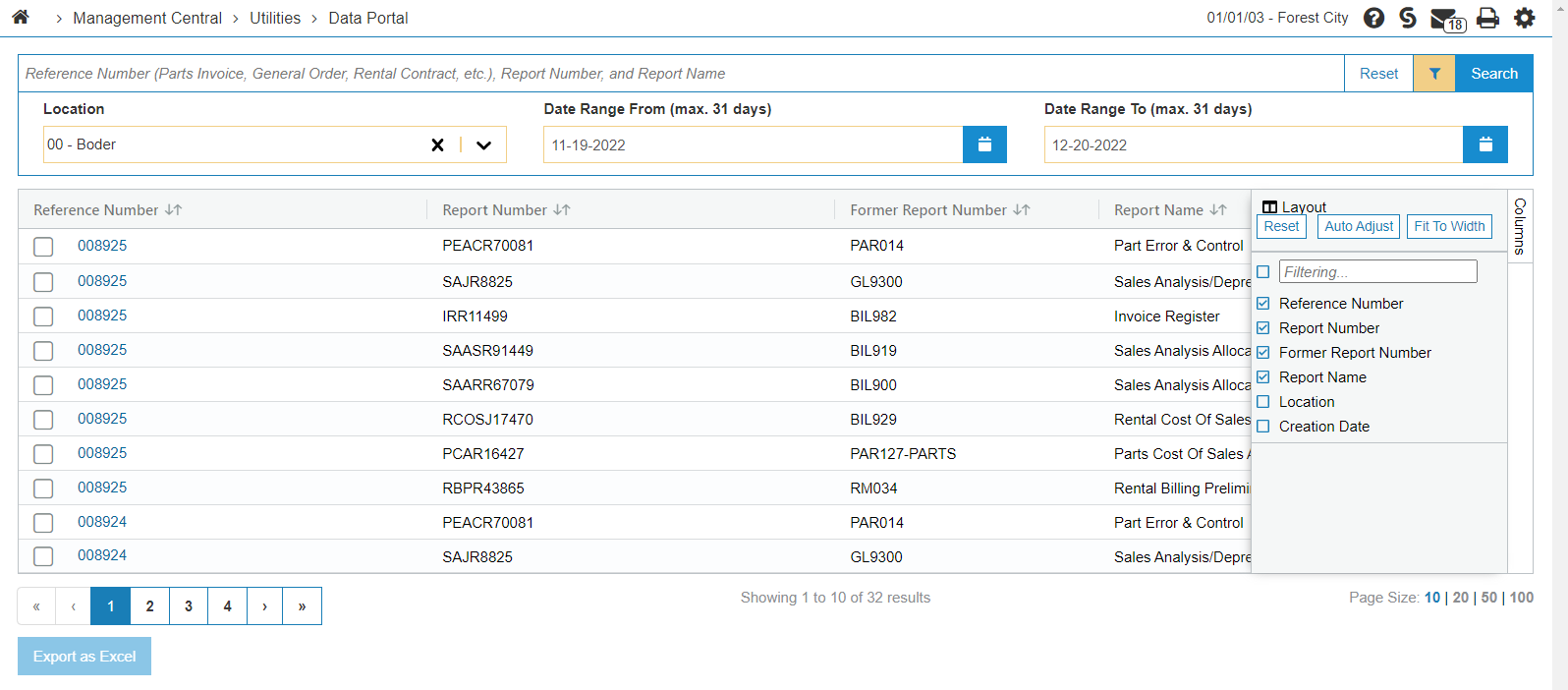
To export the reports to an .XLS file, select the desired reports from the list, then click Export as Excel. A separate file is generated for each type of report.
To customize the columns shown in the reports list, click the Columns box located at the top right of the list. You can add or remove columns using the checkboxes, or filter the list.
Security: 505, Management Central - Utilities, Access to Data Portal Reports
Revision: 2026.09