
Inventory Management
Use the Inventory Management screen to evaluate inventory units and ensure their count within the system.
 Inventory Management screen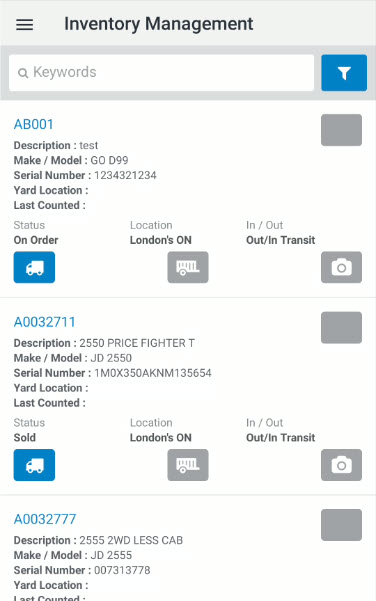
Note: Clearing the keyword search field behaves differently between Android and iOS.
The fields on the Inventory Management screen are:
| Field | Description |
|---|---|
| Description | A brief description of the unit. |
| Make/Model | The unit's manufacturer and model. |
| Serial Number |
The unit's serial number, as assigned by the vendor. If this is an internal stock number (for example: a generic internal unit used for Monthly Work Orders) "NA" or "N/A" is displayed in this field. |
| Yard Location | The abbreviated location of the unit. |
| Last Counted | The date the unit was last counted. |
To open the Equipment Detail screen, select the status button.
To review if any Multimedia files are attributed to the equipment unit select the Location button.
To review the current In/Out status, and any accompanying multimedia, select the In/Out button. If a unit has multimedia attached to it, the radio button is color coded.
Security: 800 - Equipment Profile