
Rental Counter - Functionality
Use the Functionality tab to set up rental functionality options within the Rental Counter module.
The Rental Counter module has been designed to be as flexible as possible so that it can work in a way that makes the most sense for each dealership setting. In an effort to give the dealer control over most aspects of how the system works, a number of control settings have been created, which can be activated and deactivated depending on what parameters you wish to include in your Rental Counter module.
To open the Functionality tab, from anywhere within IntelliDealer and navigate to Configuration > Rental > Setup > Rental Control Setup.
First, use the Select Location field to select a location to setup rental control options on.
Click the Previous or Next
 icon to scroll to the next option or back to a previous option.
Topics in this section are:
Rental Record Retention
While invoice history is controlled by the Retention History configuration (RETNHIS), Deleted Contracts, Finished Contracts, and Rental Requests can be stored for the number of months specified in the Deleted, Finished, and Request fields on this screen. If a field is blank, the system treats the value as 0. If all three fields are 0, no rental contract purge runs. Contracts that are not invoiced or fully billed are not purged.
Contracts are purged with the first full database reorganize after an Accounts Receivable month end. For each non-zero retention value, the system calculates a separate cutoff date using the months in the matching field: Deleted for deleted contracts, Finished for finished contracts, and Request for requests. A contract is eligible for purge when its comparison date is before the cutoff date for its contract type. Deleted contracts and requests always use the date the contract was added as the comparison date. The Purge Contract Based On End Date option applies to finished contracts only; see the field description below.
The formula for the cutoff date is:
system date - configured retention months, rounded to the first date of the resulting month
For example, if the purge runs on June 23, 2026 and the Finished retention period is 3 months:
| Step | Result |
|---|---|
| System date | June 23, 2026 |
| Configured retention (Finished) | 3 months |
| June 23, 2026 minus 3 months | March 23, 2026 |
| Cutoff date (first day of resulting month) | March 1, 2026 |
A finished contract with a comparison date of February 28, 2026 is eligible for purge. A finished contract with a comparison date of March 15, 2026 is not eligible because it is on or after the cutoff date.
On purge, the program deletes the contract and related records. For non-deleted, non-request contracts, utilization history is written to RMUHST, which continues to store summarized details for contracts even after they are purged from the normal "active" rental files. This allows accurate rental Utilization information to be gathered from the system even after the retention period has passed.
Rental Control Setup - Functionality
Navigate to Configuration > Rental > Setup > Rental Control Setup.
Click the Previous or Next icon to scroll to the next option or back to a previous option.The options on the Functionality tab are completely customizable allowing you to setup only the functions you wish to apply to your dealership's rental system. See the table below.
After selecting your settings on the Functionality tab for the selected location, click the Save button to the apply changes to the rental system.
 The Functionality tab appears.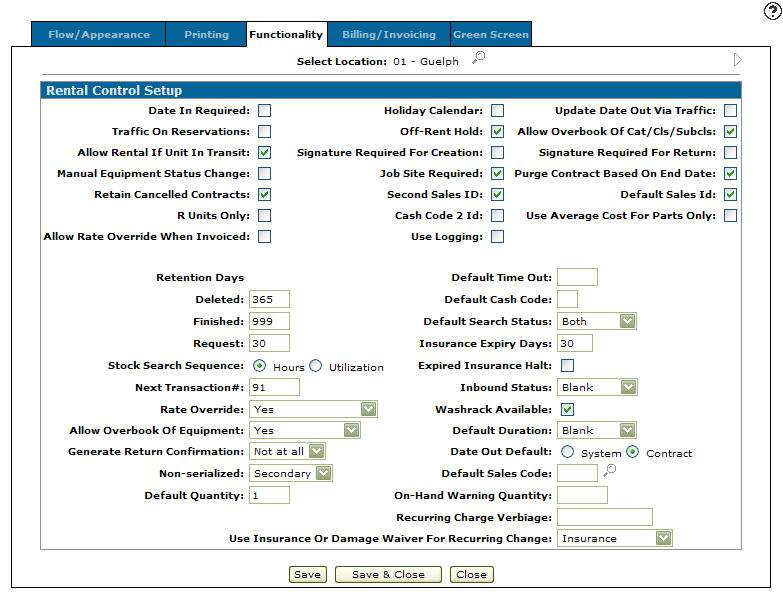
Accessing the Rental Activity Log
The Rental Activity Log allows you to view an activity log for the selected rental contract. The Activity Log screen logs all activity that has occurred on the selected rental contract.
Navigate to Configuration > Rental > Setup > Rental Control Setup.
The Functionality tab appears.
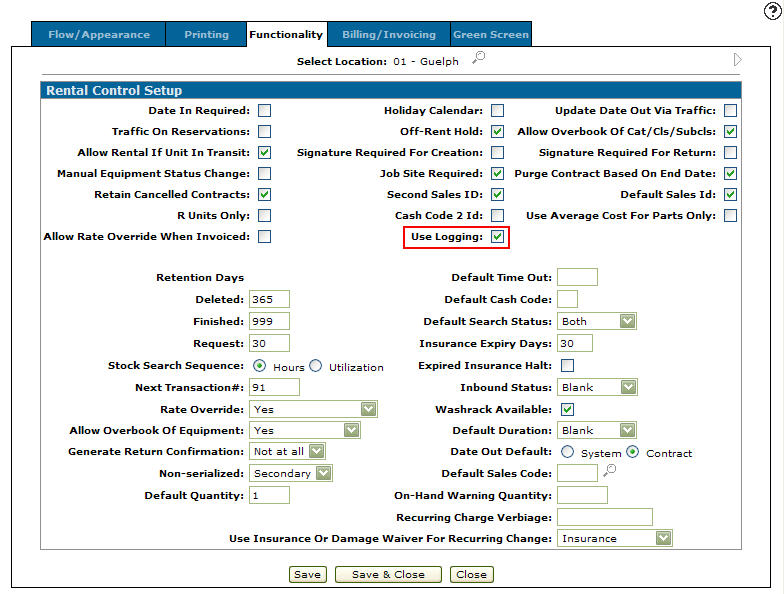
Click the Previous or Next icon to scroll to the next option or back to a previous option.Select the Use Logging field.
The Use Logging field activates the Click here to view activity log link on the Customer tab in the Rental system.
Click Save.
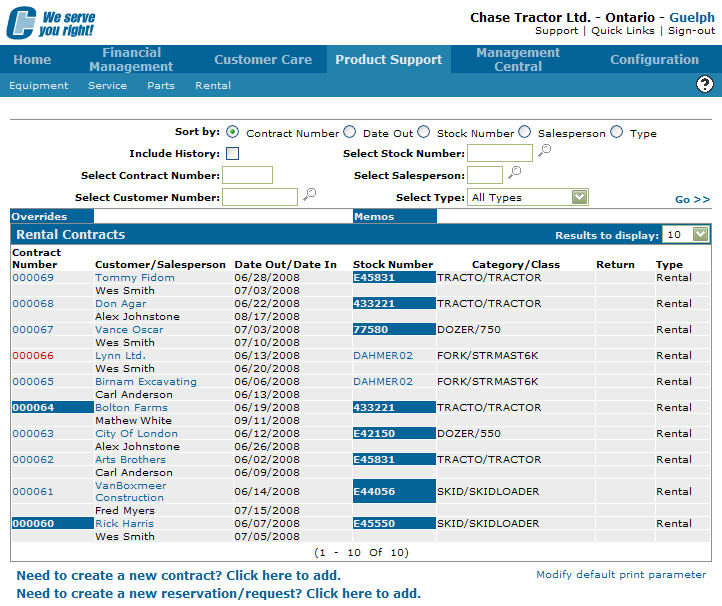
Navigate to Product Support > Rental > Rental Counter.
Fill out the appropriate fields and click Go >>, then open a rental contract for edit.
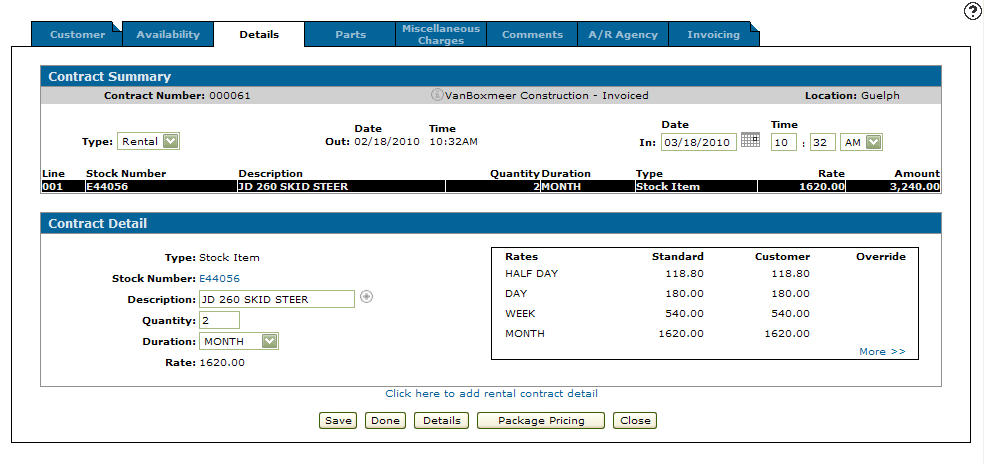
Click the Customer tab.
Click the Click here to view activity log link.
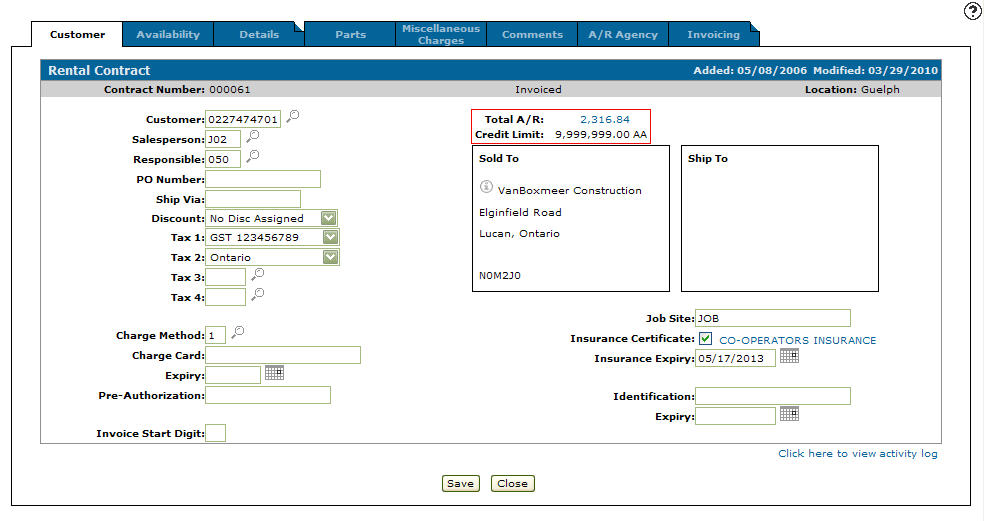
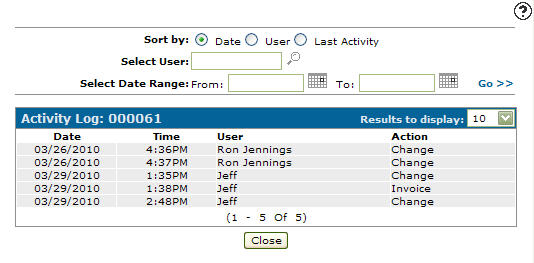
Screen Description
The fields on the Functionality tab are:
| Field | Description |
|---|---|
| Date in Required | If selected, the Date In field is required to be filled out on Rental Counter screens. The system automatically recalculates the contract date in, and the date in used for overbooking. |
| Traffic On Reservations | If selected, gives the user the option to create Rental traffic tickets for Reservations before they are converted to contracts. Normally a traffic ticket is only created for a Reservation once it has been converted to a contract. |
| Allow Rental If Unit In Transit | Allows the user to rent out units currently in transit. |
| Manual Equipment Status Change | Allows the user to manually change the Traffic sub code within the rental system. Can be used to change the sub-code of a machine from W (Wash Rack) to Blank (Available) once the machine has been washed, inspected, and prepared for rental. If not selected this field is not manually changeable. |
| Retain Canceled Contracts | If selected (default), cancelled contracts are marked Deleted and retained per the Deleted months setting. If not selected, cancelled contracts are deleted immediately on cancel. |
| R Units Only | If selected, forces the machine the Availability tab to show only equipment with Equipment Status of R for Rental Fleet. If not selected allows both Rental and Inventory machines to be shown. |
| Allow Rate Override When Invoiced | If selected, allows the user to edit the Override and Rate fields on the Details tab and Extended Details screen for rental contact lines that have already been invoiced, as well as edit the Price field on the Return Summary screen. This change is retroactive, and the system makes an adjustment for the difference between the original rate and the new rate on already billed invoices. |
| Deleted | The number of months to retain deleted contracts. Maximum value allowed is 99. If blank, the system treats the value as 0. See Rental Record Retention. |
| Finished | The number of months to retain finished contracts. Maximum value allowed is 99. If blank, the system treats the value as 0. See Rental Record Retention. |
| Request | The number of months to retain contract requests. Maximum value allowed is 99. If blank, the system treats the value as 0. See Rental Record Retention. |
| Stock Search Sequence | Controls how the Availability tab sorts items. Select one of:
|
| Next Transaction # | Enter a number to be used as the Transaction (Request, Reservation, or Contract) number on the next Rental Counter document that is processed. From now on, every Rental Counter document that is created will have a number that runs forward, in sequence, starting from this number. |
| Rate Override | Controls whether the standard rates set up in the Rental Duration Set Up can be manually overridden on a contract by contract basis:
Note: If you are licensed for feature number 6206 and are using the Rental Rate Authorization system, this field is irrelevant for its configuration. |
| Rate Authorization Required | Allows you to select when rate authorization requests are mandatory in the system. Options are:
|
| Allowable Override Percent | Allows you to enter the percentage by which a user can override the standard rental rate for a unit without having to make an authorization request. For example, if the standard rental rate for a unit is 10 dollars per hour but the user attempts to override the rate and make it 5 dollars per hour (a 50% decrease), if the Rate Authorization Required field is set to Decrease or Both and the Allowable Override Percentage is 49 or lower, the user will be required to send an authorization request to the rental supervisor. |
| Authorize Credits | If selected, forces the user to request authorization when adding a credit line (negative value) to the Details tab of a rental contract. |
| Date Out Default | The default date to use for the Date Out field, when adding new rental items to a contract. Options are:
|
| Default Sales Code | If selected, the salesperson ID entered in the Default Sales ID field will be used in the Salesperson field when creating rental Requests, Reservations, and Contracts, and can be overridden if required. |
| On-Hand Warning Quantity | Enter in a minimum on-hand quantity for non-serialized parts. If your on-hand quantity drops to this level, a warning message will be displayed. |
| Recurring Charge Verbiage | The verbiage to show on the contract and invoice printouts, and the billing preliminary next to the appropriate total. |
| Enhanced Liability Processing | When using this option you must ensure that the contract's certificate is set to N and the expiry date is 0. |
| Holiday Calendar | If selected, the billing cycles for contracts uses the Holiday/Non-Business Maintenance function. The billing cycles include Saturdays, Sundays and Holidays. |
| Off Rent Hold | Halts all billings of a contract when a contract is returned and set to an Off-Rent status. |
| Signature Required For Creation | The system can prompt the user to input an authorization name during either the creation or the return of a rental contract. The name appears on the Traffic ticket under a signature line. |
| Job Site Required | When a contract is created, this determines whether the job site is required to be selected or entered. |
| Second Sales ID | Forces the Responsible Salesperson ID to be entered on the Customer Information screens. |
| Cash Code 2 ID | Whether or not customer identification is required when using cash code 2. |
| Use Logging | When selected, the system logs activity on all rental contracts. The system adds a log entry when a contract is Created, Changed, Deleted, Invoiced, or Returned. If the Use Logging field is selected the Click here to view activity log link will appear on the Customer tab. |
| Default Time Out | Uses the value entered as the default time value in the Time field on the Return Summary screen when returning a rental contract, rather than using the system generated times. If blank, the rental system uses the system generated times. |
| Default Cash Code | Enter a default cash code to be used by the rental counter system. Validated against the CASHTAB table. |
| Default Search Status | Sets unit search default. Options are:
|
| Insurance Expiry Days | A warning message can be displayed if a customer has a Certificate of Insurance that is due to expire within the number of days entered in this field. |
| Expired Insurance Halt | Prevents contracts from being opened to customers if the Certificate of Insurance coded on their Customer Profile has expired. |
| Inbound Status | Sets a rental unit's status to either Washrack or Blank(In) when the unit is returned or exchanged. Indicating that the rental unit is being sent to the Washrack or is In available to rent. If the IntelliDealer Traffic system is being used and an Inbound Traffic ticket is produced upon return or exchange, the Inbound status resets to Blank (In) after the unit goes through the Washrack. If an Inbound Traffic ticket is not produced, the I/O subtype is set to the value loaded in the Inbound Status field. |
| Washrack Available | Whether units will be considered available even if they are coded as on the wash rack. |
| Default Duration | For cases where one type of rental (e.g. hourly, daily, or monthly) is far more common than other types, this field allows a default duration to be set. All rentals will default to the duration listed here if no duration is calculated during the add process, but can be overridden on the contract. Leaving this field blank sets no default duration and duration will need to be put on the contract. |
| Allow Overbook Of Equipment | Whether or not you can overbook, book one rental unit multiple times during the same period of time, in case the unit is returned early or a rental contract is canceled. This overbooking is also included if the unit is on an open work order. |
| Generate Return Confirmation | Whether to produce a receipt document (return confirmation) upon the return or exchange of a rental unit. Options are:
|
| Non-serialized | Controls the priority of the Non-Serialized Parts view. You can make it either a Primary, Secondary, or No view. |
| Default Quantity | When entering rental items onto a contract and no rental quantity is entered, the system defaults to the quantity entered in this field. |
| Part Day Duration | The duration code that has been configured as a partial day in the Rental Duration screen, to be used when applicable rented equipment is returned up to 4 hours late. |
| Recurring Charge | Indicates that either Insurance or a Damage Waiver is going to be used for the new recurring charge. The method that is chosen prompts the system to calculate the insurance or damage amounts, regardless of whether the customer has a valid certificate of insurance on file. |
| Update Date Out Via Traffic | Updates the Date Out field in the Rental Counter module with the Date Out field from the Traffic module. This regards only the first shipment and applies to both serialized and non-serialized units. |
| Allow Overbook Of Cat/Cls/Subcls | Whether you wish to allow the overbooking of Categories/Classes/Subclasses. The system warns the user that there are not enough rental units in the Category/Class/Subclass being added to a rental transaction to fulfill the transaction’s requirements, but allows the user to continue and double-book the Category/Class. |
| Signature Required For Return | The system can prompt the user to input an authorization name during either the creation or the return of a rental contract. The name appears on the traffic ticket under a signature line. |
| Purge Contract Based On End Date | This option applies to finished contracts only. Deleted contracts and requests always use the date the contract was added, whether this option is selected or not. Controls which date the system compares to the cutoff date when determining whether a finished contract is eligible for purge. When selected, the system uses the contract end date: the latest return date of all units on the contract. If the contract has no rental items (for example, when billing miscellaneous charges or parts only), the system uses the Date In field. If Date In is zero, the system uses the date the contract was added. When not selected, the system uses the date the finished contract was added. A finished contract that completed recently can be purged soon after it ends if it was created before the cutoff date. It is strongly recommended to enable Purge Contract Based On End Date to prevent the system purging recent contracts. When this option is not selected, retention for finished contracts is measured from the date the contract was created, not when it finished. A finished contract that ended last week can be purged if it was opened long ago and its added date is before the cutoff date. |
| Default Sales ID | Whether to default the Salesperson ID to the Salespersons ID found on the renter's Customer Profile. Remember that this default can be overridden. Note: As of IntelliDealer 6.0, this field is not used by the system and is to be ignored. |
| Use Average Cost For Parts Only | For IntelliDealer, where the Parts tab in IntelliDealer Rental features a margin percentage column, this control determines how that calculation is performed. |
| Exit Without Agency Authorization | If selected, allows the user to exit a rental contract with a credit card Charge Method on it without having to authorize the contract charges first. For example, if a user opens a contract that has a credit card selected in the Charge Method field of the Customer tab and this switch is deactivated, the user would be forced to authorize the charges on the contract before being able to close it. As such, activating this switch allows the user to view a contract's details without forcing any unnecessary authorizations. |
Security Switch 999 - Configuration - Rental - Access Setup
Data Source: RMCTL, RMDUR
Revision: 2026.07