
MyDealer Settings: Mass Update Tool
The MyDealer Mass Update Tool allows dealerships to 'onboard' their customers using all configured switch controls. The settings on this page are the same as those used on the MyDealer Profile Configuration screen.
Warning: This tool can effect EVERY user at multiple business locations. Please be aware when applying mass updates.
To access the MyDealer Mass Update Tool, navigate to Administration > MyDealer Settings > Mass Update Tool.
 MyDealer Mass Update Tool screen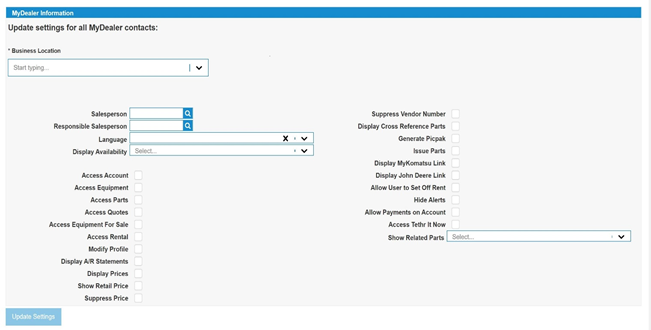
Use the Business Location dropdown to specify the location you are configuring.
Use the Salesperson or Responsible Salesperson search field to further define the users you are configuring.
When you click in a checkbox you are given these options:
-
Enable All—enables the selected option for all users at the selected Business Location and/or configured Salesperson or Responsible Salesperson included in the search fields.
-
Disable All—disables the selected option for all users at the selected Business Location and/or configured Salesperson or Responsible Salesperson included in the search fields.
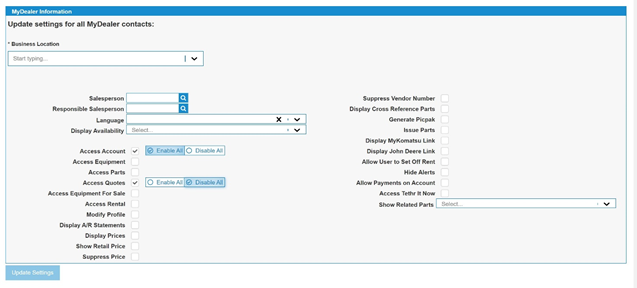
When you are satisfied with your changes, click the Update Settings button. A confirmation message appears indicating the number of users that are impacted by the change. Click Yes to make the change, and No to cancel.
Security: 994 WebAdmin - Access MyDealer Settings
Revision: 2024.04