
Wireless Inventory Control: An Introduction
Ensure your inventory information is current, thus increasing customer satisfaction through more accurate inventory, while also eliminating unwanted write-offs. The Wireless Inventory Control applications combine the strength of the IBM System with the portability of a laptop or PDA (Personal Digital Assistant) to ease equipment and parts-inventory tasks.
Opening Wireless Inventory Control
Wireless Inventory Control is a browser application that runs on the same web server as IntelliDealer. It is not opened from the main IntelliDealer menu. Use a separate browser address (bookmark) to sign on to Wireless Inventory Control.
The sign-on address uses the same host name as IntelliDealer, with the path /wireless/pfw. For example, if you sign on to IntelliDealer at https://dealer.example.com/intellidealer, open Wireless Inventory Control at https://dealer.example.com/wireless/pfw.
Note: Your dealership may use a different host name, path prefix, or port for Wireless Inventory Control. If the example address does not work, contact your system administrator or refer to implementation notes from your go-live.
Most users receive the Wireless Inventory Control address from their administrator, save it as a browser favorite, or open it from a shortcut on a handheld or barcode scanner device.
One task opens Wireless Inventory Control from IntelliDealer:
-
Shop Parts Return—On the Parts Invoicing or Parts Requisitions listing, when you are licensed for Wireless Inventory Control and have the appropriate 990 - Wireless Inventory security, select the return control beside a work order on a requisition row. IntelliDealer opens the Shop Parts Return wireless screen in a new browser window.
Other Wireless Inventory Control tasks, such as parts counts, receipting, and equipment updates, start from the Wireless Inventory Control sign-on screen. Electronic order picking (PicPak) also uses Wireless Inventory Control after you mark parts ready to pick in IntelliDealer. See PicPak: Electronic Picking Ticket System Overview.
Logging On to the Wireless Inventory Control System
-
Open Wireless Inventory Control in a browser using the application address described in Opening Wireless Inventory Control.
-
Enter your User name and Password and click Login.
-
Select the Location whose inventory you wish to control and click Continue.
Only locations you are authorized to access appear in the drop-down menu.
-
Click the Login button.
-
Select either the Parts Inventory Control or Equipment Inventory Control link to continue into the selected application.
Only the options you are authorized to access appear on this screen.
 When both options are enabled: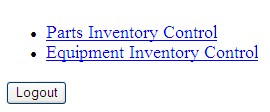
Feature: PFW.0702 - Parts Inventory Control - Wireless; PFW.0703 - Equipment Inventory Control - Wireless
Security: 990 - Wireless Inventory
Revision: 2026.10