Worldpay: Performing a Return Invoice
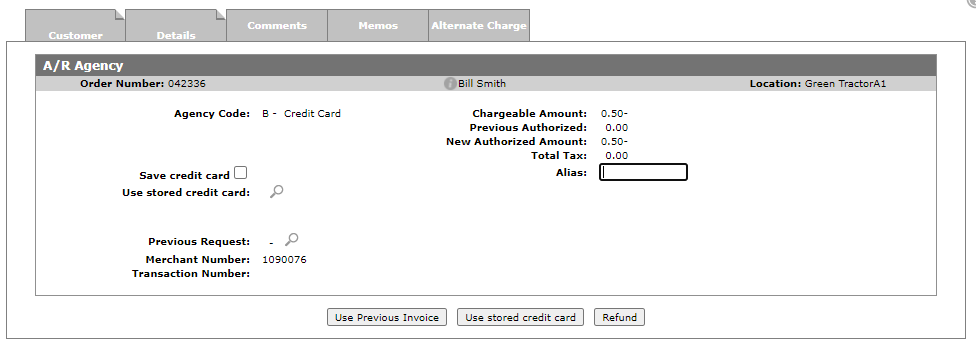
When performing a return invoice, the most cost-effective method for the dealership is to use the previous invoice which links this transaction to a previous invoice at Worldpay. If for some reason at Step 3 you are unable to click the Use Previous Invoice button, your other choice is to click the Refund or Use stored card button. Both perform as a refund. The Refund button activates the Worldpay device asking for you to swipe or insert the credit card.
Debit cards are not available for reversal using the Use Previous Invoice button. Instead, use the Use Stored Credit Card or Refund button. Using stored cards is considered 'Card not present' by the credit card companies. It also has the highest transaction fees associated with credit cards.
To perform a return invoice with Worldpay:
-
Create a return invoice with a negative amount.
-
Click on the invoice button.
-
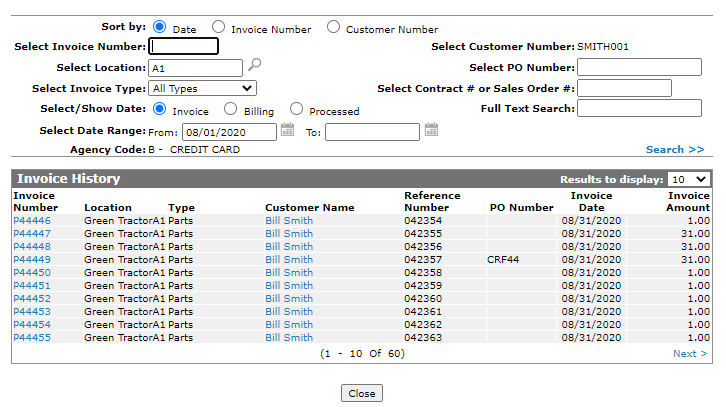
To link the transaction to a previous invoice at Worldpay, click Use Previous Invoice, or the magnify glass beside Previous Request.
Previous invoices that were paid via Debit are not visible in the list.
-
Hover over the invoice number you want to tie this invoice to and click Select.
-
If you used the magnify glass icon
 to open the screen, click Use Previous Invoice button to continue. If you used the Use Previous Invoice, IntelliDealer automatically continues for you.
 The A/R Agency screen is displayed