
There are two methods for A/R aging - M - for monthly or D - for daily. The switch for this is in table CMBR. The method you choose will decide how invoices get grouped on your aging reports. This method has nothing to do with late charges.
AGING METHOD
1> If you use the monthly aging method then an invoice dated February 28th will show up in the 31-60 day column on your aging report for March 1st even though it is only 1 day old.
2> If you use the daily aging method then your invoices are aged by day and an invoice dated February 15th will show up in the current column an your aging report until you run an aging on March 16th (it would then be in the 31-60 day column).
AGING METHOD DOES NOT AFFECT LATE CHARGES
LATE CHARGES
1> When you apply late charges the following screen comes up:
2> When you say yes to apply late charges the date that comes up under the Apply Late Charges To Invoices Dates Less Than Or Equal To (MMDDYY) date will be the last day of the previous month (assuming you have your LATECHG table set up to apply late charges after 1 month). This date can be changed but it is the default. (See Point 3)
3> If you run statements on the 25th of the month like in the above example the Apply Late Charges To Invoices Dated Less Than Or Equal to (MMDDYY) date will still come up as 013197. This can cause a problem is you don't want late charges applied to invoices dated January 26th to January 31st. If this is the case you can change this date to the date you last ran statements --> January 25th in this example.
4> DON'T ever change the late charge date to the statement date or all invoices will have late charges applied to them.
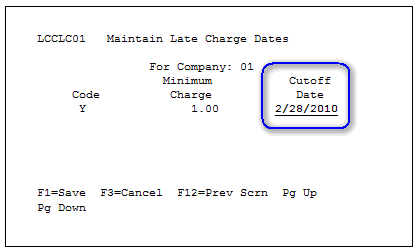
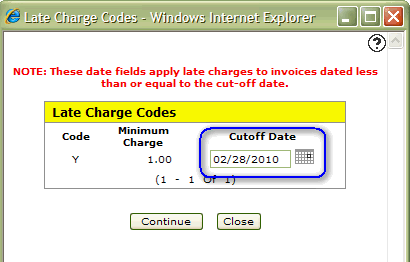
The cut-off date specified during the run will show at the bottom of the Late Charge Register (report AR0030) that's produced.
AR0030 report:

Green Screen cutoff date:
IntelliDealer cutoff date:
Note: The A/R account used to post the late charges is the A/R account for the branch assigned to the customer not the A/R account for the branch that the invoice was processed in. Also, the remit to address that prints on statements comes from the CMBRADDR table for the branch assigned to the customer.