
Warning: This procedure has been deprecated. VitalEdge recommends using the procedure described in Customer Profile: Maintain Agency Parameters.
The A/R Agency activate/deactivate option allows the user to activate and deactivate the A/R Agency codes loaded on the A/R Agencies window in Customer Profile. The codes can be activated or deactivated based upon a) amount owing for that A/R Agency code that exceeds the credit limit for that code or b) an amount owing in a specified aging period or older.
Here is how the system can be set up to use this feature:
Configuring A/R Agency Codes To Be Activated or Deactivated
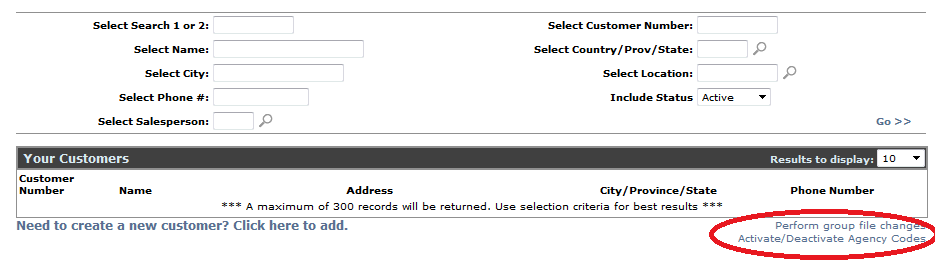
Click on Activate/Deactivate Agency Codes
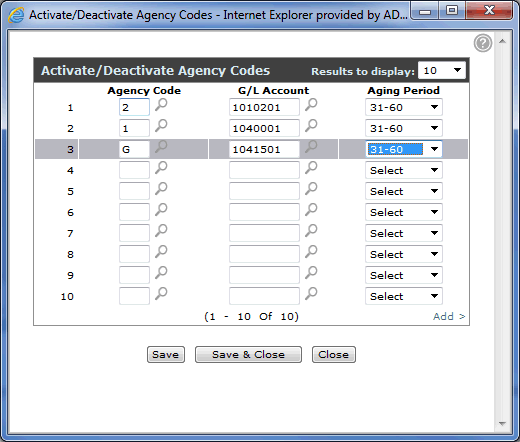
- This table will be used to deactivate or activate agency codes matching the keyed criteria. Agency code will validate against table CASHTAB, field CASH CODE. The G/L Acct will validate against the PARTS SALES ASSET ACCT in CASHTAB.
Note: If you wish to exclude certain customers from this activate/deactivate process, key a credit rating of '99' in the 'CREDIT RATING' field of the Agency screen for that customer for that A/R Agency.

You have now configured the system to use the activate/deactivate feature for the desired A/R Agency codes and G/L accounts.
- The program that actually activates or deactivates the A/R Agency codes (CALL CGUPD01) can be added to the procedure CCPEND, as part of database reorganize or as a job scheduler entry. Please contact VitalEdge Support to set this up on your system either way. When this process runs, the following report will be generated indicating which A/R Agency codes have been activated or deactivated by customer number by A/R Agency code
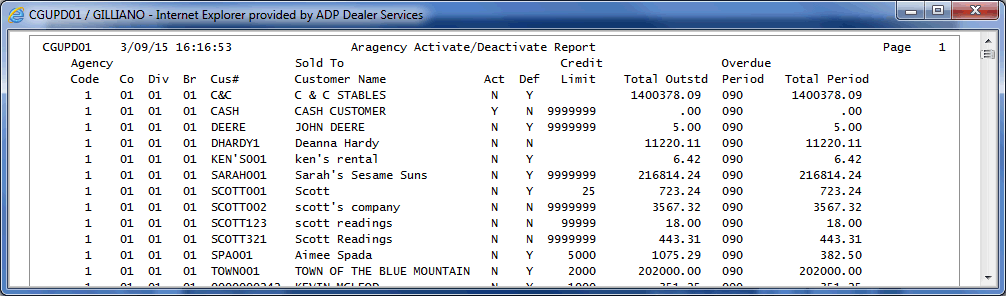
Here is the criteria for activating or deactivating an A/R Agency code:
- Deactivating : if the total outstanding amount starting at # of days on the control record is > 0 OR the total of entire outstanding amount is > or = customer credit limit. Outstanding is calculated by adding up the 0-30, 31-60, 61-90 ..etc buckets. If # of days on control record is 60 for example, everything from the 61-90 bucket and higher is accumulated and compared. When deactivating, (act code is changed from Y to N) the default code is not changed.
- Activating: if the total of all buckets starting at # of days on control record is <0 AND total of "all" buckets is < credit limit, then the agency is activated. When activating (act code is changed from N to Y), the default code is not changed.
- This activate/deactivate logic will not apply to any customer that has a credit rating of '99' for that ARAGENCY code. .
- The report is going to go to the user from the job schedule run itself, make sure you ask MRE to change the user on the run to be one of their users so the report goes to their spool file/printer.
- Report is called CGUPD01