
Description: There are some words/phrases that as a dealership you may want to rename for your customers, Depending on what IntelliDealer release you are on will depends on if you can accomplish this in Green Screen tables or IntelliDealer, please read the information to determine how your dealership should accomplish this.
Prior to the IntelliDealer Insight release (2014) - the descriptions that print beside entries on A/R statements and on the A/R detail report (ARI112B) are controlled by the set up of tables ARTRAN01 and ARTRAN02.
 ARTRAN01 Table
This table contains the default descriptions. One of these descriptions will be assigned to each transaction depending in the area of the system where the entry was made. For example, if a charge is made to a customer from any of the invoicing areas of our system (this includes Customer Invoicing/Billing, Parts Counter Invoicing, Work Orders, Sales Orders or Rental Contract Maintenance) then the description INVOICE will print. If a credit is made to the customer from any of the invoicing areas then the description CR MEMO/PAYMT will print. If the payment is made through key cash receipts then the description PAYMENT RECD will print
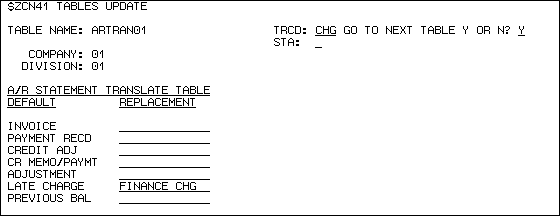
INVOICE assigned to a charge made through any invoicing screen
PAYMENT RECD assigned to a payment made through key cash receipts
CREDIT ADJ assigned to a credit applied through key cash receipts
CR MEMO/PAYMT assigned to a credit made through any invoicing screen
ADJUSTMENT assigned to any entry made through key cash receipts on the adjustment line or through accounts payable
LATE CHARGE assigned to every late charge calculated by the system
PREVIOUS BAL used on balance forward type customer statements
It is possible to use this table to replace these standard descriptions. Sometimes a dealer does not like the word LATE CHARGE to appear on the statement and would prefer FINANCE CHG instead. The above example shows how to make this change.
IntelliDealer Insight and beyond - the ARTRAN01 settings are controlled in the language/text variables in the system. There is NO conversion of the ARTRAN01/ARTRAN02 values to the language variables; this must be done by the dealer. The ARTRAN02 table is still controlled by Green Screen tables.
ARTRAN01 Text Variables
Contains the default descriptions. One of these descriptions will be assigned to each transaction depending in the area of the system where the entry was made.
For example, if a charge is made to a customer from any of the invoicing areas of our system (this includes Customer Invoicing/Billing, Parts Counter Invoicing, Work Orders, Sales Orders or Rental Contract Maintenance) then the description INVOICE will print. If a credit is made to the customer from any of the invoicing areas then the description CR MEMO/PAYMT will print. If the payment is made through key cash receipts then the description PAYMENT RECD will print
From IntelliDealer - Adminstration > Settings > Text Variables
Example:
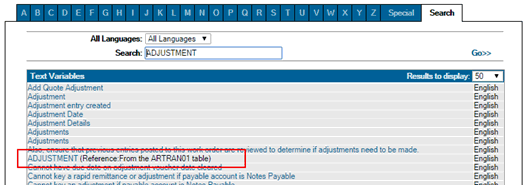
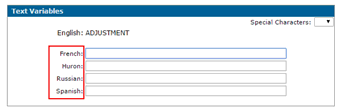
When you update the text you will also need to make sure that your customers 'Preferred Language on their profile is set to the language you put your text change in. This can be done using Group File Maintenance (Financial Management > Accounts Receivable > Customer Profile > 'Perform Group File Changes')
ARTRAN02 Table
This table was introduced to allow the dealer to assign descriptions to transactions based on the first character (or first two characters) of the invoice number. Usually all work order numbers will start with the letter S, such as S12345. If this is the case, then this second table can be used to set up a description like SERVICE for any transaction beginning with a S. If all Whole Goods tickets begin with a W then possibly the dealer would like the description EQUIPMENT to appear on the statement.
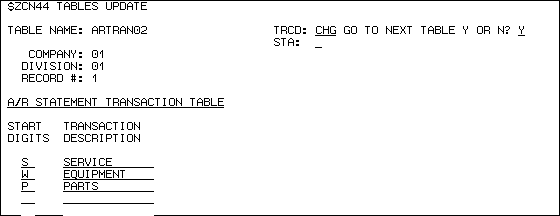
It is important that if different types of transactions beginning with the same letter occur at your dealership then that letter should not be set up in this table. Take the case where the dealers accept received on accounts at the parts counter. Since the system automatically assigns the first letter of a parts ticket number (usually a P) then a P set up in the ARTRAN02 table would cause all parts invoices and all ROA's received over the counter to have the same description - PARTS.
When assigning a description, the computer checks table ARTRAN02 first. If the first character is not in this table then it reverts back to table ARTRAN01 to get the standard description. If P is set up in ARTRAN02 with a description of PARTS, then all ROA's at the parts counter will show up as PARTS on the customer statement. If P is not set up in table ARTRAN02, then an ROA entered at the parts counter will show up on the customer statement as CR MEMO/PAYMT on the customer statement. Obviously the latter is the advised method.