Description: The differences between invoice date, billing date and processed date, and what controls the dates on the invoice printouts
Solution:
Invoice Date: Date the invoice was printed
Billing Date: The date keyed in during the billing run that processed this invoice.
Processed Date: The actual date the billing run was run.
System generated invoices (ie. for parts transfer customers) will use the keyed billing run date as the invoice date, billing date AND processed date.
Also keep in mind that there is a date on the physical invoice itself. This should match the invoice date in invoice history unless the invoice date has been overridden (equipment and rental will allow the user to specify the invoice date on the printout).
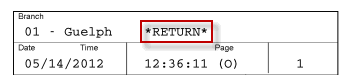
Note: On equipment reversals that print all of the details, the invoice image will show the date and time of the invoice with *RETURN* beside the branch location.