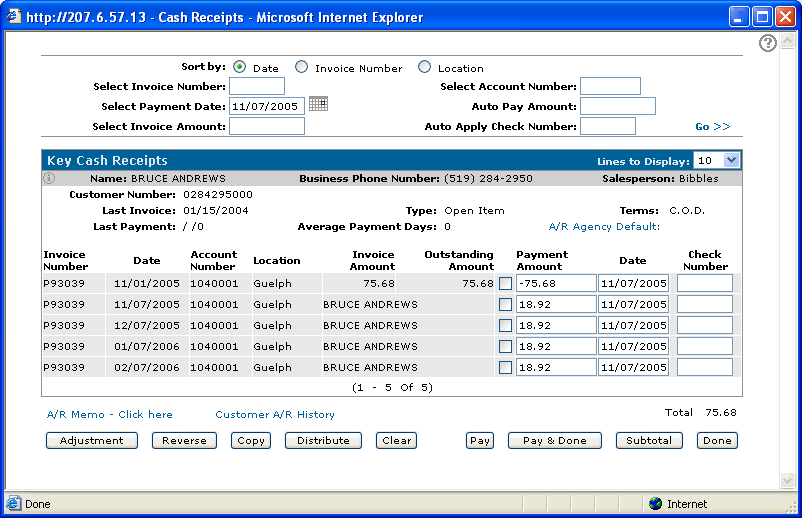
There is an option in the IntelliDealer cash receipts system to split an invoice into multiple invoices which is similar to paying off the invoice and making several adjustment entries.
This should only be used if the customer is Open Item
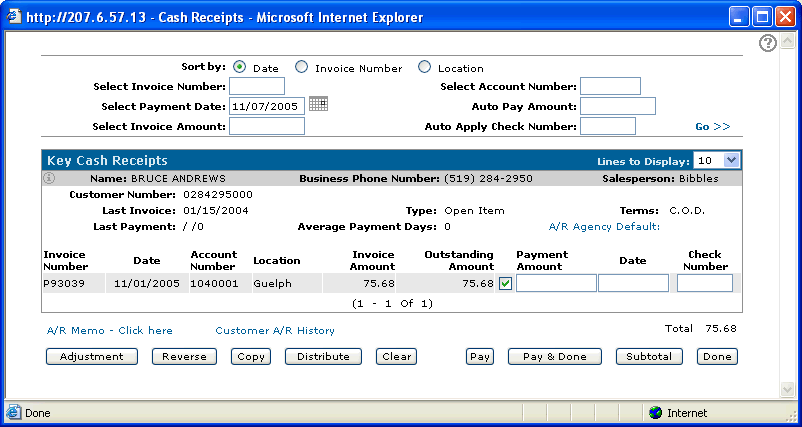
While in a cash receipts batch, select the invoice(s) in question with a check mark and click on the Distribute button. The following screen will appear:
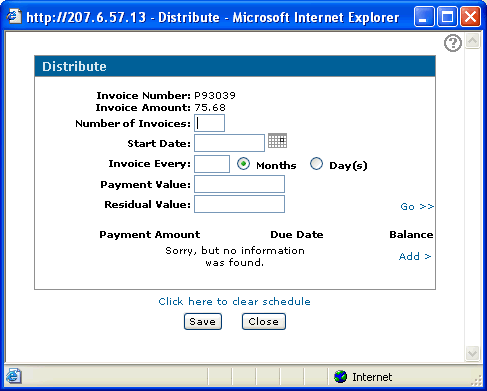
The Distribute screen allows one invoice to be split into more than one invoice. Invoice dates can be specified, and invoice amounts can be either dollar amounts, or a percentage of the total.
To Create an Invoice Schedule:
1. Key a number in the Number of Invoices field.
2. Key a start date for the invoices in the Start Date field, in MM/DD/CCYY format.
3. Key a number in the Invoice Every field to indicate the frequency of the invoices.
4. Select Days or Months
5. Press Go to calculate the invoice schedule. Dates and balances will be filled in automatically.
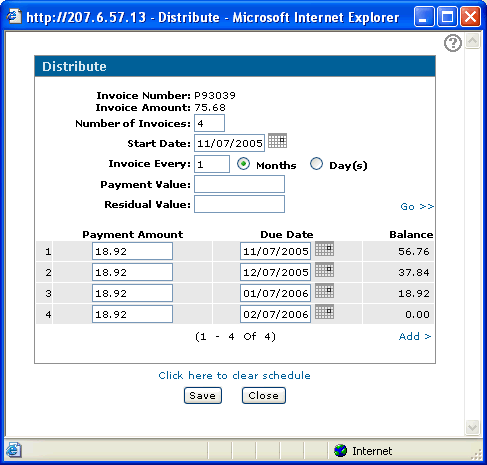
If a value is keyed in the Payment Value field, it becomes the amount for each invoice. The last Payment Amount entry in the schedule is adjusted so that the total of the Payment Amount column equals the original invoice amount.
If a value is keyed in the Residual Value field, it becomes the final Payment Amount in the schedule. Each payment amount prior to the final Payment Amount is equal to the original invoice amount, less the Residual Value, divided by the number of payments. The actual number of payments is one greater than the value in the Number of Payments field because the extra payment is the Residual Value payment.
The user can key in both a Payment Value and a Residual Value. In this case, the second-last Payment Amount in the schedule is used to balance the total of the Payment Amount column to the original invoice amount.
Once the invoice schedule has been created, it can be adjusted manually. Dates and amounts can be modified, and dollar values can be changed to percentages and vice versa.
All invoice amounts must be either dollar amounts or percentage amounts. A combination of the 2 is NOT allowed.
If the schedule is calculated by dollar amount, the total dollars must add up to the invoice total. If the schedule is calculated by percentage, the percentage total must add up to 100. The system will automatically convert percentages to dollar amounts.