
MyDealer: Printer Output
The Printer Output screen allows you to view your pending printer output or an another user's printed output, depending on your authorization.
To open the Printer Output screen, hover over the  icon at the top right hand corner of the screen.
 Printer Output screen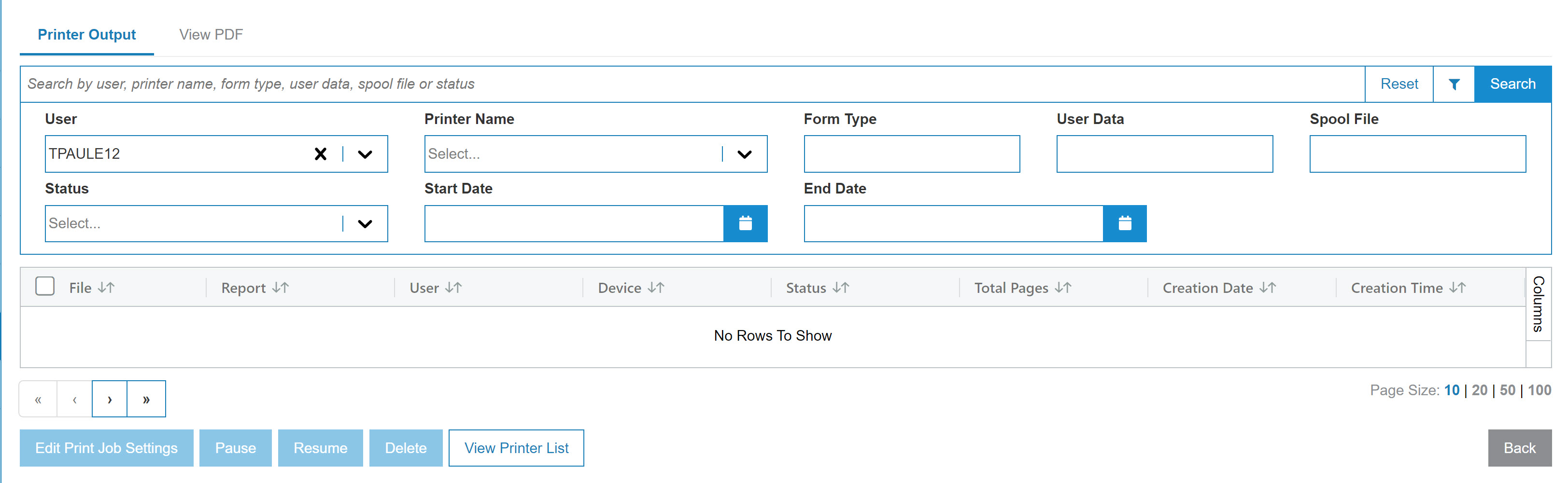
Searching can be refined by category:
| Field | Description |
|---|---|
| Select User |
Search for output files by entering a user ID. Note: Access to this field is restricted if you are on ASP. If you are on your own server, you must have access to System 995 User Security (Allow Viewing Of Other Users PDF/Printer Output). |
| Select Printer Name | Search for output files by entering a printer ID. |
| Select Form Type | Search for output files by entering a form type. |
| Select User Data | Search for output files by entering user data. |
| Select Spool File | Search for output files by entering a spool file. |
| Select Status | Search for output files by selecting a print status from the drop down list. |
| Select Date Range | Narrow down the output files search results by selecting or entering a date range. |
The fields on the Printer Output screen are:
| Field | Description |
|---|---|
| File | The printed document file name. |
| Report | The type of report as it appears in the output. |
| User | The ID of the user who created the printed output. |
| Device | The device used to print the output. |
| Status | The current status of the printed output. |
| Total Pages | The total number of pages of printed output. |
| Creation Date | The date the printed output was created. |
| Creation Time | The time the printed output was created. |
Use these buttons to complete your work:
| Button | Function |
|---|---|
| Edit Print Job Settings |
Opens the Print Job Settings menu in which you can select a different printer, adjust the number of copies, determine whether the output is Double Sided and you have the option to Save File After Printer. |
| Pause | Pauses the selected print job. |
| Resume | Resumes a paused print job. |
| Delete | Deletes the selected output file. |
| Export .TXT |
Exports the printer output into a .txt file or a .csv file, respectively. You can select multiple files before you click an Export button. The files are bundled into a zip file, called download.zip. Each file within the zip retains the name of the original selection, but with an extension consisting of attributes of the spooled files to uniquely identify it. |
| Export with .CSV extension | |
| View Printer List |
Opens a window where you can configure any printer that is available and what is currently printing. |
| Back | Returns to the previous screen. |