
Once the desired customers have been enabled for MyDealer, you will begin to receive orders and inquiries from the application.
Topics in this section include:
Inquiries/ Requests
When a user creates an inquiry using MyDealer, the dealership employee assigned to the associated department receives an email containing the inquiry or request. The employee can then reply to the inquiry, or complete the required procedure in IntelliDealer to fulfill the request.
For example, in the following email the user has notified the dealership that they acquired a new piece of equipment that they would like to add to their IntelliDealerCustomer Profile:
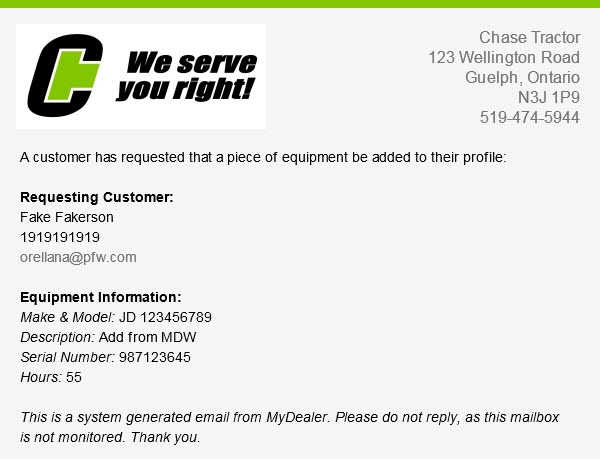
To complete the request, the employee may add the unit through IntelliDealer using the information contained in the request, or contact the customer for further information.
Orders
When a user places an order using MyDealer, the following occurs:
- A email is generated and sent to the employee(s) specified in the Part Contact field of the MyDealer Settings screen
-
A picpak is printed either on the PicPak Printer specified on the MyDealer Information screen (if the order is placed at the branch location specified in the Business Location field of the MyDealer Administration screen) or on the Default Picpak Printer specified on the MyDealer Settings screen (if the order is placed with a branch location other than the Business Location.)
Note: This picpak is only generated if the Generate Picpak switch is activated on the MyDealer Administration screen
- The parts on the order will be issued if the Issue Parts switch is activated on the MyDealer Administration screen and if the branch has available inventory
- The order will appear on the Parts Invoicing screen in IntelliDealer
Parts orders created for Pick Up (as specified on the Checkout screen within the application) will display ** MyDealer Pick Up ** in the Customer name field of the Parts Invoicing screen. Parts orders that are to be shipped to the customer appear as normal.
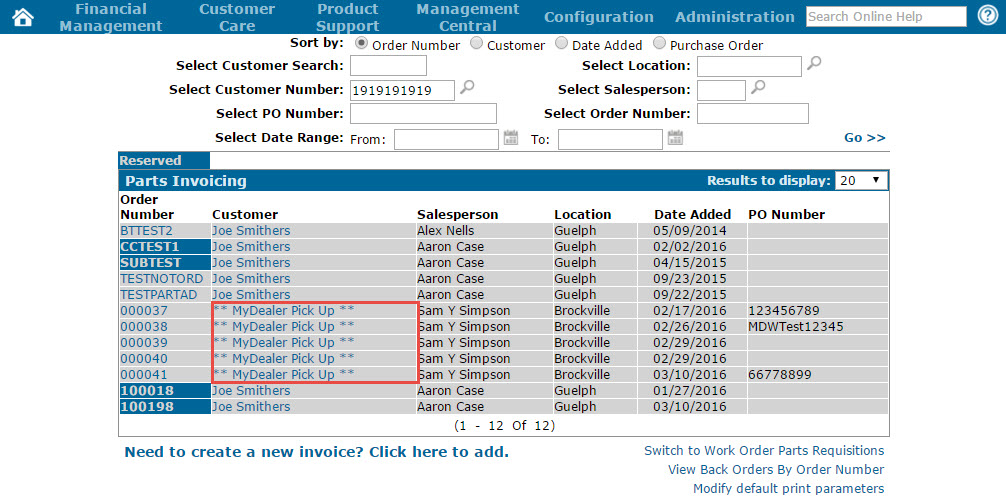
Parts Invoicing screen
Both Pick Up and Ship To orders can be processed as normal parts invoices through IntelliDealer to complete the transaction.