
Account 1st Digit Listing
Adding an Account 1st Digit allows you to setup the first digit for accounts used within the general ledger, chart of accounts.
The first digit on an account is used to indicate the type of account. Valid first digits are: 1, 2, 3, 4, 5, 6, 7, 8, 9.
To access the Account 1st Digit Listing screen navigate to Configuration > General Ledger > G/L Accounts > Accounts 1st Digits.
Click a 1st Digit number to open the Chart of Accounts 1st Digit Details screen for that digit.
 Chart of Accounts (CoA) Details Screen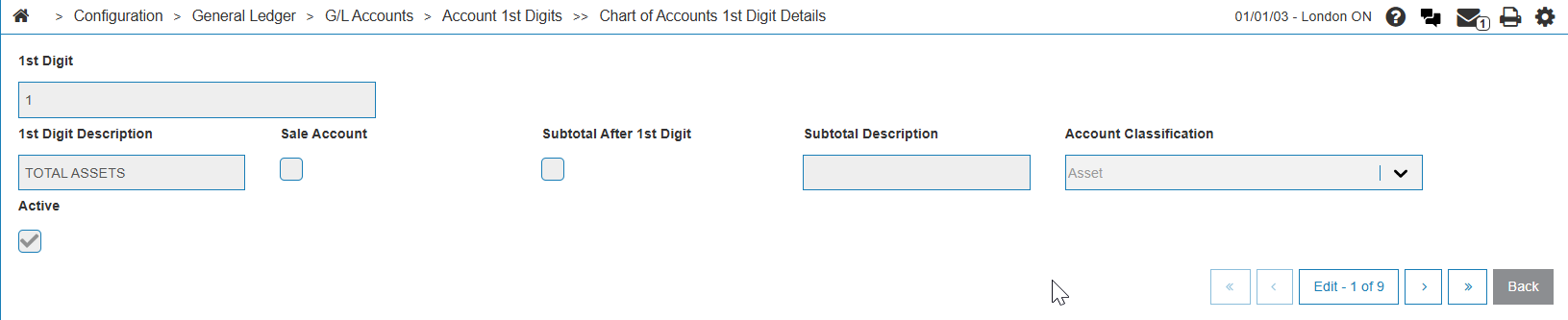
These fields appear on the Account First Digits screen:
| Field | Description |
|---|---|
| 1st Digit | A single numeral (ranged 1 - 9) that represents the major category of accounts in the Chart of Accounts. |
| 1st Digit Description | The plain language name for the account category defined by the 1st Digit. |
| Sale Account | A yes/no setting (checkbox on the CoA Details screen above) indicating if accounts within this category are directly related to sales revenue. |
| Subtotal After 1st Digit | A yes/no setting (checkbox on the CoA Details screen above) that, when enabled, automatically prints a subtotal for all accounts within the 1st Digit category on key financial reports (ie, Balance Sheet or Income Statement). |
| Subtotal Description | A brief description that appears on financial reports for the subtotal generated by the Subtotal After 1st Digit field. |
| Account Classification |
On the CoA Details screen, A dropdown where you can define the account type. |
| Active |
On the CoA Details screen, when checked, allows transactions to be posted to any account within that category. Uncheck this box if you intend to avoid accidental use of a specific account. |
Security: 602 General Ledger - Chart of Accounts
Revision: 2025.11