
Add Customer
Tap the Add Customer  button on the Customer Search screen.
 The Add Customer screen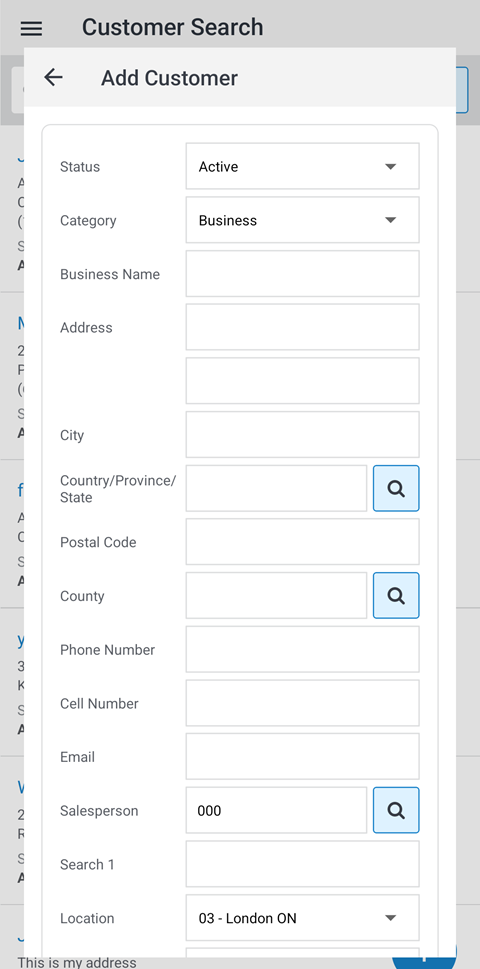
Where available, it is recommended that you search for and select a code or entry by tapping the search  icon.
icon.
The fields on the Add Customer screen are:
| Field | Description |
|---|---|
| Status | The current status of the customer profile (Active, Inactive or Prospect). |
| Category |
The customer category that controls which name fields appear and which are mandatory. Options are:
|
| Business/Customer Name | The name of the business or the name of the individual customer. |
| Address Line 1/2 |
The customer's address. Address information is used for mailing the customer invoices and statements. |
| City | The customer's city. |
| Country/Province/State |
The customer's Country/Province/State. The Country/Prov/State code must be entered using a specific format. |
| Postal Code | The Zip or Postal code for that customer. |
| County | The abbreviation of the county where the customer resides. Mandatory once a country is selected and if county codes are configured in IntelliDealer. |
| Phone Number | The customer's phone number. |
| Cell Number | The customer's cell phone number. |
| An email address for the customer. | |
| Salesperson | The salesperson responsible for this customer. |
| Search 1 | The first five characters of a customer’s last name or a company’s first name. |
| Search 2 | A secondary search field up to 10 digits long. |
| Location | The default location assigned to the customer. |
| Township | The abbreviation of the township where the customer resides. |
| Lot | The customer's lot number. |
| Concession | The customer's concession number. |
| Business Classification | The customer's business classification, assigned by your dealership. |
| Size | The customer size classification, assigned by your dealership. |
| Type | The customer's business type, used for classification purposes. |
| Owner | Indicates whether the equipment is operated by the owner. Other dealer-defined codes can be used. |
| Equipment |
Used to indicate a rating code for the Equipment Profile tab, as defined by your dealership. |
Once you have entered the required information to add the customer, select the Add Customer button to add the entry.