When creating a Work Order through IntelliDealer via the Quick Add (Insight 2.0) or the Work Order module itself, the Hours and Estimated Hours fields on the segment itself are derived from Job Code hour values (Fig.2) and the Rate Code multiplier (Fig.3). User Group security switch from system 810 "Default Estimated Hours To Job Code Hours" (FIg.1) will have an impact as well.
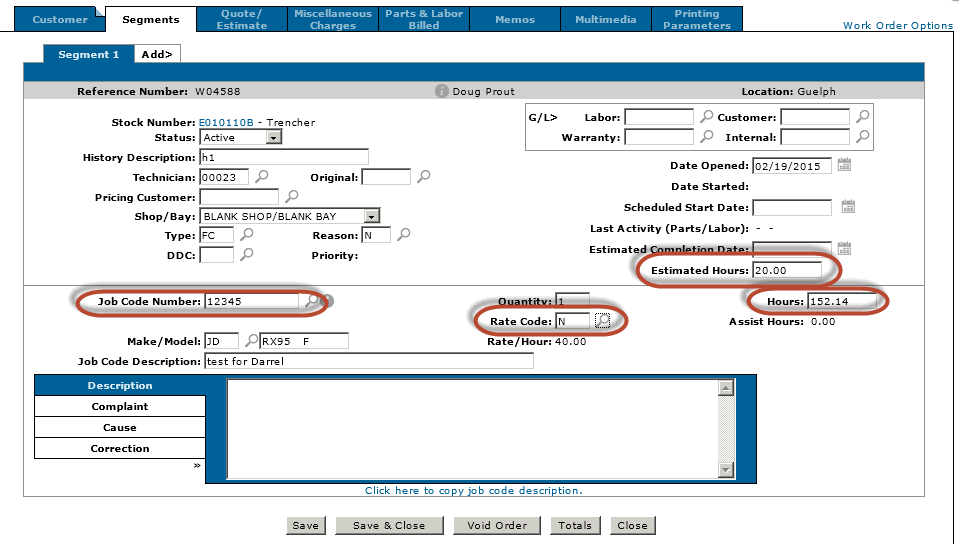
In the Work Order example below (Fig.4), Job Code 12345 has been selected along with Rate Code "N". Notice that the Rate Code has a multiplier of 2.00. The system 810 user group switch is set OFF.
The Estimated Hours field (20) is calculated by taking the Average Hours value (10) from the Job Code and multiplying it by the multiplier (2.00) on the Rate Code.
It is possible that the Average Hours could be zero. In that case the Job Code Hours will be substituted in the calculation above.
The Hours field (152.14) is calculated by taking the Job Code Hours (76.07) and multiplying it by the multiplier (2) on the Rate Code.
Had the system 810 user group switch been set ON, the Estimated Hours field would have been set to the Job Code Hours value (76.07) times the multiplier giving 152.14.
Note: These default values are set when the Job Code or Rate Code is manually changed from their previous on screen values and Save is pressed. The individual Hours and Estimated Hours can be overridden as long as the Job Code and Rate Code are not changed. Once the Job Code or Rate Code is changed from its previous value on screen and Save is pressed, the above defaulting logic/calculations will take place.
Fig.1

Fig.2
* the average hours field is calculated from a two fields on the FLATRATE (Job Code) file. FRUAH (actual used hours) / FRUF (used Frequency).
Essentially it is an average of how many times this job code was used across work orders and how long did it actually take to perform the job.
Total used is shown on screen. The actual used hours is not.
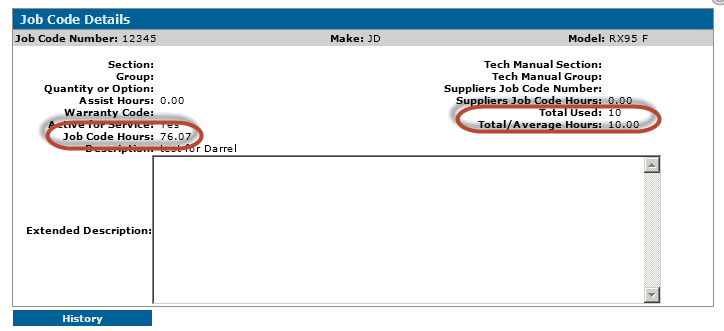
Fig.3
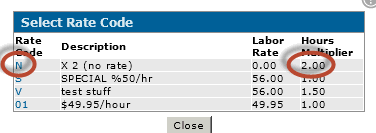
Fig.4