
Exceptions Report
Use the Exceptions Report screen to review accounting exception events logged by IntelliDealer. Each event records when the system could not complete equipment accounting entries—most often when a unit location change cannot update inventory or sale accounts because another process holds the equipment or related records.
This screen lists exception events stored in TRAFLOG. It is not the same as printed financial exception reports you run from other areas of the product (for example, fixed asset or rental exception listings).
Events are typically logged when a location transfer fails during processing in areas such as Equipment Profile, Rental, Traffic, or Purchase Orders. The Event Description explains why the transfer or update could not finish (for example, billing or accounts payable update in progress, or a segment in use on a work order or sales order). Other equipment accounting errors may also appear on this screen.
To open the Exceptions Report screen, navigate to Financial Management > Exceptions Report (below Payroll in the menu).
The sections of this topic include:
Exceptions Report listing
The listing shows open and completed exception events for your company and division. Incomplete events appear before completed ones; within each group, the most recent Event Date appears first.
 Exceptions Report screen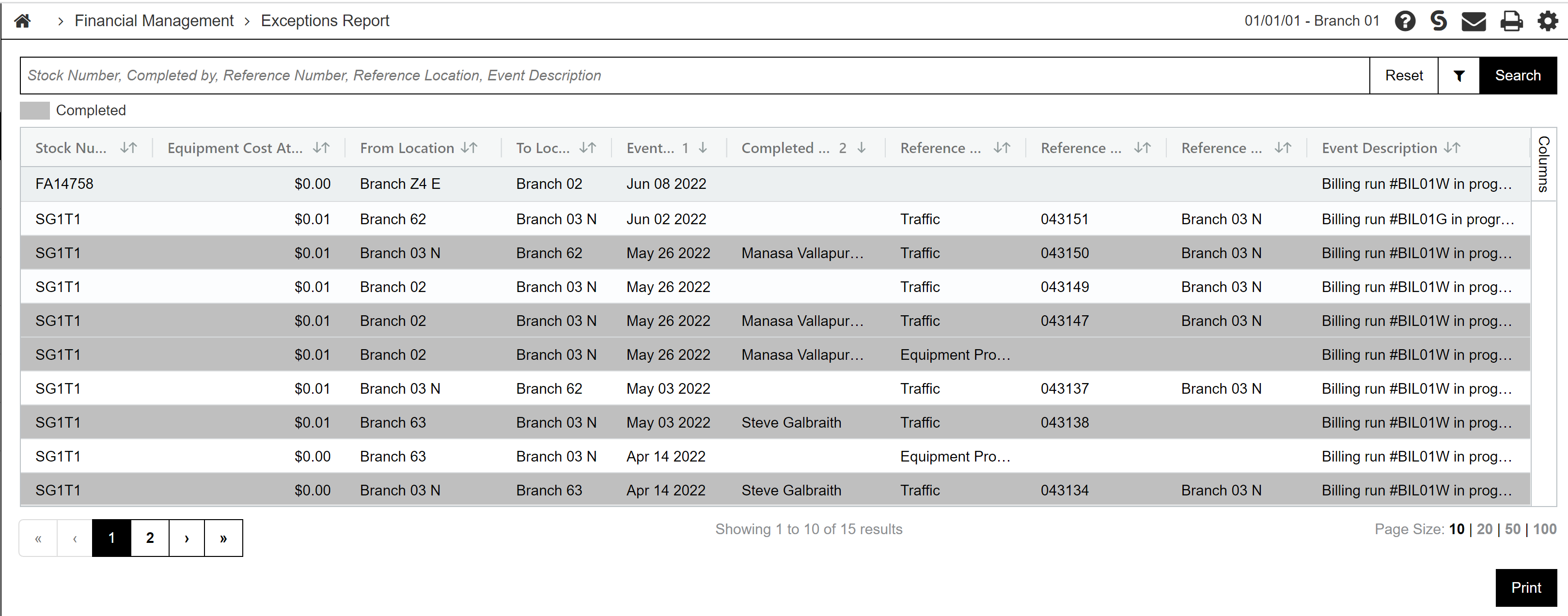
Use the search bar to filter the grid. The fields are:
| Field | Description |
|---|---|
| Search | Searches Stock Number, Completed By, Reference Number, Reference Location, and Event Description. |
| From Date / To Date | Limits the listing to events with an Event Date in the range you specify. |
| Exclude Completed | When selected, hides rows you marked Completed on the Exception Event Details screen. |
The grid columns are:
| Column | Description |
|---|---|
| Stock Number | The unit associated with the exception. |
| Equipment Cost at Exception Event | The equipment cost when the event was logged. |
| From Location / To Location | The location the unit was transferred from and the destination location for the transfer. |
| Event Date | The date and time the exception was logged. |
| Completed By | The user who marked the event Completed. This column is blank until the event is completed. |
| Originating System | The area of IntelliDealer where the location change or update was attempted (for example, Equipment Profile or Rental). |
| Reference Number | A reference from the originating system (for example, a traffic ticket number or rental contract number). |
| Reference Location | The location associated with the originating system record. |
| Event Description | A plain-language description of why the accounting entries could not be completed. |
Rows marked Completed are labeled in the grid. Click a row to open the Exception Event Details screen for that event.
Click Print to generate a PDF listing using the current search criteria, which can be viewed via the PDF Viewer.
Exception Event Details
On the Exception Event Details screen, review the event, follow the Recommended Resolution text, correct the underlying issue in the originating area, and mark the event Completed when finished.
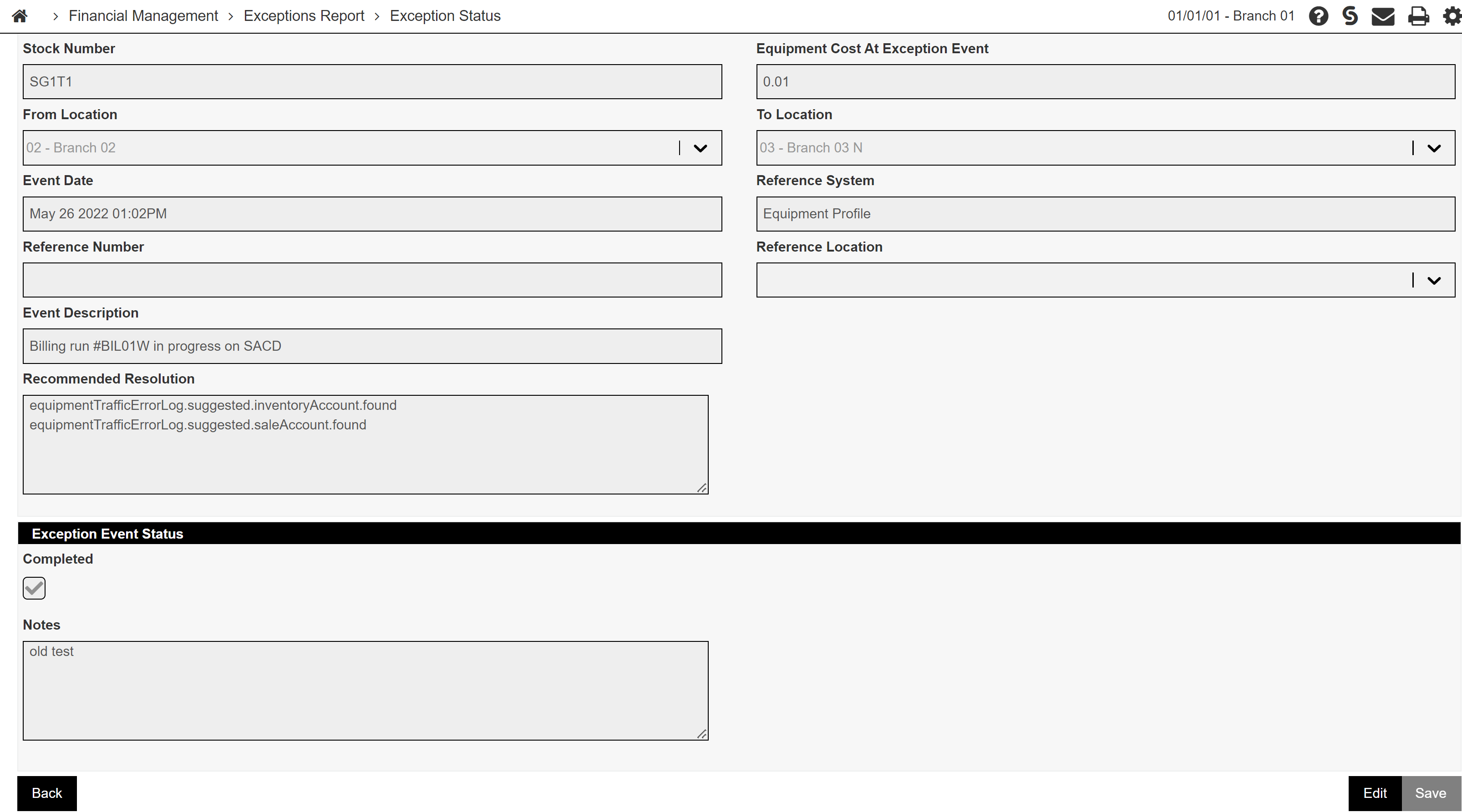
Click Edit to change Completed or Notes, then click Save. Saving with Completed selected records your user ID in Completed By on the listing. Click Back to return to the listing without saving further changes.
The read-only fields on the Exception Event Details screen are:
| Field | Description |
|---|---|
| Stock Number | The stock number of the unit that has the exception. |
| Equipment Cost at Exception Event | How much the equipment was worth when the event was logged. |
| From Location | The location the unit was transferred from. |
| To Location | The destination location for the transfer. |
| Event Date | The date and time the exception was logged. |
| Originating System | The area of IntelliDealer where the event occurred. |
| Reference Number | A reference from the originating system. |
| Reference Location | The location associated with the originating system record. |
| Event Description | A description of why the accounting entries could not be completed. |
| Recommended Resolution | Suggested inventory and sale account changes and journal entries, based on the unit and equipment default configuration for the destination location. Use this text as a guide when you post correcting journal entries on the Journal Listing screen. |
| Exception Event Status | |
| Completed | Select this checkbox when you have resolved the exception. |
| Notes | Optional notes about how you resolved the exception. |
Data retention
When the system logs a new exception event, it removes older TRAFLOG records that fall outside the Journal History retention period for the division. Configure that period on the Retention History screen (see Journal History under Years).
Data Source: TRAFLOG
Security: 602 - Financial Management - General Ledger, Access Key Journals
Revision: 2026.10