
Ship Via (Add & Edit)
Use the Ship Via screen to configure a ship via code. It has dual functionality and allows a Fuel Surcharge to be configured and used. Once the Freight screen and the Ship Via screen are configured (see Setting up FREIGHT and FUEL surcharges), the Add Freight screen appears when updating customer-ordered parts on a parts order.
To open the Ship Via screen, click a shipping Code or the Need to add a ship via code? Click here to add link on the Ship Via screen.
Topics in this section are:
Adding a Ship Via Code
Ship Via codes added to the system will appear as a valid transportation company codes on the Ship Via field drop down list field on the Shipping tab within the PO system.
-
Navigate to Configuration > Miscellaneous > Other > Ship Via.
-
Click the Need to add a ship via code? Click here to add link.
-
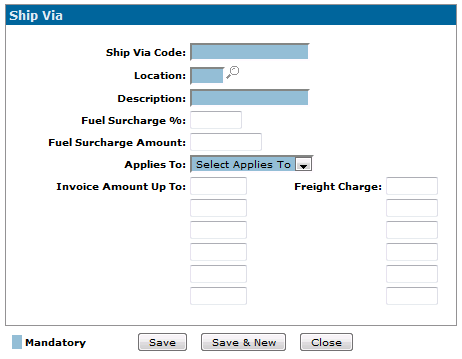
Enter the desired information the appropriate fields, referring to the table below.
-
Click the Save button to save the new ship via code.
 The
The 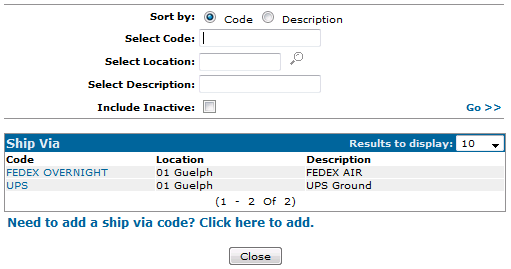
Screen Description
The fields on the Ship Via screen are:
| Field | Description |
|---|---|
| Ship Via Code | A code to designate the carrier to be used as a Ship Via code in IntelliDealer or MyDealer. An example of a code would be "FEDEX" if Federal Express is to be used as the carrier. |
| Location | The location that this code applies to. |
| Description | A description for the carrier. |
| Fuel Surcharge % | The Fuel Surcharge percent to apply to an invoice (charged as a miscellaneous charge) in IntelliDealer when using the Fuel Surcharge Part #. The fuel surcharge percentage is a percentage of the freight amount. |
| Fuel Surcharge Amount | A Fuel Surcharge amount to apply to an invoice (charged as a miscellaneous charge) in IntelliDealer when using the Fuel Surcharge Part #. |
| Applies To |
Indicates where the code applies to. Options are:
|
| Invoice Amount Up To | The estimated shipping charge added to an invoice within MyDealer, using the Freight number entered in the Freight # field on the FREIGHT table. |
| Shipping % | The amount of estimated shipping (in dollars) charge to an invoice within MyDealer when the corresponding invoice amount is reached. |
| Active for System | Select the checkbox to indicate that this code should remain active on the system. |
Use these buttons to complete your work on the Ship Via screen:
| Button | Description |
|---|---|
| Save | Saves the changes to this ship via code. |
| Copy | Copies the entries in this code to a new code. |
| Save & New | Saves the changes to this ship via code and opens a new ship via code. |
| Save & Next | Saves the changes to this ship via code and opens the next code in the list. |
| Close | Closes the screen without saving any of the changes made. |
Data Source: PFWTAB
Revision date: 2026.09