
Add Freight
Use the Add Freight screen to distribute freight and fuel surcharge charges to the sales orders on a parts order.
The Add Freight screen opens automatically when you click Update on a Parts Order if Freight and Ship Via are configured for the location. See Setting up FREIGHT and FUEL Surcharges.
 The Add Freight screen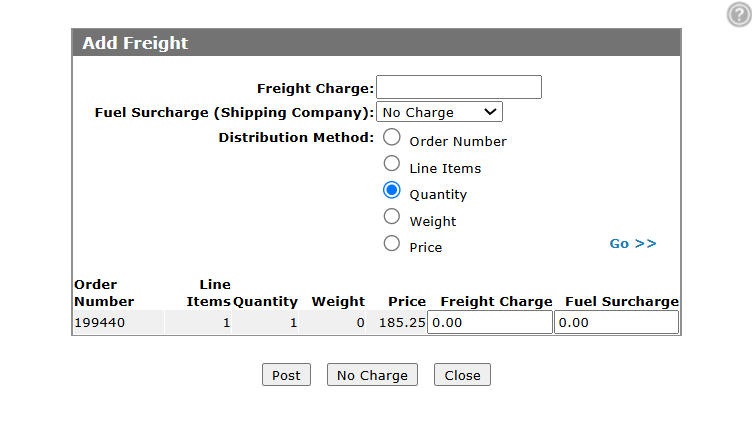
Topics in this section are:
Using the Add Freight Screen
Prerequisites: You must have completed freight configuration. See Setting up Freight and Fuel Surcharges.
-
Enter the total Freight Charge amount.
-
Select a shipping company in Fuel Surcharge (Shipping Company) to apply a fuel surcharge, or select No Charge.
-
Confirm or change the Distribution Method. The default comes from the Freight configuration for the location.
-
Click Go>>.
The system calculates how freight and fuel surcharge are allocated to each sales order and updates the distribution grid.
-
Review the distribution grid.
-
Click Post to apply the charges, No Charge to continue without freight, or Close to return to the parts order.
Screen Description
The fields on the Add Freight screen are:
| Field | Description |
|---|---|
| Freight Charge | The total freight charge to distribute across the sales orders on the parts order. |
| Fuel Surcharge (Shipping Company) |
Select a shipping company to calculate a fuel surcharge, or select No Charge. Options are based on ship via codes configured on the Ship Via (Add & Edit) screen. The value entered in the Fuel Surcharge column does not have to match the calculated amount. |
| Distribution Method |
The method used to distribute freight and fuel surcharge amounts across the listed sales orders. Options are:
|
| Freight Charge (distribution grid) | The portion of the freight charge allocated to the sales order based on the selected distribution method. |
| Fuel Surcharge |
The fuel surcharge allocated to the sales order. A fuel surcharge appears when a Fuel Part Number is configured on the Freight screen and the selected shipping company has a Fuel Surcharge % or Fuel Surcharge Amount on the Ship Via (Add & Edit) screen. The Override Fuel Surcharge security switch in system 821 controls whether a user can override the calculated fuel surcharge amount. |
The buttons on the Add Freight screen are:
| Button | Function |
|---|---|
| Post | Posts the distributed freight charge to each sales order using the freight part number, and posts the fuel surcharge using the fuel part number when applicable. |
| No Charge | Continues updating the order and bypasses the freight distribution process. |
| Close | Closes the Add Freight screen and returns to the Parts Order screen without posting freight. |