
VitalEngage Text: Consent Dashboard
Use the Consent Dashboard screen to review customer text consent status, send individual consent request emails, and download a PDF copy of a saved consent form for customers who have already consented. After you configure branding details on the Opt-in Form screen, use this screen to monitor which customers have consented, are awaiting a response, or have not yet received a consent email. See also VitalEngage Text.
To open the Consent Dashboard screen, navigate to Configuration > Interfaces > VitalEngage Opt-in > Consent Dashboard.
 The Consent Dashboard screen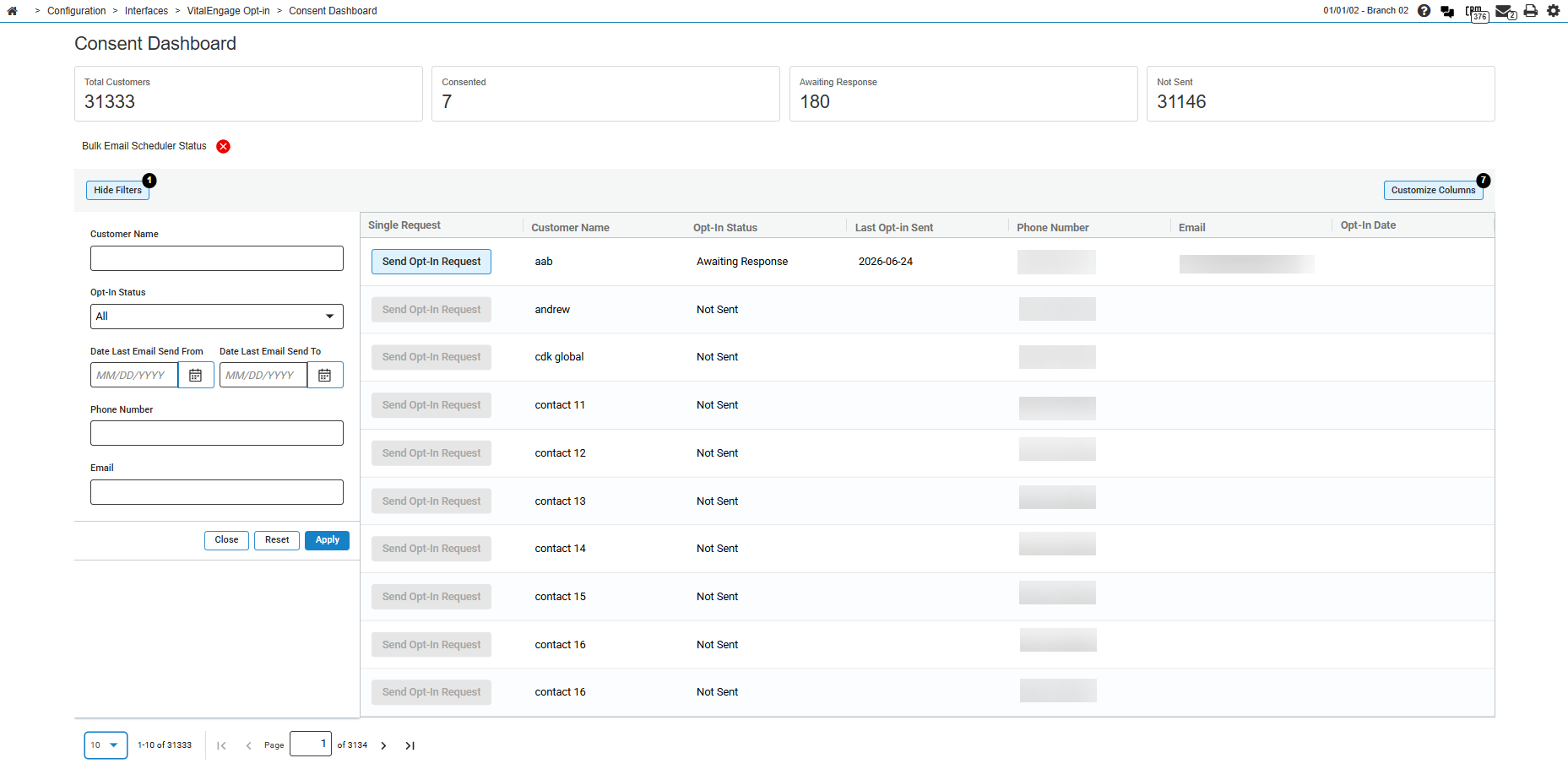
Topics in this section are:
Summary Statistics
Summary cards at the top of the Consent Dashboard screen display counts for the customer list:
| Statistic | Description |
|---|---|
| Total Customers | The total number of customers in the current dashboard list. |
| Consented | The number of customers who have provided consent to receive text messages. |
| Awaiting Response | The number of customers who were sent a consent email but have not yet responded. |
| Not Sent | The number of customers who have not yet been sent a consent email. |
Bulk Email Scheduler Status
The Bulk Email Scheduler Status indicator shows whether the nightly job that sends bulk consent request emails is enabled. A green check mark indicates the scheduler is enabled; a red X indicates it is disabled. It is disabled by default so that a large number of emails are only sent when the dealer enables it.
Enable or disable the scheduler and set the Daily Email Limit on the Opt-in Form screen. When the scheduler is enabled, IntelliDealer runs the VitalTextBulkEmailJob batch each night and sends consent emails to customers up to the configured daily limit.
Sending an Opt-In Request
Use this procedure to send a consent request email to an individual customer from the dashboard.
-
Navigate to Configuration > Interfaces > VitalEngage Opt-in > Consent Dashboard.
-
Optionally filter the customer list. See Filters.
-
Click Send Opt-In Request on the customer row.
The button is disabled when the customer has no email address or the Opt-In Status is Consented.
If the customer has not previously been sent a consent email, IntelliDealer sends the email and refreshes the grid.
If a consent email was previously sent, a message displays indicating the date the email was sent and asking whether you want to send it again.
-
Click Submit to send the email again, or click Cancel to close the message without sending.
Downloading a Saved Consent Form
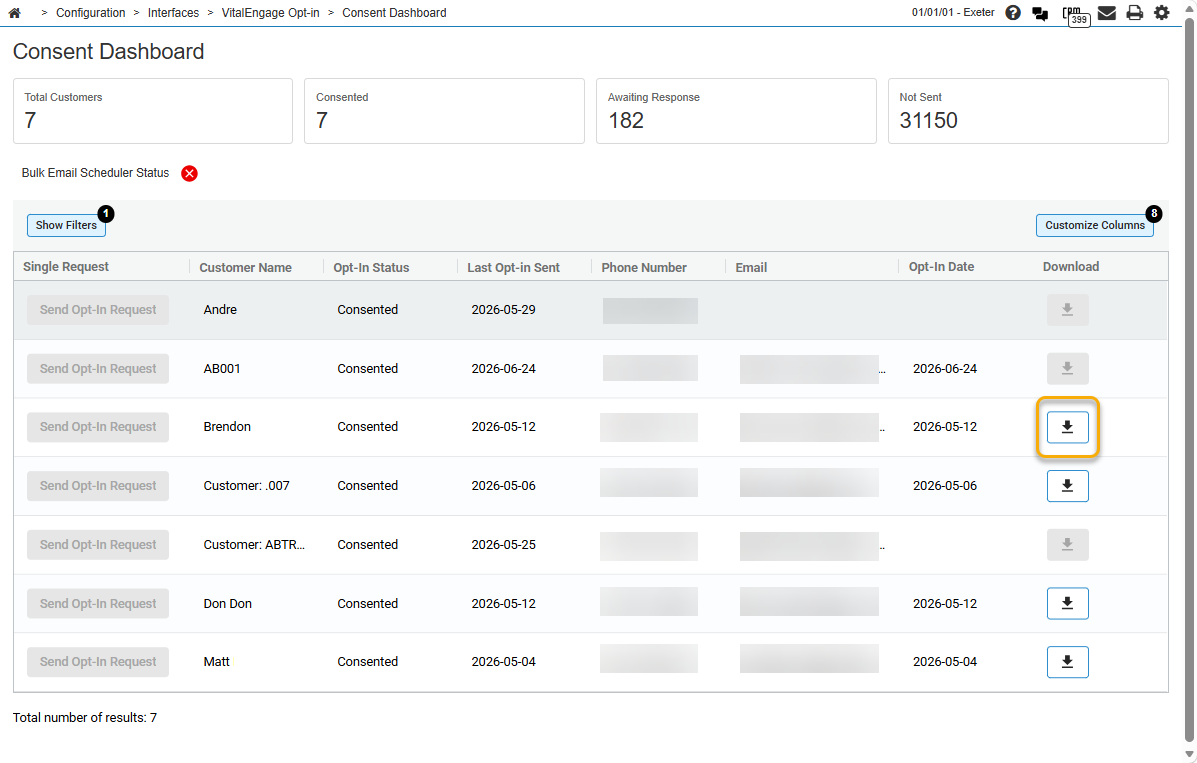
Use this procedure to download a PDF copy of the opt-in consent form that a customer submitted. The PDF reflects the consent details as they were captured at the time the customer provided consent, not the customer's current profile information.
-
Navigate to Configuration > Interfaces > VitalEngage Opt-in > Consent Dashboard.
The Consent Dashboard screen opens.
-
Locate the customer row. The Opt-In Status must be Consented.
-
Click the download icon in the Download column.
The download icon is available only when a saved consent form exists for the customer. It is disabled when the customer has not yet provided consent.
-
IntelliDealer opens the consent form PDF in a new browser tab. Save the file locally if you need a copy for your records.
The downloaded PDF includes the customer name and contact information, the date and time consent was provided, the consent type and scope, and any additional fields captured on the opt-in form at the time of submission.
Filters
Use the column filters on the customer grid to narrow the list displayed on the Consent Dashboard screen. When you apply filters, the grid and summary statistics refresh to reflect the filtered results.
The filters on the Consent Dashboard screen are:
| Filter | Description |
|---|---|
| Customer Name | Enter a customer or contact name to filter the list. |
| Opt-In Status |
Select a consent status from the drop-down list. Defaults to All. Options are:
|
| Date Last Email Send From | Enter the start date for filtering by Last Opt-in Sent. |
| Date Last Email Send To | Enter the end date for filtering by Last Opt-in Sent. Use with Date Last Email Send From to filter customers within a date range. |
| Phone Number | Enter a phone number to filter the list. |
| Enter an email address to filter the list. |
The Single Request, Opt-In Date, and Download columns do not have filters.
Screen Description
The columns on the Consent Dashboard screen are:
| Column | Description |
|---|---|
| Single Request | Contains the Send Opt-In Request button for the row. See Sending an Opt-In Request. |
| Customer Name | The customer or contact name. |
| Opt-In Status |
The current consent status for the customer. Values are Consented, Awaiting Response, Not Sent, or Skipped. Skipped indicates a user chose Continue to Chat on the consent pop-up because Do Not Mandate SMS Consent is enabled on the Opt-in Form screen. IntelliDealer does not store a signed consent form for Skipped customers. |
| Last Opt-in Sent | The date the most recent consent request email was sent. |
| Phone Number | The customer phone number, including country code when applicable. |
| The customer email address used to send the consent request. | |
| Opt-In Date | The date the customer provided consent. |
| Download | Contains a download icon that opens a PDF copy of the customer's saved opt-in consent form. The icon is available only when the customer has provided consent. See Downloading a Saved Consent Form. |
See Filters for column filter details. The customer list uses infinite scroll and loads additional rows as you scroll.