
Authorize.net Configuration
This feature is currently in beta.
You can add Authorize.net as payment option for outstanding invoices within MyDealer. Customers reviewing invoices to make a payment on account from within MyDealer are presented with Authorize.net as an ACH-hosted payment option. This ACH product is for clients using Worldpay as a payment processor.
Note: This feature is only available in the US and can only be used to pay outstanding invoices in MyDealer.
Topics in this section include:
See also MyDealer: Payments.
Prerequisites
-
You must be licensed for IntelliDealer feature 6286.
-
You must have an Authorize.net account. As a client, when creating an Authorize.net account make sure that eCheck is part of the product purchased. Applicable fees from Authorize.net will apply.
-
You need to retrieve the API credentials for the account from the Authorize.net website. It should be located under Security settings and you need both the apiLoginId and transactionKey.
Configuring Authorize.net
-
Navigate to Configuration > Interfaces > Other > Authorize.Net Payment Interface.
-
Enter your Authorize.net credentials in their respective fields, then click Save.
You only need to perform this step for the initial setup.
-
Select the location(s) you wish to activate, then click Activate Selected.
You can use the search field to find the desired location and you can select more than one location.
-
To deactivate a location(s), select it, then click Deactivate Selected.
 Authorize.Net screen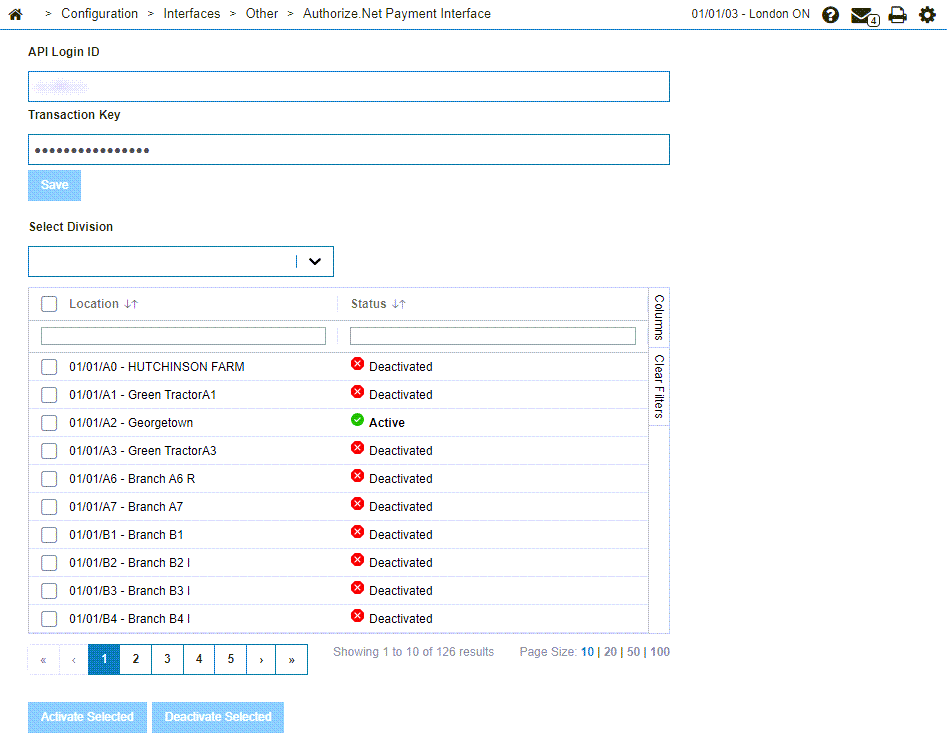
Feature: 6286 - Authorize.Net Payment Interface
Revision: 2025.09