
Configuration: Rental Holidays
Use the Rental Holidays screen to code exception days on rental contracts where the daily rate should not apply.
To open the Rental Holidays screen, navigate to Configuration > Rental > Setup > Rental Holidays.
 Rental Holidays screen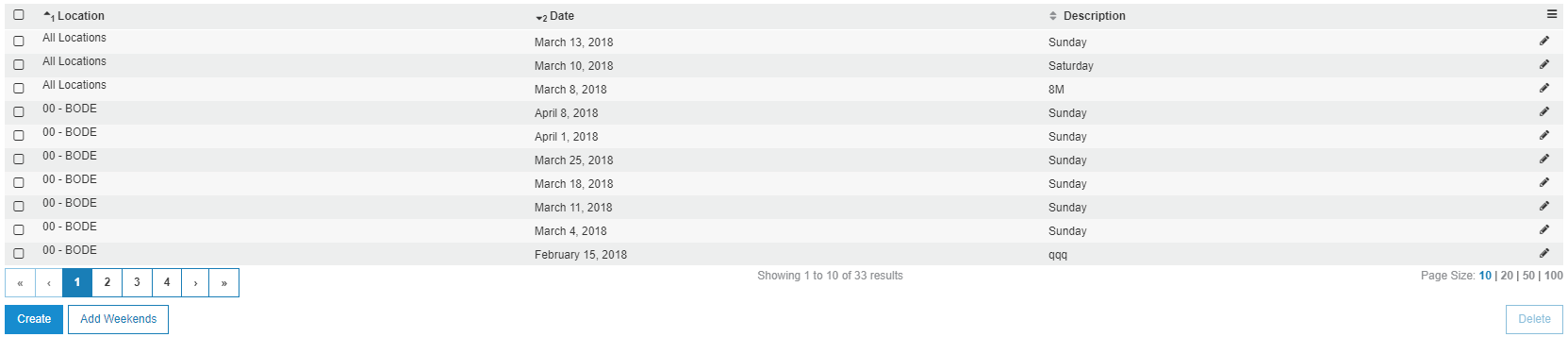
The fields on the Rental Holidays screen are:
| Field | Description |
|---|---|
| Location | The location for the rental holiday code. |
| Date | The date for the rental holiday code. |
| Description | A brief description of the rental holiday. Typically this field contains the specific day(s) the rental holiday code applies to. |
To create a new Rental Holiday, click Create.
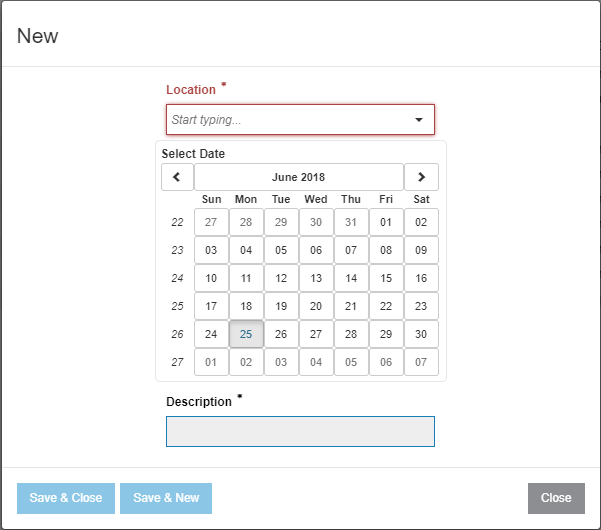
The buttons on the New Rental Holiday window are:
- Save & Close—saves the entry and closes the window.
- Save & New—saves the entry and opens a new window for additional Rental Holidays to be created.
To open the Add Weekend window, click Add Weekends.
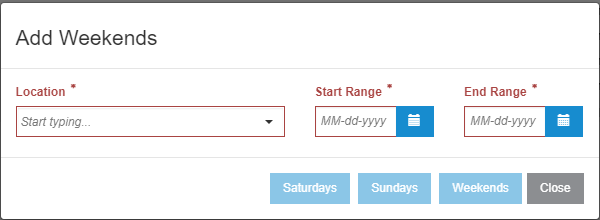
The Saturdays, Sundays, and Weekends buttons automatically select those specific days out of the selected date range.