
Configuration: Customer Insurance Agency
Use the Customer Insurance Agency screen to manage customer insurance agency information and policies.
To open the Customer Insurance Agency screen, navigate to Configuration > Rental > Setup > Insurance Agency.
The fields on the Customer Insurance Agency screen are:
| Field | Description |
|---|---|
| Agency Number |
The insurance agency number. An agency number does not need to be assigned. If details of the insurance agency are not required, simply check the certificate checkbox and enter an expiry date. |
| Agency Name | The name of the insurance agency. |
| Contact Name | The name for the main contact associated with the insurance agency. |
| Expiry Date |
The expiration date of the customer's insurance policy. If you edit the insurance policy expiry date in this field, the Insurance Expiry field on the Customer tab of any rental contracts related to this customer is not automatically updated by the system; the date must be maintained manually in both areas of the system to remain accurate. |
| Policy Number | The insurance policy number. |
| Liability Amount | The amount of liability the customer has with the insurance policy. |
To define a new Insurance Agency Profile, click Create.
 Insurance Agency Profile window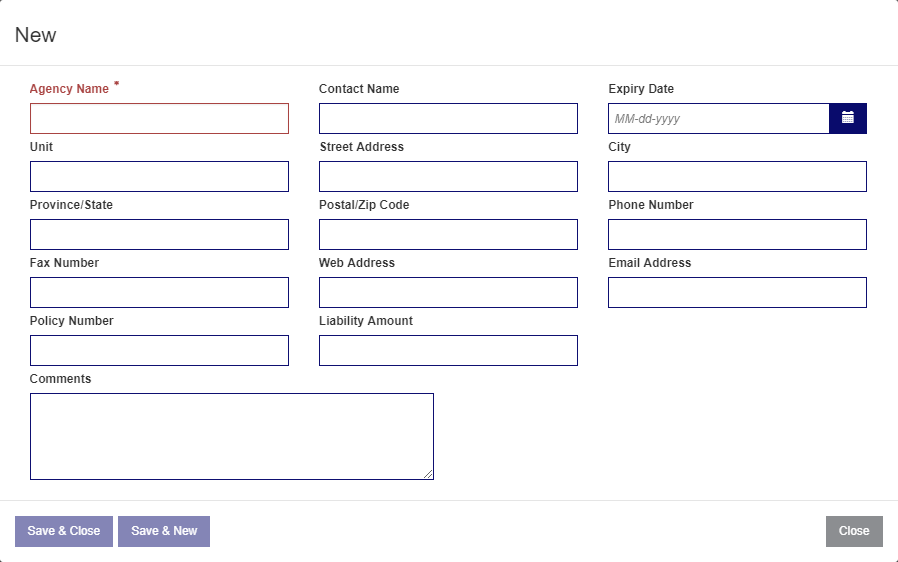
The fields on the Insurance Agency Profile window are:
| Field | Description |
|---|---|
| Agency Name | Enter the name of the insurance agency. |
| Contact Name | Enter the name of the point of contact for the insurance agency. |
| Expiry Date | Select an expiry date. |
| Unit | Enter the unit information. |
| Street Address | Enter the street address of the insurance agency. |
| City | Enter the city name of the insurance agency. |
| Province/State | Enter the province or state of the insurance agency. |
| Postal/Zip Code | Enter the postal code or zip code for the insurance agency. |
| Phone Number | Enter the primary contact number for the insurance agency. |
| Fax Number | Enter the fax number for the insurance agency. |
| Web Address | Enter the URL for the insurance agency. |
| Email Address | Enter the email address for the insurance agency. |
| Policy Number | Enter the policy number for the new insurance profile. |
| Liability Amount | Enter the liability amount for the new insurance profile. |
| Comments | Enter any relevant comments associated with the new insurance profile. |
The buttons on the Insurance Agency Profile window are:
- Save & Close—saves your new insurance agency information and closes the window.
- Save & New—saves your new insurance agency information and re-opens the screen to create an additional insurance profile.