
Editing Custom Screen Field Values
-
Navigate to Administration > Settings > Custom Screens.
The Custom Screen Fields tab will appear.
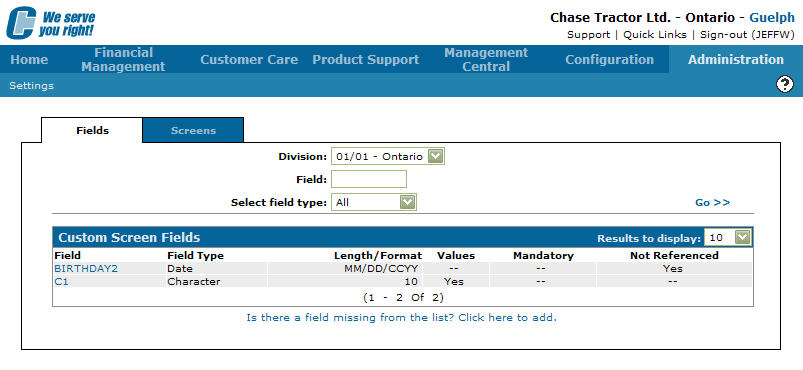
Custom Screen Fields tab
-
On the Custom Screen Field tab, fill out the search fields and click the Go >> link.
The system will generate search results related to your search criteria. -
Move the cursor over a Field and select Edit Values from the list.
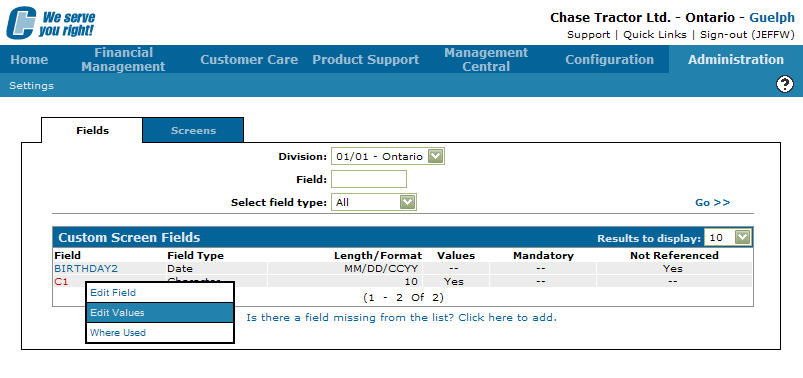
Custom Screen Field Values tab
-
The Custom Screen Values screen will appear.
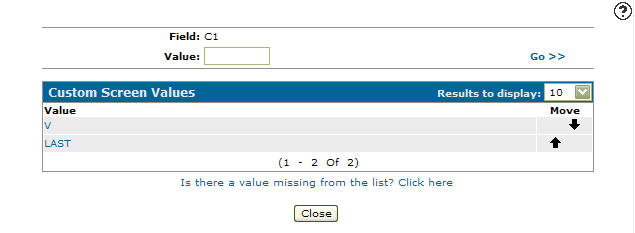
Custom Screen Values screen
-
Type in a Value name and click the Go >> link.
The system will generate search results related to your search criteria. -
Click on a Value name.
The Custom Screen Value Edit screen will appear.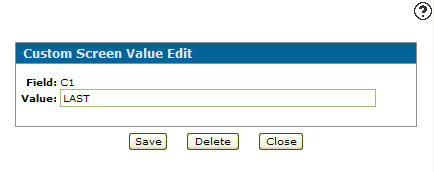
Custom Screen Value Edit screen
-
On the Custom Screen Value Edit screen, modify the value by editing or adding any information about the value to the corresponding values as desired.
-
Click the Save button to record your custom screen value changes, click the Delete button to delete the selected value from the custom value field.