
Use Parts per Package (PPK) when you purchase ONE PACKAGE and sell multiple parts from that package. For example, you purchase one box of 100 screws, and sell each screw individually. Or you purchase a single roll of tubing and sell it by the foot.
Topics in this section are:
Adding a New Part Using with a PPK Value
-
Navigate to Parts Profile, click to add a new part, give it a part number and location then click save.
-
Enter your Cost and List for the package, and the Parts per Package value.
-
Enter any other required information and click Save.
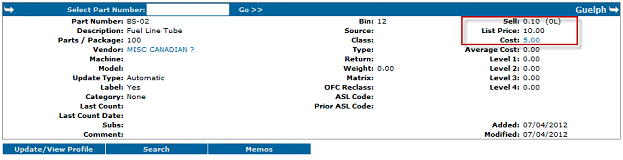
Notice that the Cost and List values are the same as entered, but that IntelliDealer has calculated the Sell price to be 1/100th of List due to the PPK being 100.
-
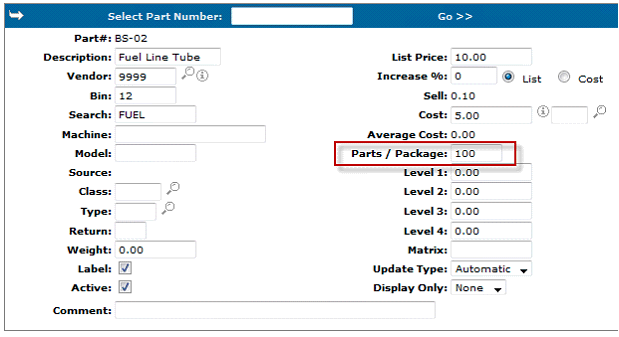
To make further changes to the part, click Update/View Profile.
-
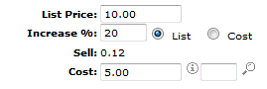
For this example, update the Increase value to 20% of List then click Save.
Now the Sell price is (List+20%)/PPK which is $0.12 for a foot of line.
 This is an example of a box of fuel line that costs $5 and contains 100 feet. The fuel line is sold by the foot, so the PPK value is 100.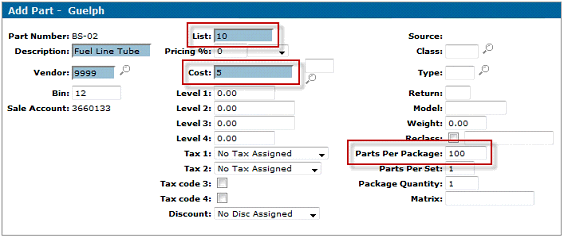
Ordering and Receiving Parts with a PPK value
When ordering parts that use a PPK value, remember to order the number of packages you need.
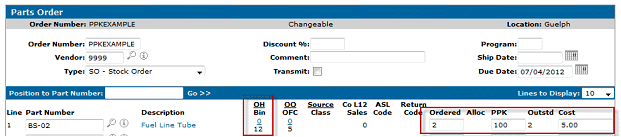
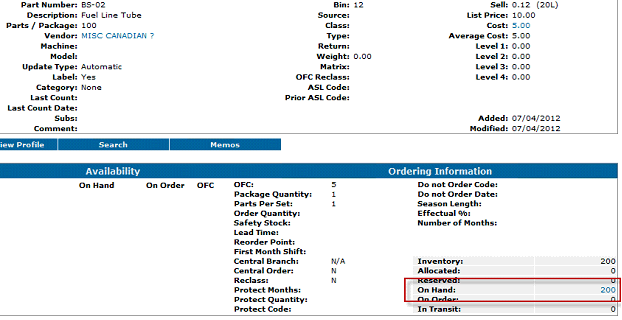
Notice the On Hand is currently 0, and the Ordered is for 2 packages of line. Once that order is received into the system, the On Hand count increases by Ordered*PPK. In this example that is 2*100 which gets receipted in as 200 On Hand.
Revision: 2026.04