
VitalEngage Text: Opt-in form configuration
Use this page to configure branding details for an email message requesting consent from the customer. There is a link in the email the customer can click to provide consent and only then can dealers send that customer text messages via VitalEngage Text. See also VitalEngage Text.
To access the VitalEngage Text Consent Branding screen, navigate to Configuration > Interfaces > VitalEngage Text > Opt-in form configuration.
 The Opt-in form configuration screen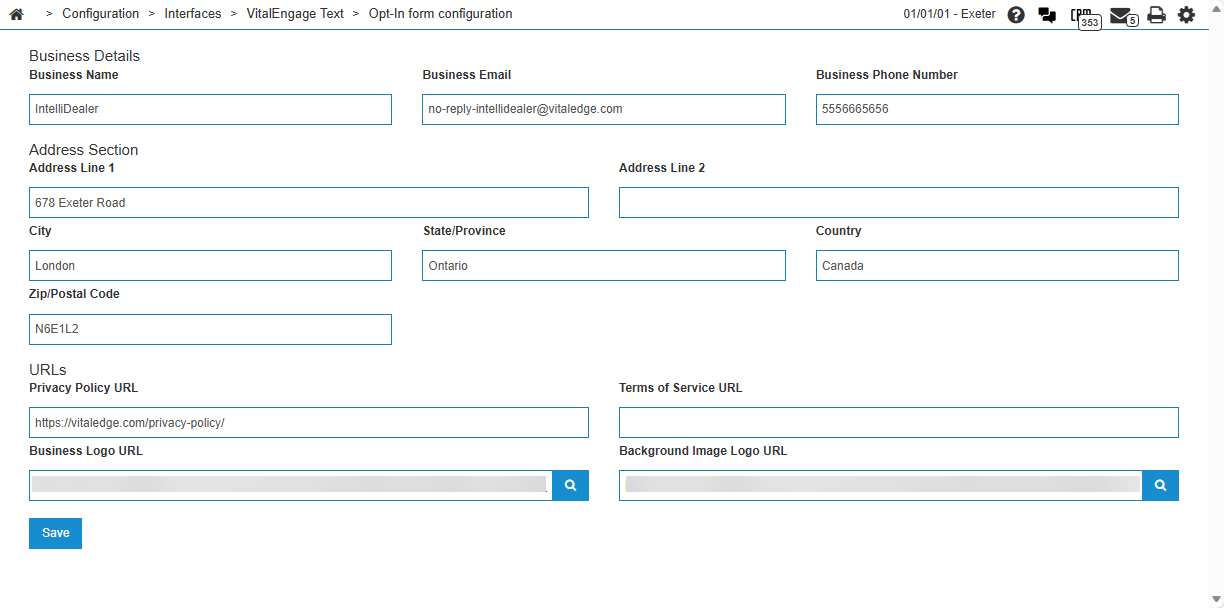
US text messaging regulations require that you obtain consent from US customers before you can send them text messages. You cannot send a text message to a US customer who has not yet consented to receive messages. This includes sending automated alert messages via text. At this time, a request for consent must be sent to each customer individually.
If you manually try to send a text message to a customer who has not yet consented:
-
on the Customer Profile or Contact Profile screen, a pop-up opens requesting you to send an email message to the customer.
-
on any other screen, an error message displays with a notification that this customer has not yet consented to receive text messages.
The fields on the VitalEngage Text Consent Branding screen are:
| Field | Description |
|---|---|
| Business Name |
The name of the dealership. The dealership name and address is displayed in the upper right of the email sent to customers. |
| Business Email | The email address used for business correspondence. |
| Business Phone Number | The primary phone number for the business. |
| Address Line 1 | The primary street address. |
| Address Line 2 | An optional secondary address line (e.g., suite or unit number). |
| City | The city where the business is located. |
| State/Province | The state or province. |
| Country | The country where the business is located. |
| Zip/Postal Code | The postal or ZIP code. |
| Privacy Policy URL |
The web address of the business privacy policy, hosted on the dealer's server. This URL is displayed as link in the email for customers to read and review the dealership's privacy policy when using VitalEngage Text. |
| Terms of Service URL |
Optional. The web address of the terms of service. This URL is displayed as link in the email for customers to read and review the terms of service for using VitalEngage Text. This document can be either hosted on the dealer's server, or contact VitalEdge Implementation team to create a web link for terms of service. |
| Business Logo URL |
The web address of the dealership logo image. This image is displayed in the top left of the email sent to customers. Click the search |
| Background Image Logo URL |
Optional. The web address of the background image logo. This image is displayed as the background of the email sent to customers. Click the search |
 icon to select an image from the server or to upload a new image.
Click Save to save the updated configuration.